
Participant
November 8, 2023
Question

My LRc catalogue is behaving strangely

  • November 8, 2023
  • 4 replies
  • 273 views

My main catalogue has been slowing down and generally being a bit glitchy for a while, then recently I had a corrupt error message. It was successfully repaired but has been growing progressively more and more unuseable ever since because it's behaving very strangely;

1. Generally being unreasonably slow
2. I've had images which have been edited randomly reverting to raw when they're clicked (when I go on history the last edit is still there so I click on it to restore, but this happens so frequently it's not a reasonable workaround).

3. It often stalls when navigating back and forth through a collection. So for example I might be viewing a particular image, then when I click another image or advance using the keys, the desired image is selected but the previous image is still showing. I have to go back and forth a number of times before it settles down. 

4. Edits from PS are rendomly corrupting.

5. I can't import anything into the catalogue. It just sits there when you click import and doesn't show any images available. I am able to import from another catalogue, just not from devices, hard-drives or Aftershoot.

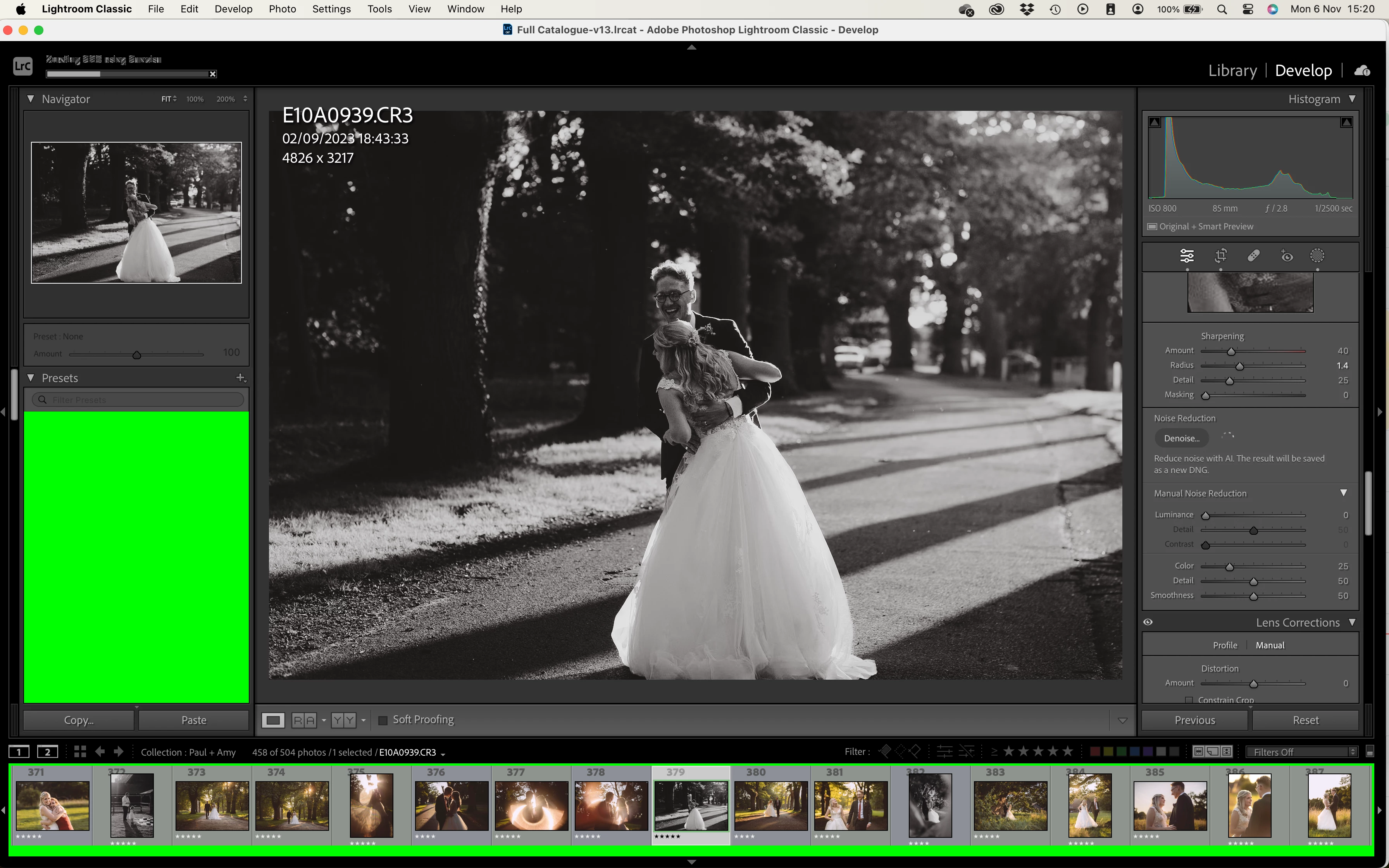
5. Weirdest of all; I recently hit 'Denoise and the below happened. A bunch of green surrounding the images and in the presets pane, plus complete gibberish in the top left progress bar. Surprisingly the denoise actually completed and then everything went back to normal but I didn't dare touch it anymore after that and I'm worried that the catalogue is teetering on imminent and total faliure. I back up daily and use the optimise feature. I've even tested the integrity and it claims it's fine so I had thought it was LRc that was failing but when I set up a temporary catalogue to see what happened I found that one behaved perfectly so I'm now assuming it's the cataglogue which is the problem. I have around 36,000 images in it which from what I gather shouldn't be a problem for LRc. Telephone support has been unhelpful, I wondered if anyone has any advice as to my next steps?
 

This topic has been closed for replies.

4 replies

Participant
January 1, 2024

Update: For anyone who's had any othese issues, I've fixed all of them. It's a multifactorial problem requiring multiple solutions and I'm not 100% certain exactly which issues fixed which but here's everything I did and the bits that I do know. 

1. Unable to import
Export all collections into a new catalogue and start again. Problem solved. 

2. Edits from PS randomly corrupting
Discovered that this only happens when I'm saving to my NAS. If I save them locally then the problem doens't happen. I can then manually move the file over to the NAS after. VERY annoying but that's the issue. I'm connected via ethernet usually so it's pretty sound but it gets worse if it's over WiFi so I'm going to presume it's something to do with the connection not being 100% whilst saving. 

Everything else; 
Buy a brand new top spec 16" Macbook Pro Max. Coupled with a REALLY big tidy-up. 
Probably the least convenient solution and obviously not accessible to everyone but the take-home message I got here is that LRc has now become such a monster compared to when I bought my last mac back in 2019 with all this AI stuff built in that my old Intel model was starting to struggle to keep up. The green bits when trying to denoise a file in particular I think are a direct result of the GPU/CPU not being able to cope with what it was being asked to do. 
If you have these issues and you're a profesional then this is your sign to invest in the very best for your business because time is money. Also, Adobe sucks. You're welcome. 

Participant
November 15, 2023

I thought I'm the only one but I'm also experiencing the first 5 things you have listed and I'm at loss on how to olve it.

dj_paige
Legend
November 8, 2023

Hello, @joshua.anstey and @emmap29470739 


A standard diagnostic for many situations is for you to provide the information about your computer hardware and operating system from Help->System Info. We need the first 50 lines or so, down to the GPU information and driver number. Do not show us anything after that, since is not needed and will be ignored.

Participant
November 8, 2023

Lightroom Classic version: 13.0.1 [ 202310121438-d2af310c ]
License: Creative Cloud
Language setting: en-GB
Operating system: Mac OS 14
Version: 14.1.0 [23B74]
Application architecture: x64
Logical processor count: 12
Processor speed: 2.6GHz
SqLite Version: 3.36.0
Built-in memory: 16,384.0 MB
Real memory available to Lightroom: 16,384.0 MB
Real memory used by Lightroom: 1,091.7 MB (6.6%)
Virtual memory used by Lightroom: 47,591.5 MB
Memory cache size: 252.7MB
Internal Camera Raw version: 16.0 [ 1677 ]
Maximum thread count used by Camera Raw: 5
Camera Raw SIMD optimization: SSE2,AVX,AVX2
Camera Raw virtual memory: 69MB / 8191MB (0%)
Camera Raw real memory: 71MB / 16384MB (0%)
Standard Preview Size: 2880 pixels
Displays: 1) 4096x2560

Graphics Processor Info:
Metal: AMD Radeon Pro 5300M
Init State: GPU for Image Processing supported by default
User Preference: Off

That the right stuff?

Participant
November 8, 2023

Hi Joshua, I'm unfortuantely not able to help as I'm experiencing the same problems - specificaly point #3. It's really slowing down my workflow to have to page back and forth multiple times in order to put edits on the right image. A video is below when clicking on the crop function it's populating the wrong image to crop and screwing with the crop of the original file without touching it. (and seeing the same view problems you're describing as well)


I'm thinking of re-installing the older version until the next LrC 13 version comes out so I can at least make it through busy season without adding hours to paging back and forth. If anyone else has any suggestions please let us know! 

Participant
November 8, 2023

So I have actually just discovered that #3 in particular is actually now a known bug and they've got a fix on the way. I was considering rolling back too until firstly I discovered it's an aparrently a nightmare to do so and secondly that as per above, pretty sure most of my issues are catalogue related. It definitely got a lot worse after V13 but my problems were already there before.