
Navigation Bar lockable?
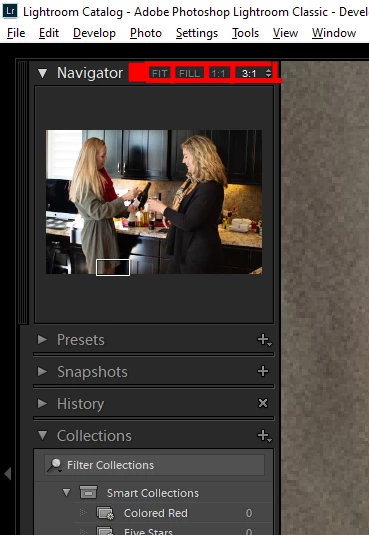
Is there a way to lock the navigation bar, or any bar for that matter so it doesn't collapse unintentionally? I believe with heavy editing, we all interchange between zoom levels using the navigation bar. There are times I'm working quickly and I'll go to press the little arrow key, but I'll accidentally click in between the denoted sizes (depicted in red below) and it collapses the navigation bar which prevents me from seeing the preview shot and where I'm zoomed in. This drives me absolutley bat guano crazy. It slows me down because I have to scroll over and hit the drop-down arrow on the left to re-open the nav bar to see the preview again. Additionally, the word "Navigator" cannot be clicked to expand the menu so I'm forced to use that little arrow on the left. There should be a button somewhere in those fields that allow us to lock each tab so it doesn't collapse while accidentally clicking in the wrong spot. I've searched various resources and can't find anything. Hopefully I'm missing something because I have to admit... there are a few things that seem like no-brainers to implement in certain programs and this is one of them. Depending on how much brush editing, spot removel or localized color grading I have to do on some of my images, this issue creeps into my world easily a dozen times per heavily edited image.
 AdChoices