


December 5, 2025
Question

Need help. Can't see all of the photos in film strip at bottom

  • December 5, 2025
  • 3 replies
  • 336 views

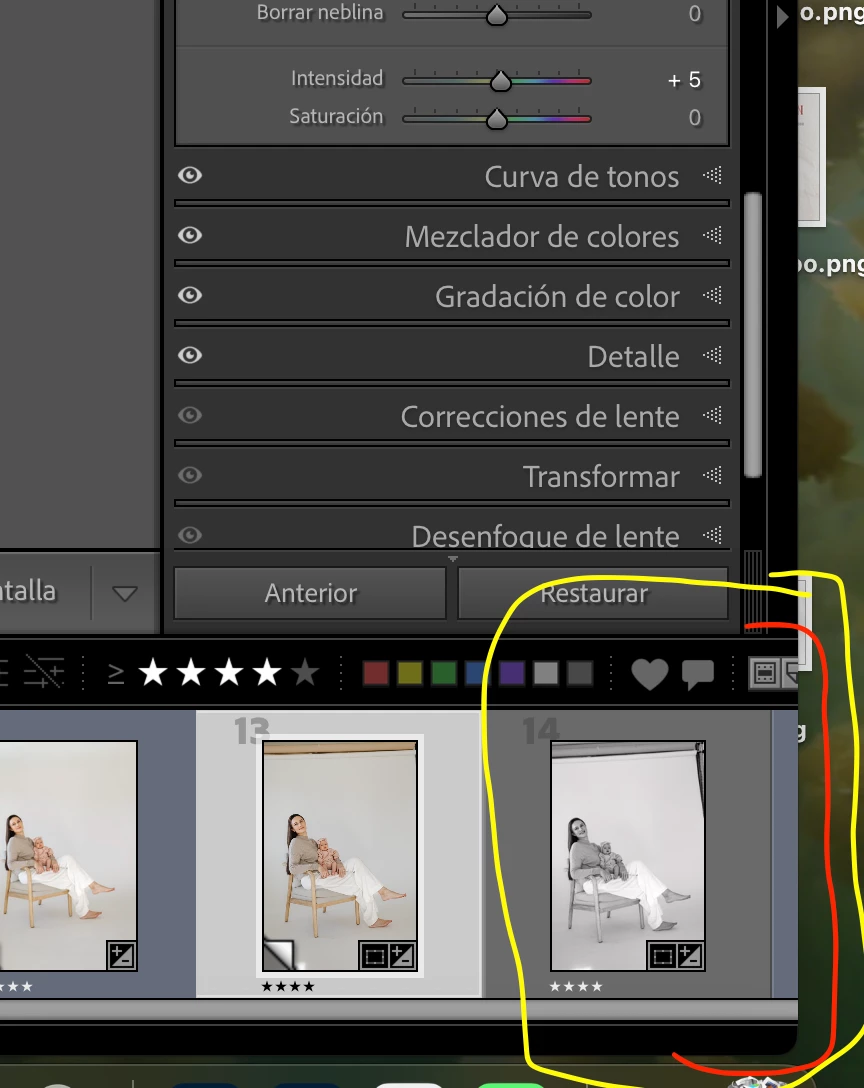
My toolbar at the bottom of Lightroom has slid to the right, and I can't see all the photos completely. Does anyone know how I can get it back to how it was before so everything is visible? I've attached a picture; I hope someone can help me. I've tried many things and I can't fix it.
3 replies

Rob_Cullen
Community Expert
Community Expert
December 5, 2025

I can see the same if my interface window is markedly reduced in size- then it does not show the entire filter line. (see my screen-clip).

Check by expanding your LrC interface to full-screen- Press [Shift+F] 

868038i2607FC48363E191A.jpg


Regards. My System: Windows-11, Lightroom-Classic 15.4.1, Photoshop 27.8, ACR 18.4, Lightroom 9.4, Lr-iOS 10.4.0, Bridge 16.0.3 .
dj_paige
Legend
December 5, 2025

There is a scroll bar at the bottom, you slide the scroller to the right or left.


867923i495AC92583C28F09.png


@focused_Coral5E46 please help us out, as we are trying the help you. Do not entitle your message as "I'm having a problem" or similar because that doesn't tell anyone anything; everyone who posts here is having a problem. The forum would be useless if every post was entitled "I'm having a problem" "I have a problem" etc. Use a title that briefly describes the problem, such as "Can't see all of the photos in film strip at bottom"

December 5, 2025

Thank you. This doesn't work; the problem isn't the scroll bar at the bottom, as I show in the image. The rest of the bar has been removed, but thank you for trying to help me; I appreciate it. And yes, I'll keep what you've said in mind. I know everyone has problems here; that's what this community is for. Have a good day.


Community Expert
December 5, 2025

In a first step try to reset the preferences of Lightroom Classic:  How to reset Lightroom Classic preferences (adobe.com)

It's recommended to backup your preferences before you reset the preferences to the default settings: 

https://helpx.adobe.com/lightroom-classic/kb/preference-file-and-other-file-locations.html


See also here: Gelöst: Filmstrip got cutoff in the last couple versions - Adobe Product Community - 15313490


My System: Intel i7-8700K - 64GB RAM - NVidia Geforce RTX 3060 - Windows 11 Pro 25H2 -- LR-Classic 15 - Photoshop 27 - Nik Collection 9 - PureRAW 6 - Topaz Photo AI