bdou
Participant
July 1, 2019
Question

Need help with histogram

  • July 1, 2019
  • 2 replies
  • 242 views

Hi guys !

I'd like to reproduce this kind of effect with Lightroom :

Here is the photo : Jay | Enzo ZEYLSTRA | Flickr

Or here : Crystal | Enzo ZEYLSTRA | Flickr

It's like there was a white sail on the picture, do you see what I mean ?

How could I do this with Lightroom ? With this kind of histogram ?
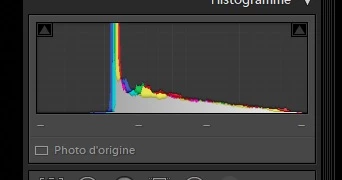
Thanks !!

    This topic has been closed for replies.

    2 replies

    Bob Somrak
    Legend
    July 1, 2019

    If you want all your darks to disappear do this to the tone curve.  Make it as extreme as you want. 

    M4 Pro Mac Mini. 48GB
    Community Expert
    July 1, 2019

    There are all darks missing in your picture.

    You can try to increase the values of the Shadow and/or Blacks slider and increase the contrast slider.

    4 Key Lightroom Sliders That Will Supercharge Your Photos

    My System: Intel i7-8700K - 64GB RAM - NVidia Geforce RTX 3060 - Windows 11 Pro 25H2 -- LR-Classic 15 - Photoshop 27 - Nik Collection 9 - PureRAW 6 - Topaz Photo AI
    bdou
    bdouAuthor
    Participant
    July 1, 2019

    I already tried, but it doesn't make all darks disapear.

    Community Expert
    July 1, 2019

    Sorry, I meant decrease to get more dark tones in you picture. My mistake. 

    You can always try the dehaze slider.

    My System: Intel i7-8700K - 64GB RAM - NVidia Geforce RTX 3060 - Windows 11 Pro 25H2 -- LR-Classic 15 - Photoshop 27 - Nik Collection 9 - PureRAW 6 - Topaz Photo AI