


Known Participant
June 20, 2025
Answered

New AI image distractions not working.

I am currently editing a group shot with distractions - other people in the background. The proposed solution doesn't work for my situation. There may be too many people in the entire photo -- the target group and the people in the background.


At first attempt I got "no distractions found".


Then, I opened a second image of the same group, but with a slight zoom out. The feature found part of the distraction — a few of the people in the background, but not all. There is a message that suggests, "to regenerate the result for an area, click on its pin."


I was unable to find the PIN.  Help, please; I really want this to work. 

 

Conrad_C
Conrad_CCorrect answer
Community Expert
June 20, 2025
quote

I was unable to find the PIN.  Help, please; I really want this to work. 

By @David Ris


Each pin (not PIN) should look like a black version of the Remove tool, and there should be a selectable pin for each distraction that the Remove tool proposes.


6 replies

David RisAuthor
Known Participant
June 21, 2025

Conrad's answer did address my question regarding pins.   


However I am still unable to remove the people in the background of the photo using the new distractions removal tool.  


In fairness, I am also not able to remove the people in the back ground using the original generative AI tool.   


I am guessing operator error ... what am I doing incorrectly?


Translate
JohanElzenga
Community Expert
Community Expert
June 22, 2025

Explain what exactly you try to do and what does not work. A simple "it does not work" doesn't mean anything and is useless information for troubleshooting. As you can see in the screenshot, there is a big 'Remove' button in the lower right corner. You need to press it to remove the 'pinned' distractions. Did you press it? The reason that you get this extra step is that you can first select any pin and press the delete key to deselect any people that are not distractions and should not be removed.


Translate
-- Johan W. Elzenga
Conrad_C
Community Expert
Conrad_CCommunity ExpertCorrect answer
Community Expert
June 20, 2025
quote

I was unable to find the PIN.  Help, please; I really want this to work. 
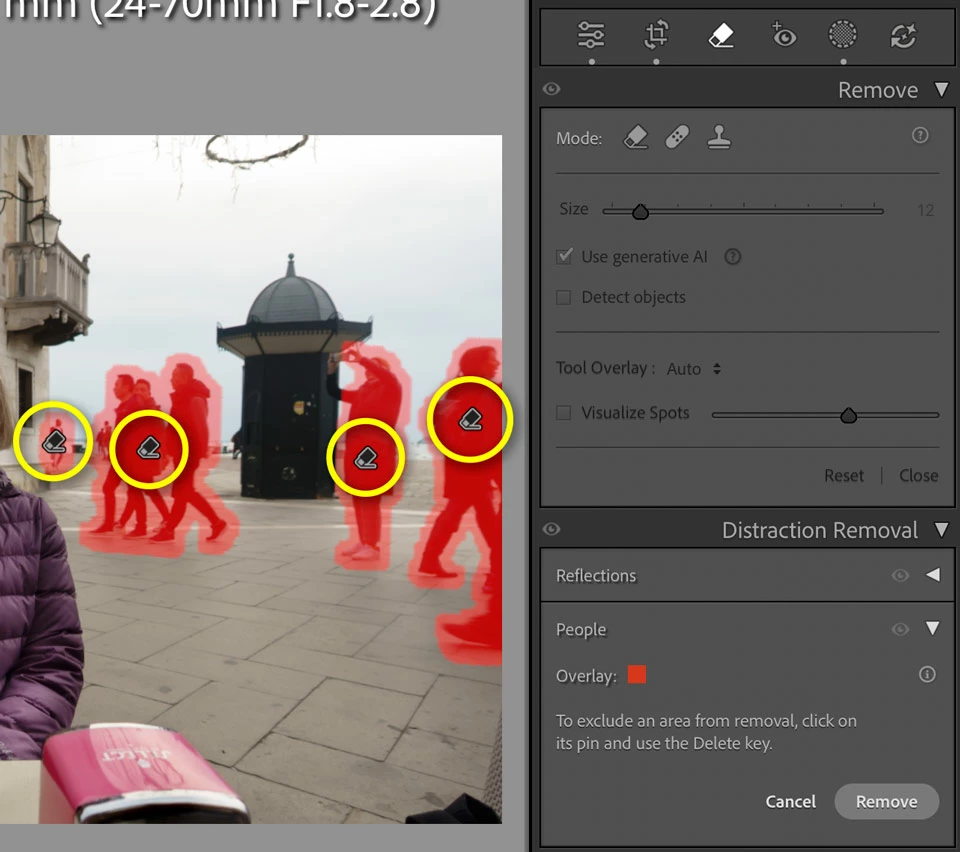
By @David Ris


Each pin (not PIN) should look like a black version of the Remove tool, and there should be a selectable pin for each distraction that the Remove tool proposes.


Translate
JohanElzenga
Community Expert
Community Expert
June 20, 2025

Make sure the Tool Overlay is not set to 'never'.


Translate
-- Johan W. Elzenga
David RisAuthor
Known Participant
June 21, 2025

Good suggestion, Johan.  I did not think to check that setting. But I have it set as "always".


Translate
Ian Lyons
Community Expert
Community Expert
June 20, 2025

Can you post a screenshot of the image to the forum? If yes, then use the button highlighted in attached to upload the screenshot.


Translate