sandroriz
Inspiring
December 13, 2017
Question

New Auto Tone of 7.1 dependent of Camera Profile?

  • December 13, 2017
  • 5 replies
  • 1451 views

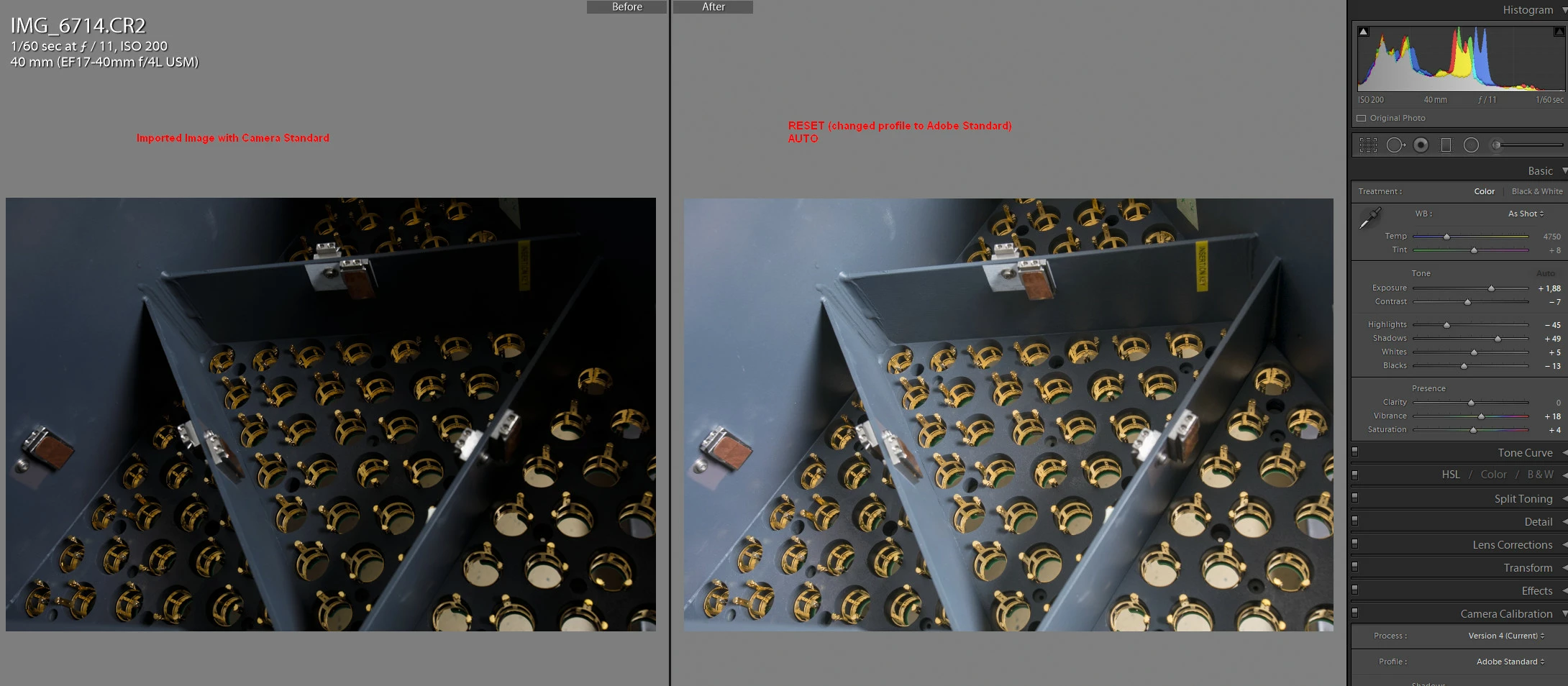
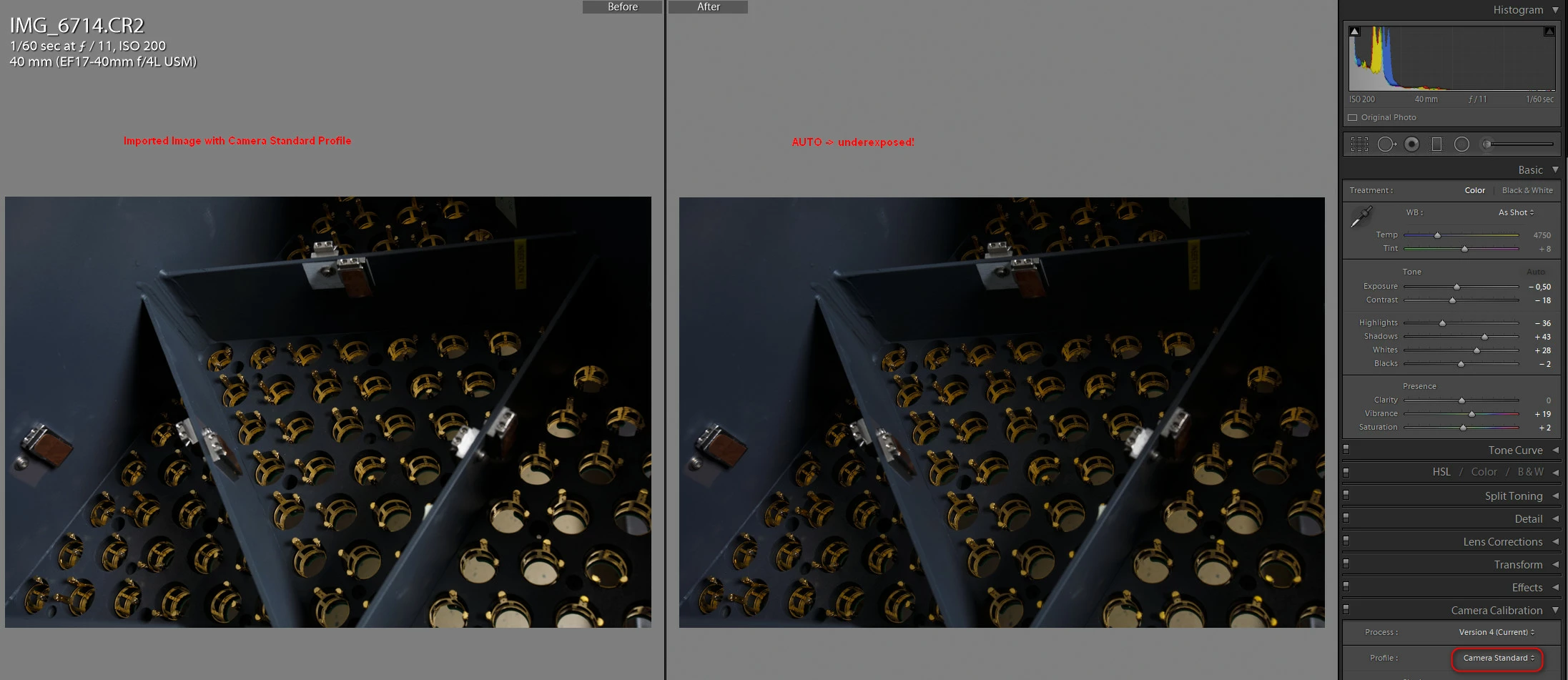
I'm experimenting with the new Auto Tone Feature of 7.1 and my first try were a bunch of very underexposed photos.

Then I realized that if I keep the "Camera Standard"  calibration profile (I shot with a Canon Reflex) the results are VERY different than with "Adobe Standard" profile, where the Auto seems to work better.

So do you confirm, Auto works completely different and dependent to Camera Profile ?

Is the new workflow:

- import without assign Profile

- do Auto + some tuning

- change profile (if needed)

Thanks
This topic has been closed for replies.

5 replies

elie_dinur
Participating Frequently
January 30, 2018
Also it would be nice if saturation and vibrance is not automatically applied or if I could select the settings to be applied for auto tone.

Double-click on "Presence" to zero out Vibrance and Saturation. To apply Auto to individual tone values instead of all at once, hold Shift and double-click on the value's name or on the slider.

Auto Settings attempts to bring your image to a standard established by the analysis of thousands of photos submitted by a panel of pros and fed into Adobe's Sensei AI. Start from a flattish, conservative profile like Camera Neutral, more "jazz" will be added; start from a contrasty and saturated profile and the changes will be less. But in both cases the result will be similar to the "pro standard". It may not suit your taste, but it's hard to see what Adobe could have done otherwise. I doubt a standard based on jpgs from cellphones would have gone over well.

KR Seals
Community Expert
Community Expert
January 30, 2018

I have custom LR profiles for all my cameras, including drones created with the xRite Color Checker Passport. The results I get using the Auto button in the develop, basic panel are preferable to me using the xRite profiles than any of the Adobe supplied camera calibration profiles. Better color and contrast.

Ken Seals - Nikon Z 9, Z 8, 14mm-800mm. Computer Win 11 Pro, I7-14700K, 64GB, RTX3070TI. Travel machine: 2021 MacBook Pro M1 MAX 64GB. All Adobe apps.
Dreamy_Smile0D4C
Participant
January 29, 2018

Having the same issue that auto tone extremely underexposes images if not using Adobe Standard Profile. This is very annoying as I use auto tone a lot as a starting point in my workflow and import pictures with my Canon Standard profile. Hope Adobe fixes this issue soon. Also it would be nice if saturation and vibrance is not automatically applied or if I could select the settings to be applied for auto tone.

DdeGannes
Community Expert
Community Expert
January 29, 2018

Have you tried using the Auto tone with "Adobe Standard" as the selection in the Camera Calibration then switching to one of the Camera matching profiles?

Regards, Denis: iMac 27” mid-2015, macOS 11.7.10 Big Sur; 2TB SSD, 24 GB Ram, GPU 2 GB; LrC 12.5,; Lr 6.5, PS 24.7,; ACR 15.5,; (also Laptop Win 11, ver 24H2, LrC 15.3; PS 27.0; ) Camera Oly OM-D E-M1.
Dreamy_Smile0D4C
Participant
January 29, 2018

Hello, yes, that would work but would be additional steps in the workflow for something that worked just fine in the past.

elie_dinur
Participating Frequently
December 13, 2017

From Scott Kelby's review of the new Auto Settings:

"Also, according to Adobe, “If you apply a crop, white balance adjustment, or camera profile changes after applying Auto, Lightroom will re-enable the Auto button. Pressing Auto again will recompute the settings based on the updated image render.

https://lightroomkillertips.com/new-lightroom-updates-today-one-new-features-pretty-awesome/

So maybe a better workflow would be to take care of cropping, WB and profile selection before hitting the Auto button.

Participating Frequently
December 24, 2017

On LR CC 7.1 new "Auto settings" produces very different results when the camera profile is other than "Adobe Standard".  Results differ more than +-2EV between "Camera Faithful" and "Adobe Standard".  Bug or not ?

Can some on Adobe test software updates before launching them to public ?

mariom10839617
Participant
January 12, 2018

Having the same issue. Auto Tone only seems to produce acceptable results under Adobe Standard but if I use one of the Fuji profiles, the images are much too dark (Pro Neg Hi being the worst).

Ian Lyons
Community Expert
Community Expert
December 13, 2017

Auto will produce different results for each camera profile. Likewise, applying auto to a cropped image will produce a different result from the uncropped version