
Participant
July 31, 2024
Answered

New catalogue won't sync to Lightroom mobile app

  • July 31, 2024
  • 1 reply
  • 554 views

I recently had to create a new catalogue but new images won't sync with Lightroom mobile app.  I can see that it is trying to sync but nothing happens. When I first started using Lightroom Classic the images from the original catalogue synced with the Lightroom mobile app without much problem. Now I'm not sure that I have the right location for the new catalogue specified. It shows Lightroom Catalog New Helper.Irdata. Is this the correct file to sync from? See screen shots attached.

Any assistance would be greatly appreciated.
This topic has been closed for replies.
Correct answer Conrad_C

The Preferences / Lightroom Sync / Location settings shown in your screen shot control only where synced files are downloaded to the local computer. They don’t control which catalog syncs, and don’t enable or disable sync.


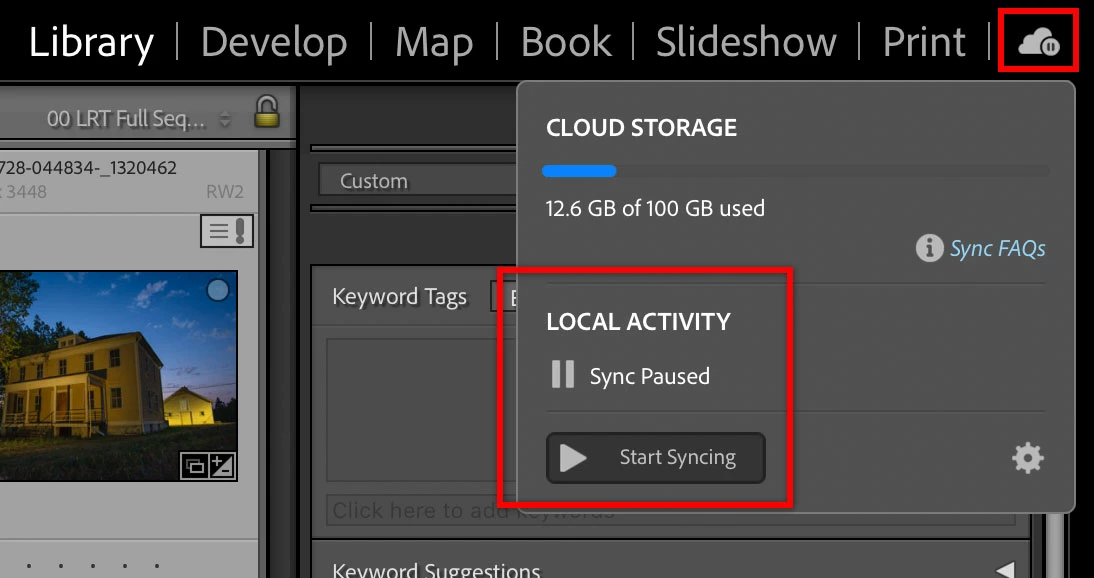
Enabling sync for a specific catalog is done by clicking the sync (cloud) icon in the module picker, which opens a sync control menu. In the current catalog you would click that cloud icon, and then in the menu that opens, click Start Syncing. I think that will delete and replace whatever is synced in the cloud from the previous catalog with whatever is set to sync in the current catalog, and probably also disables sync with all other catalogs.


1 reply

JohanElzenga
Community Expert
Community Expert
July 31, 2024

Lightroom Classic can only sync one single catalog. Creating a new catalog does not automatically sync that one and terminate the sync of the old one. You will have to manually enable sync in the new catalog.


-- Johan W. Elzenga
Participant
August 1, 2024

Hi Johan. Thanks for this advice. I know that LRC can only sync to a single catalgoue. I'm just not sure that under Preferences it is set to the correct folder for the new catalog. It shows in the attached screen shot that under Preferences it is pointing to Lightroom Catalog New Helper.Irdata. Is this the correct folder? Thanks for your assistance.


Conrad_C
Community Expert
Conrad_CCommunity ExpertCorrect answer
Community Expert
August 1, 2024

The Preferences / Lightroom Sync / Location settings shown in your screen shot control only where synced files are downloaded to the local computer. They don’t control which catalog syncs, and don’t enable or disable sync.


Enabling sync for a specific catalog is done by clicking the sync (cloud) icon in the module picker, which opens a sync control menu. In the current catalog you would click that cloud icon, and then in the menu that opens, click Start Syncing. I think that will delete and replace whatever is synced in the cloud from the previous catalog with whatever is set to sync in the current catalog, and probably also disables sync with all other catalogs.