
Participant
May 16, 2023
Answered

New Lightroom AI noise reduction creates false colors

  • May 16, 2023
  • 2 replies
  • 1361 views

Lightroom Classic-Version: 12.3

Interne Camera Raw-Version: 15.3.1
Betriebssystem: Windows 10 - Business Edition

Systemarchitektur: x64
Anzahl logischer Prozessoren: 32
Prozessorgeschwindigkeit: 3,3GHz

Integrierter Speicher: 65436,2 MB

Informationen zum Grafikprozessor:
DirectX: AMD Radeon RX 6900 XT 


Since the update to Camera Raw v 15.3.1 today, I observerd following topic.


By using the new Lightroom Classic intergated AI noise reduction function on my *.CR3 raw files I got purple colored pictures.

Even in the preview zoom area the picture get a colored purple overlay after the precalulation has been performed.
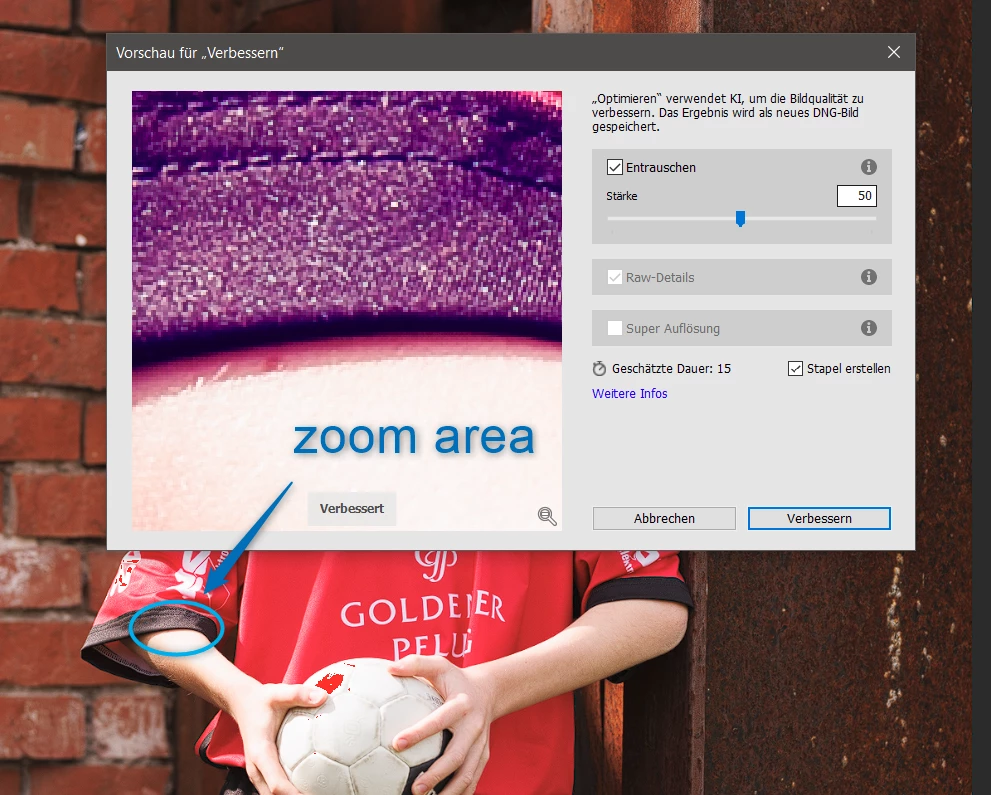
Please give me a hint to get rid of this "feature".


Thanks a lot from south Germany

Best regards Rainer


This topic has been closed for replies.
Correct answer Keith Reeder

Have  a look around the forum, Rainer - this problem has already been discussed numerous times  eg:


https://community.adobe.com/t5/lightroom-classic-discussions/denoise-ai-purple-blue-tint/td-p/13743755


(And there are more...)


For a start, make sure you're sing the most up to date GPU drivers. 

2 replies

Participant
August 1, 2023

I've the same problem, I've contacted the support but the technician failed to solve the problem


Ian Lyons
Community Expert
Community Expert
May 16, 2023

You appear to have the 'Highlight' clipping indicator enabled (see red patch at top of football). Does the false colour disappear when this is disabled (i.e. click the symbol highlighted in attached screenshot).


Participant
May 16, 2023

Thanks for the hint, but it seem to be a different cause.

I turned all clipping indicators off, but still purple overlay.

Even multiple reboots did not solve this topic.


Keith Reeder
Keith ReederCorrect answer
Participating Frequently
May 16, 2023

Have  a look around the forum, Rainer - this problem has already been discussed numerous times  eg:


https://community.adobe.com/t5/lightroom-classic-discussions/denoise-ai-purple-blue-tint/td-p/13743755


(And there are more...)


For a start, make sure you're sing the most up to date GPU drivers.