Inspiring
November 7, 2021
Answered

New Masking icon

  • November 7, 2021
  • 3 replies
  • 346 views

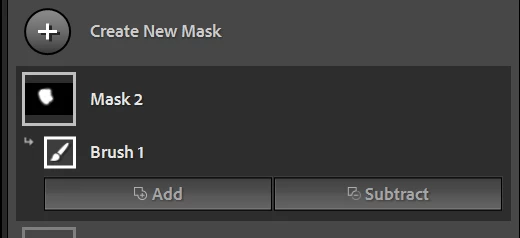
if I use masking tool and make a selection, the two buttons 'add and substract' doesn't appear in the window. What ever I do,  the two buttons stay away.

This topic has been closed for replies.
Correct answer @MNiessenPhoto

Click on a mask to see what's inside (brush, radial filter,...) and the Add/Substract buttons should be visible.
Hope that helps,

Michael

_____________

Michael Niessen - Photographer, photo-editor, educator

3 replies

GoldingD
Legend
November 7, 2021

Incidentally, a very good video on masking,:

https://www.youtube.com/watch?v=Y7Fld8eEHsE


Noticing many members with masking issues, and a few (not you) Screaming they hate it, have apparently not looked at the what is new documentation,

https://helpx.adobe.com/lightroom-classic/help/whats-new.html

nor used any tutorial info. The above video is long but worth the watch.


Inspiring
November 7, 2021

Thanks, it works

@MNiessenPhoto
@MNiessenPhotoCorrect answer
Legend
November 7, 2021

Click on a mask to see what's inside (brush, radial filter,...) and the Add/Substract buttons should be visible.

Hope that helps,

Michael

_____________

Michael Niessen - Photographer, photo-editor, educator

Photo-editing (Ps/Lr/LrC) and photography workshops & one-on-one training (off- and online)