Dave Kimball
Known Participant
May 9, 2017
Answered

NEWBEE - Saving Layers from Photoshop back into Lightroom

  • May 9, 2017
  • 1 reply
  • 650 views

I know that I should already know this but I can't figure it out.

I'm in Lightroom and edit a picture in Photoshop.  While in Photoshop I add several layers and then same the image back into Lightroom.  But when I go to re-edit the updated image back in Photoshop all the layers are gone?

I have tried saving the image as Photoshop format,and TIFF, but still no layers are preserved.

Can someone help?

Thanks in advance.

Dave Kimball
This topic has been closed for replies.
Correct answer Todd Shaner

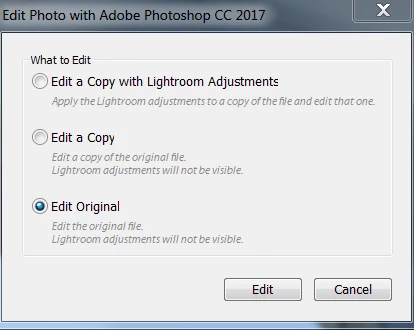
If using Edit in PS from LR you need to select 'Edit Original' and NOT Edit a Copy with Lightroom Adjustments, which will flatten the file.

1 reply

Todd Shaner
Legend
May 9, 2017

In the Save options do you have 'Layers' checked?

Dave Kimball
Known Participant
May 9, 2017

Yes I have checked the Layers for both the PSD and TIFF file formats. Did not seem to make a difference.

Thanks for the reply and idea. .

Dave

Todd Shaner
Todd ShanerCorrect answer
Legend
May 9, 2017

If using Edit in PS from LR you need to select 'Edit Original' and NOT Edit a Copy with Lightroom Adjustments, which will flatten the file.