Answered
This topic has been closed for replies.
Yes, Kathy, the Spot Removal is in the Develop module (Q is the shortcut):
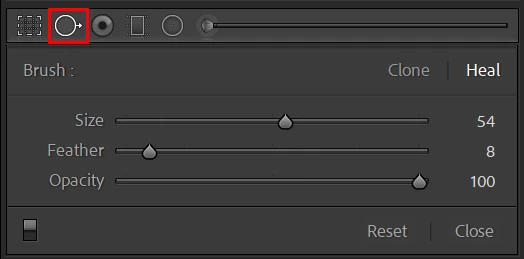
If you only click once on the picture, it clone/heals that area, but if you then hold shift and click again, it clones/heals a line between the first and second points (for other cases, you can also hold the mouse button and simply paint an area).
Try both the clone and heal options if you're not satisfied with the result. And finally, you can click and drag the area that is used as source to move it around, it sometimes helps improving the correction.
Hope that helps,
Michael
_____________
Michael Niessen - Photographer, photo-editor, educator
Sign up
Already have an account? Login
To post, reply, or follow discussions, please sign in with your Adobe ID.
Sign inSign in to Adobe Community
To post, reply, or follow discussions, please sign in with your Adobe ID.
Sign inEnter your E-mail address. We'll send you an e-mail with instructions to reset your password.
 AdChoices