
Participant
December 11, 2024
Answered

No aparece el incono de Nube para poder sincronizar

  • December 11, 2024
  • 3 replies
  • 679 views

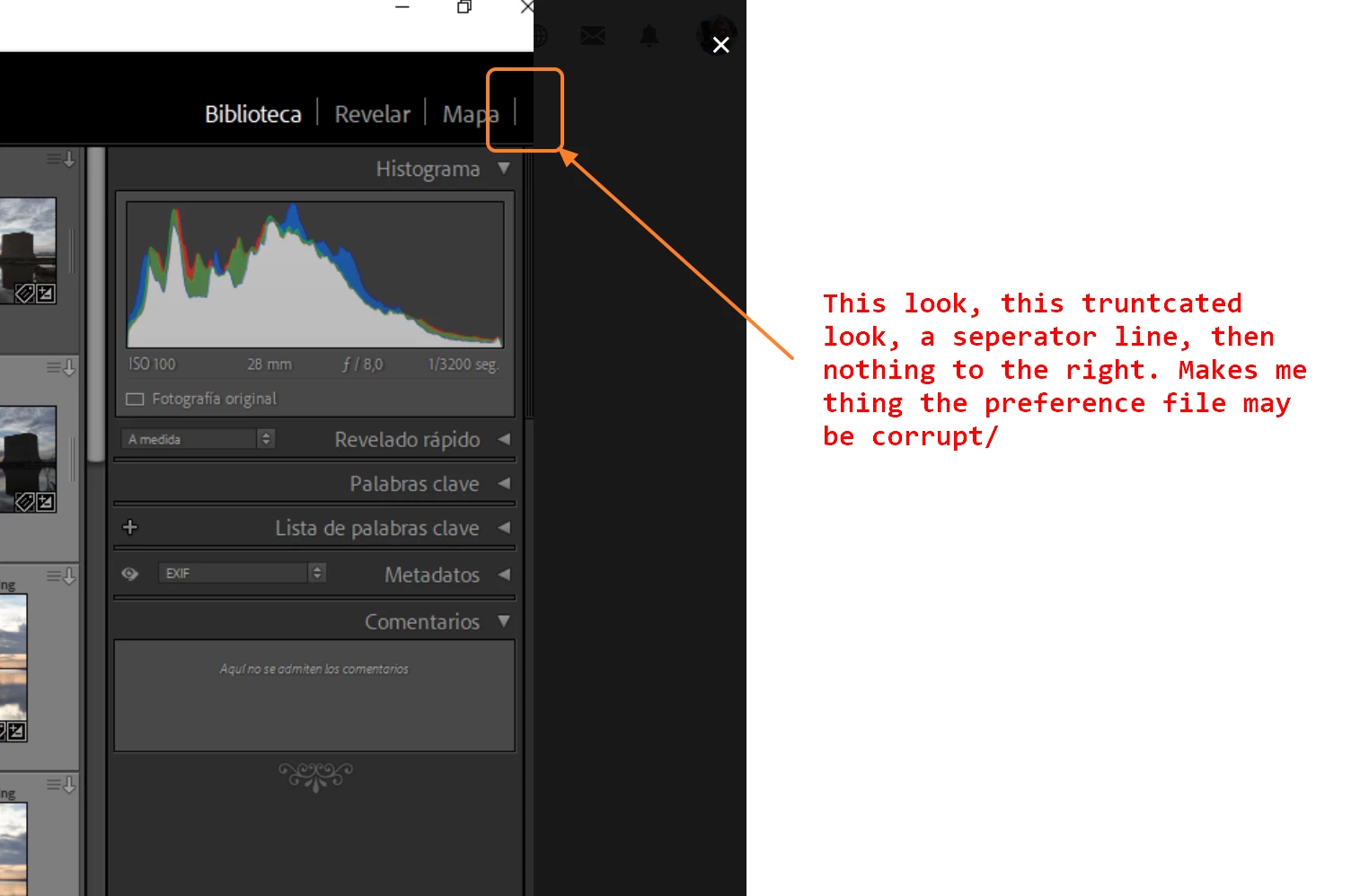
Me pongo en contacto con el foro porque tengo el siguiente problema. Tengo contratado el plan fotográfico que incluye  Adobe Lightroom y Adobe Photoshop y, además, cuenta con 20 GB de almacenamiento en la nube. El problema  es que en la aplicación de Lightroom clasic  ver. 14.0.1 para escritorio,  NO aparece el incono de la Nube y no puedo iniciar la sincronización,  El sistema operativo instalado es Windows 10 Home V.  22H2.  He desinstalado y he vuelto a reinstalar la apliación varias veces y siempre tengo el mismo resultado.  Donde tendria que estar, no aparece el icono de nube, siendo imposible iniciar la sincronizacion.  Adjunto pantallazo.


Gracias.

Juan P.
    This topic has been closed for replies.
    Correct answer juan_pedro_3253

    And if that does not work , then perhaps as "Per Bernsen" stated, the preference file may be corrupt. In your screenshot that odd truncated appearance makes me think perhaps:


    I think I've solved it now.
    In the end it's a problem with the screen resolution. I've tried with another monitor with a higher resolution and I can now see the cloud icon.
    Thank you all very much for your comments and help.

    3 replies

    GoldingD
    Legend
    December 11, 2024

    Why are you looking for the Cloud? And it would be in the upper right corner of the LrC app


    Participant
    December 12, 2024

    Good morning.

    It should appear at the top, to the right of the module switcher, but it doesn't.
    I look for it to start the synchronization. In the collections I don't see the option to synchronize either


    GoldingD
    Legend
    December 12, 2024


    Perhaps an item or more got turned off. Right click in the black area, and see if some items need to be turned back on (Ahh, but the Cloud is not included, see next reply)


    GoldingD
    Legend
    December 11, 2024

    Are you attempting to SYNC the folder as opposed to bringing up Import?


    Participant
    December 12, 2024

    What I need is to activate synchronization in the collections, so I can access the photographs from the mobile application or from Laightroom Web.

    Per Berntsen
    Community Expert
    Community Expert
    December 12, 2024

    Your Lightroom window is truncated, the top right corner should look like the screenshot below.


    What is your screen resolution in pixels?

    Try clicking the restore button, then click the maximize button to make the window fill the screen.


    kglad
    Community Expert
    Community Expert
    December 11, 2024

    sync from the apps