
Participant
December 29, 2019
Answered

No Book module in Lightroom Classic V9

  • December 29, 2019
  • 3 replies
  • 435 views

I have just subscribed to the Photographers' plan and have downloaded, amongst other apps, Lightroom Classic V9.1 (Build 20191129-1132) This work well for what I want except I am trying to create a Photo Book and there is no Book module showing. All the other modules - Library, Develop, Map etc. are there but not Books. I have searched online extensively and all tutorials etc. imply this is part of Lightroom Classic (which is what I am using). I've looked at the Cloud based version of Lightroom but the book module is not there either (as expected).


So my question is, where is the book module in this version?
This topic has been closed for replies.
Correct answer cmgap

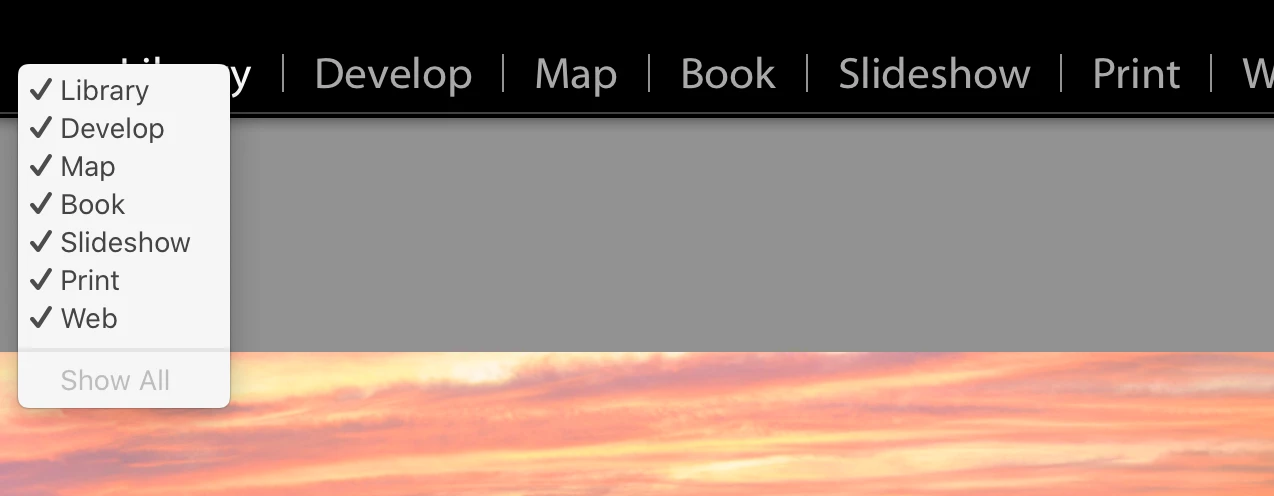
Right click in the area to the left of the Library module and make sure the Book is showing a check mark.


3 replies

dj_paige
Legend
January 2, 2020

Another solution is to go to the Window menu in Lightroom and select Book.

cmgap
Community Expert
cmgapCommunity ExpertCorrect answer
Community Expert
December 29, 2019

Right click in the area to the left of the Library module and make sure the Book is showing a check mark.


pgh1949Author
Participant
January 2, 2020

Beautiful! So easy when you know how. Thanks to both of you.

Just Shoot Me
Legend
December 29, 2019

Right click on one of the other module labels, Library, Develop, and select the Book module to show that heading. Then Click on it.