
Participant
October 4, 2025
Answered

No entiendo el uso de los catálogos de ligthroom

  • October 4, 2025
  • 2 replies
  • 250 views

He instalado Lightroom y no entiendo el uso del catálogo, el catálogo llega a ocupar lo mismo que mi carpeta de fotografías, por lo que en este caso, necesito el doble de espacio en el disco duro. Yo pensaba que el catálogo sincronizaba las fotos, pero que no ocupaba el mismo espacio. Es una locura si tengo en cuenta que tengo 4000 fotografías. Cuantas gigas necesito?? 


[since writing about catalogs, it seems to be Lightroom classic - moved to the correct community - Mod.]
Correct answer Per Berntsen

Yo le doy a propiedades a la carpeta "Catalog" y es el espacio que ocupa. Hay algun tutorial? O me puede explicar el procedimiento? No entiendo como puede ocupar tanto espacio. 


I have 56,000 photos in my catalog, and the size of the catalog folder is 40 GB.

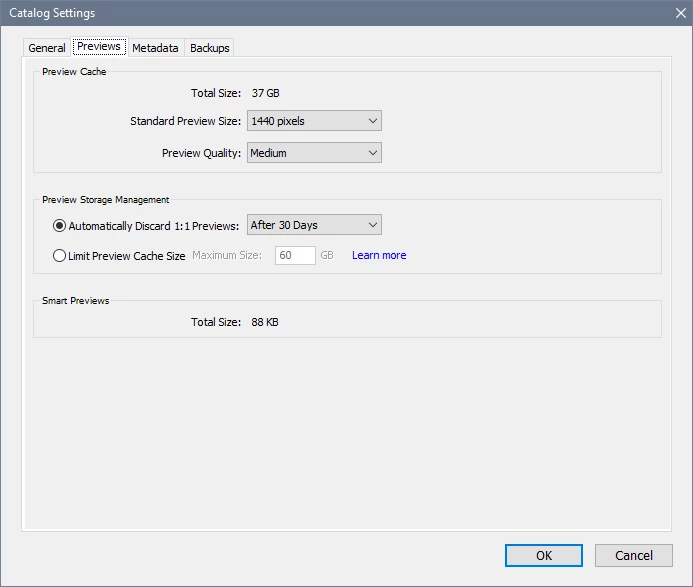
The largest item in the folder (37 GB) is the Library previews (also known as the Preview Cache).

It's name ends with Previews.lrdata.


You can control the size of the Preview Cache by going to Edit menu > Catalog settings > Previews.

There are also some options in Library menu > Previews.

And as mentioned by @F. McLion , 1:1 previews take up a lot of space.

To get a better understanding of how the catalog works, see this page:

https://helpx.adobe.com/lightroom-classic/kb/catalog-faq-lightroom.html?x-product=Helpx%2F1.0.0&x-product-location=Search%3AForums%3Alink%2F3.7.2-dev.2


2 replies

GoldingD
Legend
October 7, 2025

A screenshot of what you are looking at may be helpful


F. McLion
Community Expert
Community Expert
October 4, 2025

The catalog does not contain the photos. It just keeps links, metadata, and information to them in a database, called catalog.

Definitely, the space a catalog consumes is way lower than what the photos use.

Please share the exact version of Lightroom you use, more details about your issues, and add screen captures. Also, please elaborate on what you mean with “synchronize”, as Lightroom Classic does not synchronize anything on its own, if not explicitly set within collections.


--- Got your issue resolved? Please label the response as 'Correct Answer' to help your fellow community members find a solution to similar problems. ---
Participant
October 5, 2025

Hola, tengo lightroom classic 14.5.1. 


Mi disco duro tiene más de 500Gb de fotografías. He creado un catálogo y he importado 4,57Gb de fotografías al catálogo y el catálogo ocupa 2,65Gb. Por lo que por esa lógica, el catálogo podría llegar a ocupar más de 200Gb como importe todas las fotografías. No es lógico. 

F. McLion
Community Expert
Community Expert
October 5, 2025

Are you sure you are looking at the catalog, the *.lrcat file?

Did you set to render higher quality previews during the import? If yes, this is what consumes the space.

However, the previews can always be recreated by LrC. They can be deleted (from within LrC) and they need not be included in a backup.

--- Got your issue resolved? Please label the response as 'Correct Answer' to help your fellow community members find a solution to similar problems. ---