Inspiring
April 11, 2019
Answered

No Location Info Message After Geotagging

  • April 11, 2019
  • 2 replies
  • 408 views

I am using Lightroom Classic CC ver 8.2.1 on Windows 10 64 bit. I geotagged photos in Lightroom. If I view the photo's metadata in Lightroom, it shows GPS coordinates.

However all of the online metadata or mapping viewers that I tried, such as metapicz.com or pics2map.com report no location information is found in the file. Does anyone know where I am going wrong. These images are for an online photo gallery that can display the location the photo was taken. The gallery is also not reading the GPS coordinates in the photos that have been geotagged in Lightroom. Is the gallery and the online meta data checkers looking for a GPS coordinates in a different place than where Lightroom places them? Any ideas on this would be appreciated.
    This topic has been closed for replies.
    Correct answer kmc27

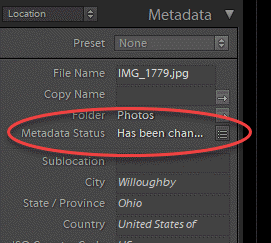
    I figured out the Lightroom geotagging issue. It was user error. After I had geotagged the images, the Metadata Status showed "Has been changed".I thought this indicated the location now part of the metadata.

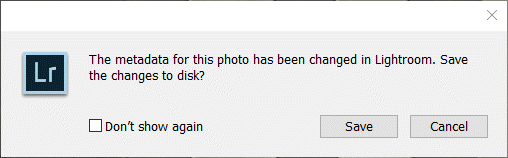
    I did not realize another step was needed. I clicked on the small button to the right of "Has been chan..."  and this dialogue box came up.

    Once I clicked "Save", the Metadata Status changed to

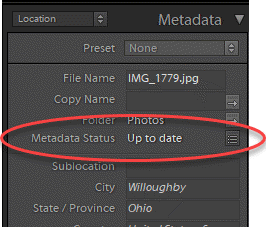
    "Up to date." Then, when I verified the location on pic2map.com, it showed the photo's location.

    2 replies

    kmc27AuthorCorrect answer
    Inspiring
    April 11, 2019

    I figured out the Lightroom geotagging issue. It was user error. After I had geotagged the images, the Metadata Status showed "Has been changed".I thought this indicated the location now part of the metadata.

    I did not realize another step was needed. I clicked on the small button to the right of "Has been chan..."  and this dialogue box came up.

    Once I clicked "Save", the Metadata Status changed to

    "Up to date." Then, when I verified the location on pic2map.com, it showed the photo's location.

    GoldingD
    Legend
    April 11, 2019

    All mods, including metadata accomplished in lightroom are kept in the database, the catalog. to burn those changes into an actual image file you need to export them.