Known Participant
August 15, 2020
Question

No option to sync collection

  • August 15, 2020
  • 4 replies
  • 634 views

Hello, i just installed Lightroom.

I want to sync collections to the cloud.

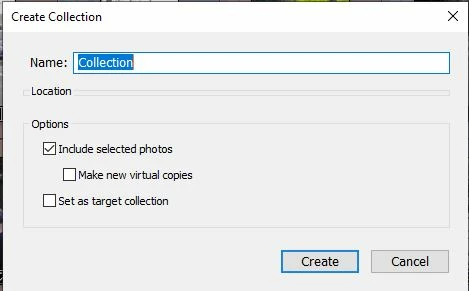
When i define new collection, there is no option to mark the sync option.
This topic has been closed for replies.

4 replies

Just Shoot Me
Legend
August 15, 2020

Nope that is not it, Paused Sync.


There seems to be something wrong with your install. The Create Collection dialog is missing something else. The Location section should have a drop down part with Check Box for Inside a Collection Set and then a Drop Down field for choosing a collection set.


Have you Restarted your computer lately? Eeven if you have try a restart first and post back if the problem continues.

EyalrAuthor
Known Participant
August 15, 2020

Well now it start working ... i started the first time sync and now i also get the option to sync from the new collection option

EyalrAuthor
Known Participant
August 15, 2020

This is the answer - To sync Lightroom Classic photos with Adobe Photoshop Lightroom apps, the photographs must be in synced collections or in All Synced Photographs collection . Photos within a synced Collection are automatically available in Lightroom on your desktop, mobile, and web.


https://helpx.adobe.com/lightroom-classic/help/lightroom-mobile-desktop-features.html#setup 

Just Shoot Me
Legend
August 15, 2020

Is the Sync feature Turned on? With it paused you don't get the option to sync collections.

EyalrAuthor
Known Participant
August 15, 2020

where can i find it ?

gary_sc
Community Expert
Community Expert
August 15, 2020

It looks like you installed Lightroom Classic, not Lightroom Desktop (please blame adobe for the name confusion, not us). 


There are two kinds of Collections: Smart and (well) dumb (that's NOT the official name). Smart Collections do not go off to the clouds, dumb ones do/can.


Assuming that you just signed up for one of the Photoshop Packages, you have the latest version (if not please let us know). Since I'm on a Mac, my window looks very different from yours so I cannot tell which version for sure.


Dumb Collections are filled up by your dragging images into them. These then can be synced up to the clouds and be seen by guests who you send links to in Lightroom.adobe.com, on your phone and iPad via Lightroom Mobile, and on Lightroom Desktop.


Let us know if you need any other help on this.

EyalrAuthor
Known Participant
August 15, 2020

Not sure i understand.

I installed LR classic.

Is it not what i need to install on my laptop ?

Just Shoot Me
Legend
August 15, 2020

You have the correct version installed and it is clear from the screen shot you posted that you are in the correct forum and have the correct version installed even if you said Lightroom in your original post.


Lightroom, the Cloud based version, does not have a Sync Collections feature as Everything you import is Synced up to the Adobe, Lightroom web, system.


Just Shoot Me
Legend
August 15, 2020

What Exact version of LrC did you install?

EyalrAuthor
Known Participant
August 15, 2020
Just install 9.3.