


Participant
Sep 19, 2024 6:40 PM UTC
Question

Noise Reduction iA

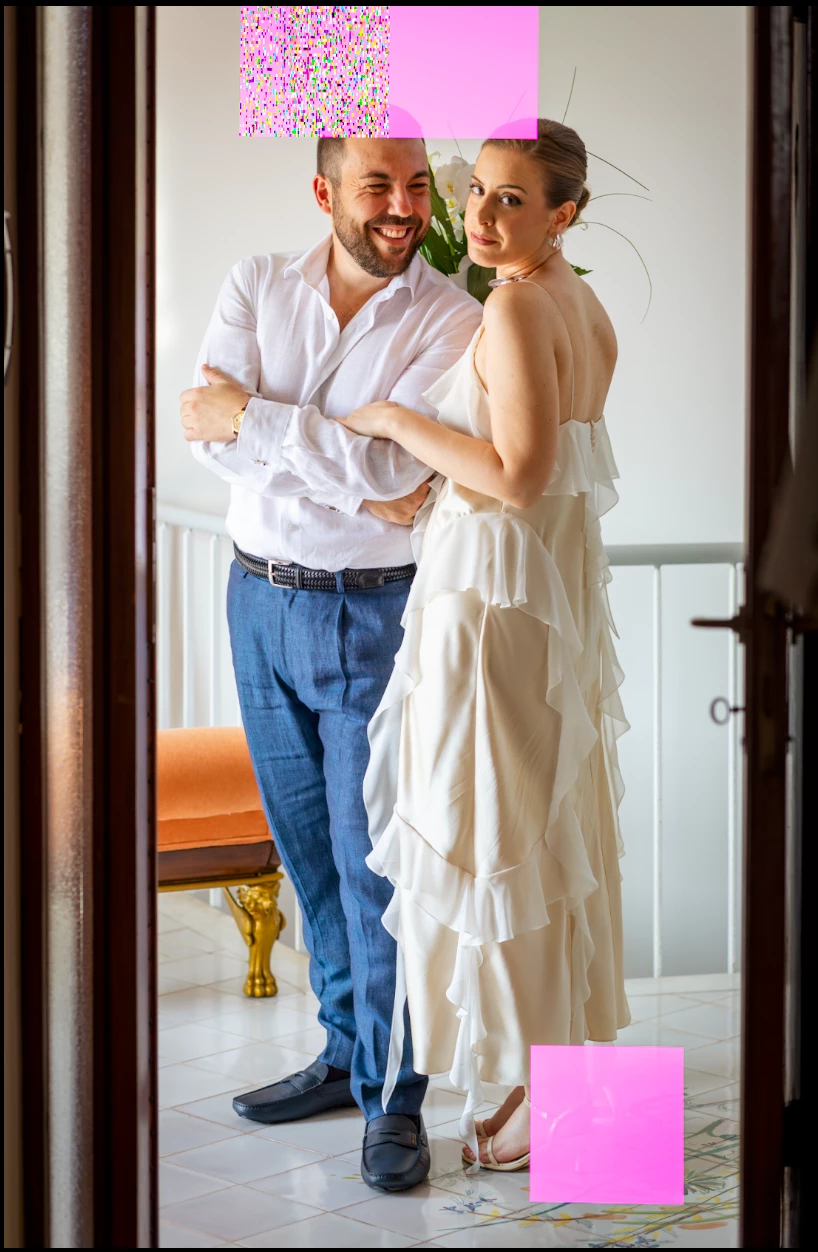
Hello, this is the first time I write here on Adobe Community, I hope you can help me, for a few months now when I run iA noise reduction with LRC pink artefacts are generated all over the image that is created in DNG, I have tried restarting the system but nothing changes, the files are CR3 of Canon R5, R6 and 5DIV. What can I do to get Noise Reduction iA working again? I am using the Adobe package on an iMac 27' 3,8 GHz Intel Core i7 8 core, AMD Radeon Pro 5500 XT 8 GB, 64 GB 2667 MHz DDR4 and OS Sonoma 14.6.1. Thanks in advance.
 

This topic is closed to new replies. Start a new post to keep the conversation going.

2 replies

Ian Lyons
Community Expert
Community Expert
Sep 19, 2024 8:11 PM UTC

You're using and AMD GPU. Therefore, based on the screenshot, I suspect you're experiencing the same issue discussed in below linked bug report.


https://community.adobe.com/t5/lightroom-classic-bugs/p-gpu-develop-edit-view-amp-export-artifacts-after-14-4-1-update-amd-only-affects-cr-lrc-amp-lrd/idi-p/14563606

Translate
Imago MakAuthor
Participant
Sep 27, 2024 9:59 AM UTC

Hi, the issue was resolved by installing the new OS Sequoia

Translate