summertu
Participant
August 25, 2017
Answered

Noise Reduction Settings Not Exporting

  • August 25, 2017
  • 3 replies
  • 4737 views

Hi all.  I'm SUPER frustrated right now, and feel like I've been chasing my tail.  And I think that there just isn't a solution for my problem, that it is a bug in the software, but I'm really hoping that is not the case.

So, when I export my RAW files as jpegs, my noise reduction settings are completely ignored, and the images turn out extremely grainy with a lot of noise.

Just to clarify... I understand high ISO, I am NOT applying any sharpening or sharpening output settings, and my images look great (with NR) in both the library and develop modules.

It is only when I EXPORT that they become a grainy mess.

So, after spending hours researching what could be wrong, I discovered that if I export the image with ANY kind of resizing, the NR DOES apply.  It is only if I try to export it in its original size that it the NR settings are not applied.

Trouble is, I really want to export all my images in their ORIGINAL size.  I do not want to make them smaller in any way, as I am a photographer and my clients buy large wall art from me.

This has never been an issue for me as I used to only shoot outdoors, but now that I am offering in-home family sessions with higher ISO values I need to be able to apply NR settings.

Any advice? Or if this is just a bug that is unfixable, any advice on what size I should be resizing my long edge too to preserve the integrity of the image so it can still be printed really large?

Thanks!
    Correct answer DdeGannes

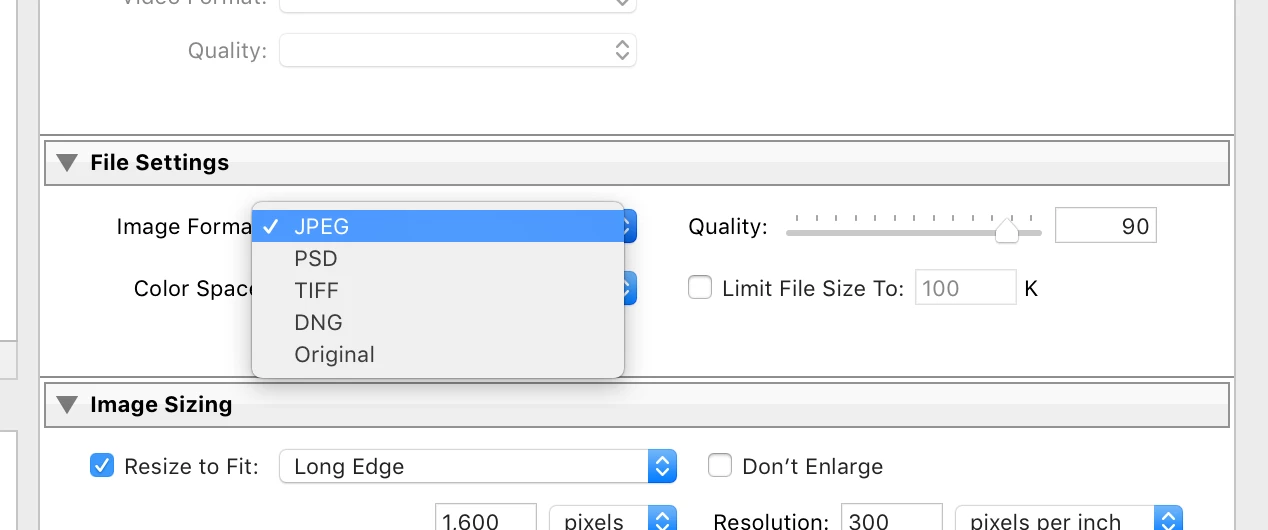
    When you are exporting the file you you need to specify the time jpeg, tiff, etc.

    Make sure you are not selecting "Original" under file settings. See the screen capture.

    If you select "original" all you will end up with is a copy of the original file with no Lightroom adjustments.

    3 replies

    Participant
    February 24, 2021

    Okay, so I don't know if this will help anyone, but I have this exact same problem. I apply noise reduction to the photos that need it, and they look perfect in Lightroom. But after I export them to JPEG, I look at them in Finder (I use a Mac), and they look a grainy mess, just like described in this thread. However, I discovered that if I open those same images up in the Preview app, they look exactly like they should. They also look perfect when I put them on my online galleries. I'm not sure if you're using Finder to preview your JPEGs or not, but I don't think they're being exported incorrectly. I think Finder just drops the Noise Reduction effect in its previews (maybe not for everyone, but at least for some of us). So don't trust Finder. Preview your JPEGs on multiple apps to make sure it's not just an app problem.

    Participant
    November 26, 2017

    Had same issue :/ spent several hours/days of my time figuring this out. At this point I should get this software for free. The The Lightroom Classic CC removes noise reduction on export. To fix this I reverted back to an old edition. The best one closest to the new version is Lightroom 6.13 which gives noise reduction and dehaze.

    dj_paige
    Legend
    November 26, 2017

    I am not experiencing this problem with Lightroom Classic CC. Noise reduction is properly applied at Export. Did you try the suggestion from @ddegannes above?

    DdeGannes
    Community Expert
    DdeGannesCommunity ExpertCorrect answer
    Community Expert
    August 25, 2017

    When you are exporting the file you you need to specify the time jpeg, tiff, etc.

    Make sure you are not selecting "Original" under file settings. See the screen capture.

    If you select "original" all you will end up with is a copy of the original file with no Lightroom adjustments.

    Regards, Denis: iMac 27” mid-2015, macOS 11.7.10 Big Sur; 2TB SSD, 24 GB Ram, GPU 2 GB; LrC 12.5,; Lr 6.5, PS 24.7,; ACR 15.5,; (also Laptop Win 11, ver 24H2, LrC 15.3; PS 27.0; ) Camera Oly OM-D E-M1.
    summertu
    summertuAuthor
    Participant
    August 25, 2017

    Thanks for responding! I should have been more clear. I am exporting as jpeg. All other adjustments to color contrast etc DO export. Just not noise reduction settings.