


Known Participant
October 14, 2026
Question

Numeric Fields in the Tone Curve not showing three digits

In LRClassic 15.6 the numeric fields in Develop>Tone Curve are not always showing three digits as they should when the White point is selected. Only seeing two digits is confusing.
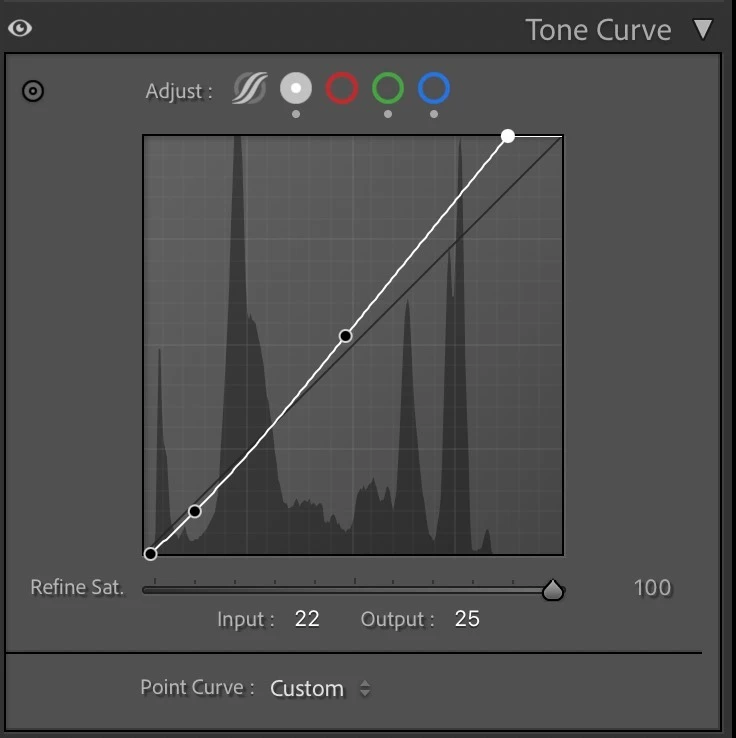


As shown where the white point is select and the Input should read 221 and the Output should be 255.

    12 replies

    Legend
    October 15, 2026

    ​@Scott_Martin_ 

    Do you see this in other numeric inputs, such as the Amount for Denoise not showing 100, but shows 10?

    Translate
    Known Participant
    October 15, 2026

    No, denoise, sharpening and all other numeric fields are showing 3 digits. 

    Translate
    Legend
    October 15, 2026

    ​@Scott_Martin_ 


    This has been seen before and is caused by a change in Mac UI elements, specifically the edit box being too small to fit/display the three digits on the Mac.


    It was supposed to have been fixed in LrC 15.6, so it is odd that you are still seeing it.


    Translate
    Known Participant
    October 15, 2026

    Yeah I’ve got the panel as wide as it will go - there is plenty of room for 3 digits. I’ve never seen this before and am not sure why I’m being it now…


    Translate
    Legend
    October 15, 2026

    ​@Scott_Martin_ 


    Is this happening on a Mac?


    Translate
    Known Participant
    October 15, 2026

    Yes, MacOS 27 and LRClassic 15.6...

    Translate
    Claire H.
    Community Manager
    Community Manager
    October 14, 2026

    Hi ​@Scott_Martin_, Thanks for reaching out to the Lightroom Classic Community Forums! I am seeing something similar on my end, but we can use some more information. To better help you with this issue, we would like a few more details. Can you send your system info, a screen recording of the issue, and a numbered list of the exact steps needed to reproduce it? You can find your system info by going to Help > System Info, copying and pasting it into a text file, then attaching the file here.


    In the meantime, let's Reset Lightroom Classic Preferences: Please refer to this Helpx article for steps. https://adobe.ly/3HsQXpA 


    It is recommended to back up your catalog before resetting preferences. You may refer to this article for more information:  https://adobe.ly/4dW8vqF.


    If none of these steps work for you, please send the requested information so we can continue troubleshooting. I hope this helps! ^CH

    Translate
    Known Participant
    October 14, 2026

    Thanks for the generic response, but your “I am seeing some similar on my end” feels disingenuous and insulting. I have included a screen grab above and therefore a screen recording would only be redundant. I will not be providing these other things unless you can respond more directly and specifically.

    Translate