
Known Participant
May 16, 2022
Question

OMS OM-1 ORF files and LrC Lens Corrections

  • May 16, 2022
  • 2 replies
  • 1086 views

I've been editing photos made using my new OMS OM-1 camera. In one of the photos I noticed the horizon had a "dip" in it. I've not noticed this in other photos from other Olympus cameras I own (EM-1 Mark 2 for instance) using the same lens (12-40 mm f 2.8). I thought this was odd so I tried to correct it using the Distortion slider in the Manual tab of the Lens Correction panel. That helped but I would need to crop the image afterward. I undid the change and went to the Profile tab of the Lens Corection Panel. To my surprise, checking "Enable Profile Corrections" actually made a difference to the image. I was surprised by this since with my older Olympus cameras checking "Enable Profile Corrections" isn't needed as the lens profile of m4/3 cameras are automatically applied.


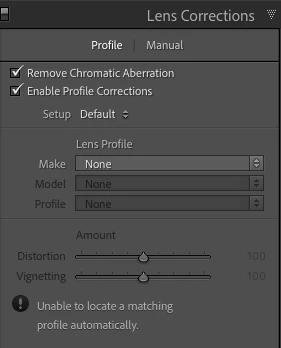
Here's a screenshot when editing a photo from the EM-1 Mk2
 

Here's a screenshot of the panel when editing the ORF file from the OM-1
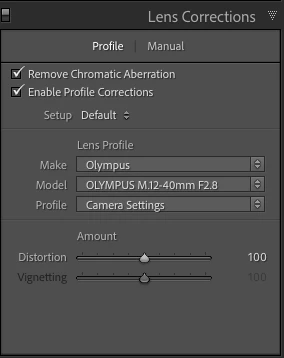
 

Has anyone else noticed this?  While the panel shows the model and make of the lens, an Adobe support page (https://helpx.adobe.com/camera-raw/kb/supported-lenses.html) does not list any lens profiles for any Olympus/OMS lenses. Any idea of what is being done by LrC? What it's based on? 


mac OS 12.3.1   LrC 11.3.1  

This topic has been closed for replies.

2 replies

DdeGannes
Community Expert
Community Expert
May 16, 2022

I get this, which is what your first screen capture shows with an already rendered file e.g. tiff.

Regards, Denis: iMac 27” mid-2015, macOS 11.7.10 Big Sur; 2TB SSD, 24 GB Ram, GPU 2 GB; LrC 12.5,; Lr 6.5, PS 24.7,; ACR 15.5,; (also Laptop Win 11, ver 24H2, LrC 15.0.1, PS 27.0; ) Camera Oly OM-D E-M1.
D RoederAuthor
Known Participant
May 16, 2022

All my screenshots are from ORF files.

DdeGannes
Community Expert
Community Expert
May 17, 2022

I think you should recheck that.

Regards, Denis: iMac 27” mid-2015, macOS 11.7.10 Big Sur; 2TB SSD, 24 GB Ram, GPU 2 GB; LrC 12.5,; Lr 6.5, PS 24.7,; ACR 15.5,; (also Laptop Win 11, ver 24H2, LrC 15.0.1, PS 27.0; ) Camera Oly OM-D E-M1.
DdeGannes
Community Expert
Community Expert
May 16, 2022

Lightroom has never created lens profiles for Olympus m4/3 lenses. For my OM-D E-M1 Mark 1 with Oly lenses including the 12-40 mm f2.8.

With an ORF from my camera, I see the following. The profile is automatically applied at import, it cannot be turned off.


 I downloaded an ORF from the OM to test and the following is displayed. The lens is the new 12-40mm f2.8 from OMD. The lens is automatically applied. Obviously created by the Camera, it just displays in a different manner.


When you opened the lens correction panel did you do a manual change? 


Regards, Denis: iMac 27” mid-2015, macOS 11.7.10 Big Sur; 2TB SSD, 24 GB Ram, GPU 2 GB; LrC 12.5,; Lr 6.5, PS 24.7,; ACR 15.5,; (also Laptop Win 11, ver 24H2, LrC 15.0.1, PS 27.0; ) Camera Oly OM-D E-M1.
D RoederAuthor
Known Participant
May 16, 2022

No, I did not make a manual change. All I did was check the box. And when I check the box, the image changed. With files from my EM-1 Mk 2, I can check the Enable Profile Corrections box and nothing happens, as I would expect.


Did you notice a change in the image you downloaded when you checked and unchecked the box? I have tried many images taken with the OM-1 and checking/unchecking the box and the image changes. This doesn't happen with other Olympus cameras. Interestingly enough, when a Panosonic LUMIX lens is used, this is what the panel looks like:

Notice the Make of the lens says OM Digital Solutions, but OMDS does not make the LUMIX G Vario 35-100 lens.


Just saying--something is different. Why does the image change when the Enable Profile Corrections box is checked and unchecked? It never happened before.

DdeGannes
Community Expert
Community Expert
May 17, 2022

It appears that the OM 1 is reporting the required lens correction differently and you are experiencing a different display in the lens correction panel.


Regards, Denis: iMac 27” mid-2015, macOS 11.7.10 Big Sur; 2TB SSD, 24 GB Ram, GPU 2 GB; LrC 12.5,; Lr 6.5, PS 24.7,; ACR 15.5,; (also Laptop Win 11, ver 24H2, LrC 15.0.1, PS 27.0; ) Camera Oly OM-D E-M1.