

rbanks88
Inspiring
September 28, 2024
Question

One DNG is bogging down LR, especially the masking brush (M1 MacBook Air)

  • September 28, 2024
  • 3 replies
  • 537 views

First of all, I've resolved the problem by resetting the edits and starting over. However, I would like to know what I might have done wrong, so I might avoid this in the future.


The DNG is 24 MB, from a Canon 6D Mark II. When it's open, LR generally lags when switching between modules, but it really boggs down when I open the masking panel. Toggling the overlay takes about 5 seconds. It takes 3-4 seconds to see the effect when clicking a mask's "eye" icon. There is several seconds delay between painting and seeing the stroke appear in the overlay, and as I move the brush the overlay appears in little blocks, instead of going down smoothly. It can take up to 10 seconds for the stroke to show in the history panel. 


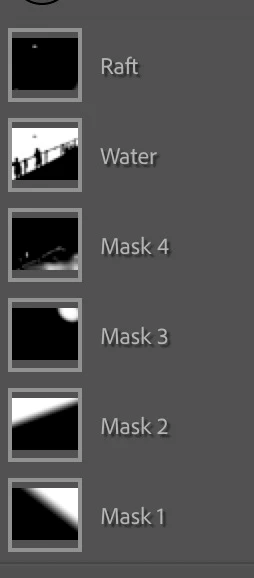
Here are the masks (2 gradients and 4 brushes):
I optimized the catalog, deleted and re-created the 1:1 preview, and turned off  the graphics processor, but it didn't help. 

Is it possible for a specific file's database entry to get randomly corrupted? Is there a way to rebuild the entry without starting over? Anything I might have done to corrupt the data?


Thanks,
Russell

This topic has been closed for replies.

3 replies

GoldingD
Legend
September 28, 2024

hmm, I should have asked first.


Can you post a screenshot of your LrC /Preferences/Performance/


rbanks88
rbanks88Author
Inspiring
September 30, 2024

Thanks! Here are my current performance settings:


GoldingD
Legend
September 30, 2024

Ok, you do not have the Adobe default of 5 GB for the CAMERA RAW CACHE limit. Even Adobe states the default is too small and to increase it to at least 20 GB. This will effect performance in the Develop module.


I suspect this is not the full problem, but you may want to bump that up to 20 GB or more

GoldingD
Legend
September 28, 2024

Something you might try. Select that particular image. In the Develop Module, in the History panel, select the first History state. Create a virtual copy. Then edit the virtual copy. And carefully pay attention as you create the edits, where and when the performance fails


With the Masks, does it occur when any AI mask is used. Does it fail if many many many brushes are applied (could be in just one mask, thinking hundreds)

.


JohanElzenga
Community Expert
Community Expert
September 28, 2024

What you could try is 'Metadata- Save Metadata to File', then remove the image from the catalog and finally import it again.


-- Johan W. Elzenga
rbanks88
rbanks88Author
Inspiring
October 23, 2024

Thanks, Johan. I'm just getting back to this after a few weeks of traveling.


I tried this and found Save Metadata to File is grayed out. Any idea what might be causing that?

JohanElzenga
Community Expert
Community Expert
October 23, 2024

Sounds like that file is locked in the MacOS Finder. Or it is 'missing' and you are working with a smart preview.


-- Johan W. Elzenga