
Participating Frequently
January 14, 2024
Question

Only on LR startup catalog is corrupt

  • January 14, 2024
  • 2 replies
  • 293 views

LR Classic 13.1

I run some of Jeffrey's LR plugins and LR/Mogrify 2

Windows 10 Pro 64-bit

Ver 22H2

Build 19045.3930

Win Feature Experience  1000.19053.1000.0

CPU i7-3770K  32GB Ram

Issue started when I upgraded to 13.1 from previous version of 13, think it was 13.02.

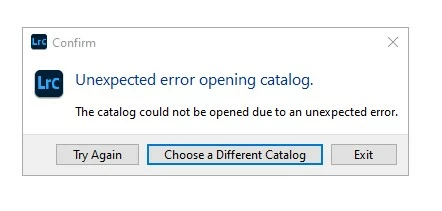
When LR starts up says catalog is corrupt, trys to do a repair fails and gives me the dialog box jpg attached.  If I try to start up LR with my other catalogs it indicates corrupt.  If I hit the Try Again button it sometimes work, or takes a couple of Try Again buttons.  If I switch catalogs without exiting to another no issue, if I switch back to catalog that was indicated corrupt on startup, no issue.   After that if I exit LR and start it up again that catalog indicates corrupt.   Only have seen issue on LR startup, switching catalogs once a catalog finally loads works fine.
This topic has been closed for replies.

2 replies

Skidoo100Author
Participating Frequently
January 14, 2024

Another thing about my system is number of disks

System disk is SSD drv C:    where windows and apps are installed

User directory is on hard drv  😧

Pictures directory is on another hard drv G:

If assumptions are made in code where files are it could be an issue.

Skidoo100Author
Participating Frequently
February 2, 2024

I have tried creating a new catalogs and catalog on different disks, use a backup catalog, it does not solve the problem.  It started with ver 13.1.  Only happens on starting up LR, never when switching catalogs once LR is running.  When I get the fail on startup the Try Again always eventially works.

I switch catalogs way more frequently than starting up LR, so if it was disk(s) it would show up on the catalog switches once LR is running.  All the catalogs do not appear to be corrupt, just LR thinks so on startup.

dj_paige
Legend
January 14, 2024

I get this message sometimes and the easiest fix is to restart the computer. Why do you say the catalog is corrupt? The word "corrupt" is not in the message you show.

Skidoo100Author
Participating Frequently
January 14, 2024

To expand on my statement above "When LR starts up says catalog is corrupt, trys to do a repair fails".  I was not able to get a screenshot of first diaglog box that says catalog is corrupt and is attemping to repair it, only the 2nd dialog box.  It happens after I reboot and everytime I start LR - after reboot or later in the day.  Have been having this issue for a couple of weeks now after update to 13.1, use LR everyday, and power off system every night.

Have uninstalled some of my plugins and so far still have the issue.

dj_paige
Legend
January 14, 2024

Ok, thanks for the information. Catalogs that are repeatedly corrupted are because you are experiencing a hard disk malfunction, and most likely the hard disk will have to be replaced. Run diagnostics on the disk. In the short run, you could try unzipping and copying a recent backup of the catalog file to a different disk and then opening it from that different disk by double-clicking on it.