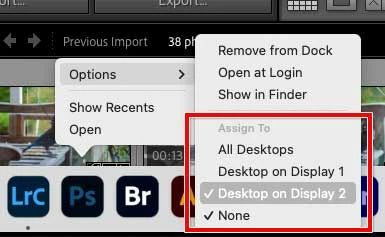
This type of feature is usually provided by the operating system, not individual applications, so you might want to see if Windows 10 has a setting somewhere that would let you do it. The picture below shows an example of what kind of feature you want to look for in Windows, if it exists — the picture is on a Mac which is what I use. In the example, when right-clicking any app icon in the Dock (the Mac equivalent of the Windows Taskbar), you can assign the display where that application will open. The picture shows Photoshop being assigned to Display 2. So see if Windows has a setting like that somewhere.
One workaround, and it’s definitely only a workaround, is to open Photoshop in advance, at the same time you open Lightroom Classic, and leave it running on the second display. That way, any images you open into Photoshop appear on that second display where Photoshop is already waiting. It’s not great, but it might help.

 AdChoices