

Opening exported keywords in Excel
LR 12.2 tweaked the Metadata > Export Keywords command to export in two formats, .csv and .txt:

The industry-standard .csv format includes all the keyword attributes (Include On Export, Export Containing Keywords, etc.), while the .txt includes just the keywords. (In prior versions, LR exported in a custom .txt format that wasn't easy to manipulate.)
In both formats, nested keywords have their names preceeded by the corresponding number of tab characters. Most text editors will display the tabs correctly:
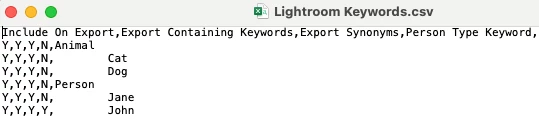
But if you open the .csv in Excel, all the indenting of nested keywords appears lost:
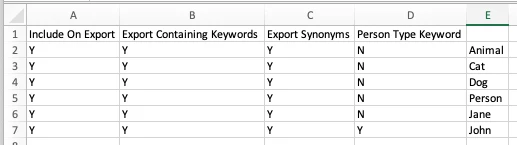
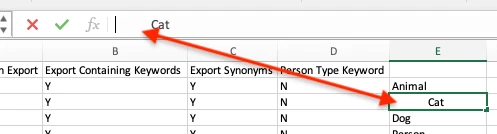
Don't panic -- Excel preserves the tabs but normally doesn't display them. If you select a cell and then click in the formula bar, you'll the tab displayed:
 AdChoices