Known Participant
September 18, 2021
Answered

Opens Folder on Export

  • September 18, 2021
  • 4 replies
  • 1346 views

When I export an image in Lightroom Classic, it opens the desitnation folder also.

Example.

When I hit Ctrl+E, my image is exported, but then LrC opens up the destination folder. Each time I export an image, it opens up that folder and if I export ten images, it will open up that folder ten different times. It's very annoying because each time I export,  have to close that folder. Please help.
This topic has been closed for replies.
Correct answer johnrellis

[This post contains formatting and embedded images that don't appear in email. View the post in your Web browser.]


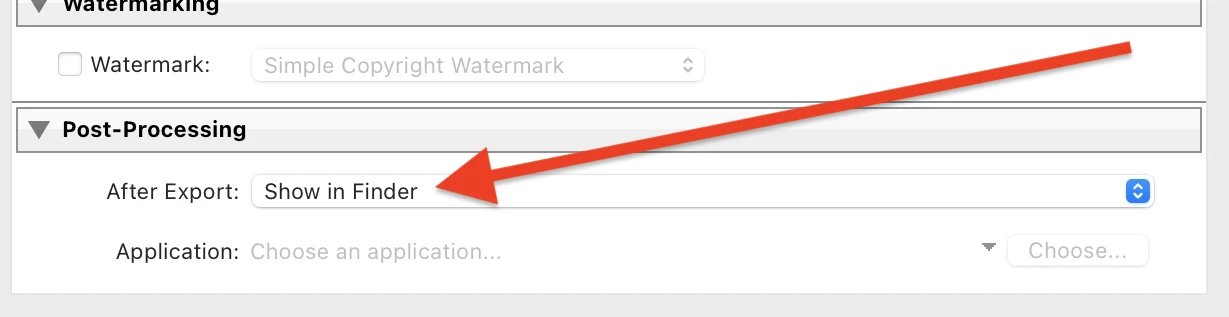
In the Export window, go to the Post-Processing section at the bottom and change After Export from Show In Finder to Do Nothing:


If you're using an Export preset, do File > Export to open the Export window, select the preset (don't check the box), change After Export, then right-click the preset and do Update With Current Settings.

4 replies

johnrellis
Legend
September 18, 2021

Moderators: Please move this to Discussions.

johnrellis
Legend
September 18, 2021

Glad it was easy to resolve.

Known Participant
September 18, 2021

Thank you so much!!!! I didn't see that selection because when the export window comes up, the box isn't set to full size. You saved me alot of drinking. That was driving me nuts. Thank you again so much. 

johnrellis
johnrellisCorrect answer
Legend
September 18, 2021

[This post contains formatting and embedded images that don't appear in email. View the post in your Web browser.]


In the Export window, go to the Post-Processing section at the bottom and change After Export from Show In Finder to Do Nothing:


If you're using an Export preset, do File > Export to open the Export window, select the preset (don't check the box), change After Export, then right-click the preset and do Update With Current Settings.