
Inspiring
January 7, 2018
Answered

Option "blancs" n'est plus présente dans réglage de base !

  • January 7, 2018
  • 2 replies
  • 573 views

Bonjour, je ne sais pas ce que j'ai fait dernièrement mais je ne suis plus capable d'ajuster les "blancs" en mode développement sur une photo, l'option n'est plus présente. Pour que cette option apparaisse, je dois faire "réinitialiser" dans le bas sur la photo. Ce n'est pas normal. De plus, certaines options sont déjà ajustées et non au centre (point neutre). C'est plutôt étrange. Qu'ai-je-fait ?!?

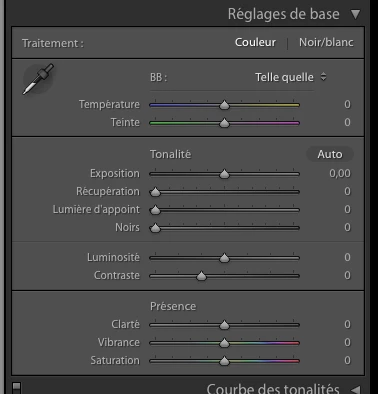
Voici de quoi le panneau de base devrait avoir l'air (a toujours été ainsi depuis que j'utilise ce produit):

Mais maintenant je vois ceci (blancs plus présent, la récupération, appoint et noirs sont toujours à gauche complètement): Si je fais réinitialiser sur la photo, là le panneau du haut revient !!!!
This topic has been closed for replies.
Correct answer patrickl32183333

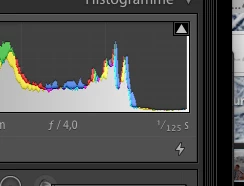
I'm still trying myself to explain this situation. I did noticed this difference: On the histogram, there is a small lightning. On the photos where I see the "white" option, it's written "processus 3" and on the photos that don't have the "white" option, it's written "processes 2". Would that explain the situation ? If yes, why is this ?

Sur l'histogramme des photos ou l'option des blancs n'est pas disponible, il y a une éclair est c'est écrit "processus 2", pour les autres, c'est mentionné "processus 3". Est-ce la raison ?

Merci, thank you


I found my answer to this question. Sorry folks. Those photos were imported by and older version of Lightroom. See the explanation here:

J'ai trouvé la réponse. Désolé du dérangement.

Where Are My Lightroom 4 or 5 Develop Controls and What's That Lightning Bolt Below the Histogram? | Laura Shoe's Lightr…

2 replies

Just Shoot Me
Legend
January 7, 2018

Check the Process you are using on those images in the Camera Calibration section.

Also are these RAW images or JPG?

Inspiring
January 7, 2018

Thanks for helping. In both cases I'm using JPG photos. As for the Camera Calibration section, nothing special there, never touch those settings in that section. As I said earlier, if I do a "reset" on those photos (the one without the white option, than everything come back normal (with white option back ans all slider in middle position).

Inspiring
January 7, 2018

I'm still trying myself to explain this situation. I did noticed this difference: On the histogram, there is a small lightning. On the photos where I see the "white" option, it's written "processus 3" and on the photos that don't have the "white" option, it's written "processes 2". Would that explain the situation ? If yes, why is this ?

Sur l'histogramme des photos ou l'option des blancs n'est pas disponible, il y a une éclair est c'est écrit "processus 2", pour les autres, c'est mentionné "processus 3". Est-ce la raison ?

Merci, thank you

Inspiring
January 7, 2018

Je viens de réaliser que j'ai ce panneau de réglage disons "plus bizarre" qu'avec certaines photos seulement. J'ai comme un gros lot de photos qui ont cette problématique. Est-ce à l'importation que j'aurais fait quelque chose d'anormale ?