
Known Participant
May 18, 2023
Answered

Option to import/sync image after export

  • May 18, 2023
  • 2 replies
  • 472 views

In the export dialog post-processing section, I would like an extra option: Import to Lightroom.

The use case driving this request is the addition of the denoise feature that creates a new dng file, which is a very large file.  If I have cropped, then I prefer to export the file as a tiff or jpg to the same folder, sync the folder and then delete the dng file.  I would like to streamline this workflow to one step: pick an export preset that does it all-in-one.
This topic has been closed for replies.
Correct answer Rikk Flohr_Photography

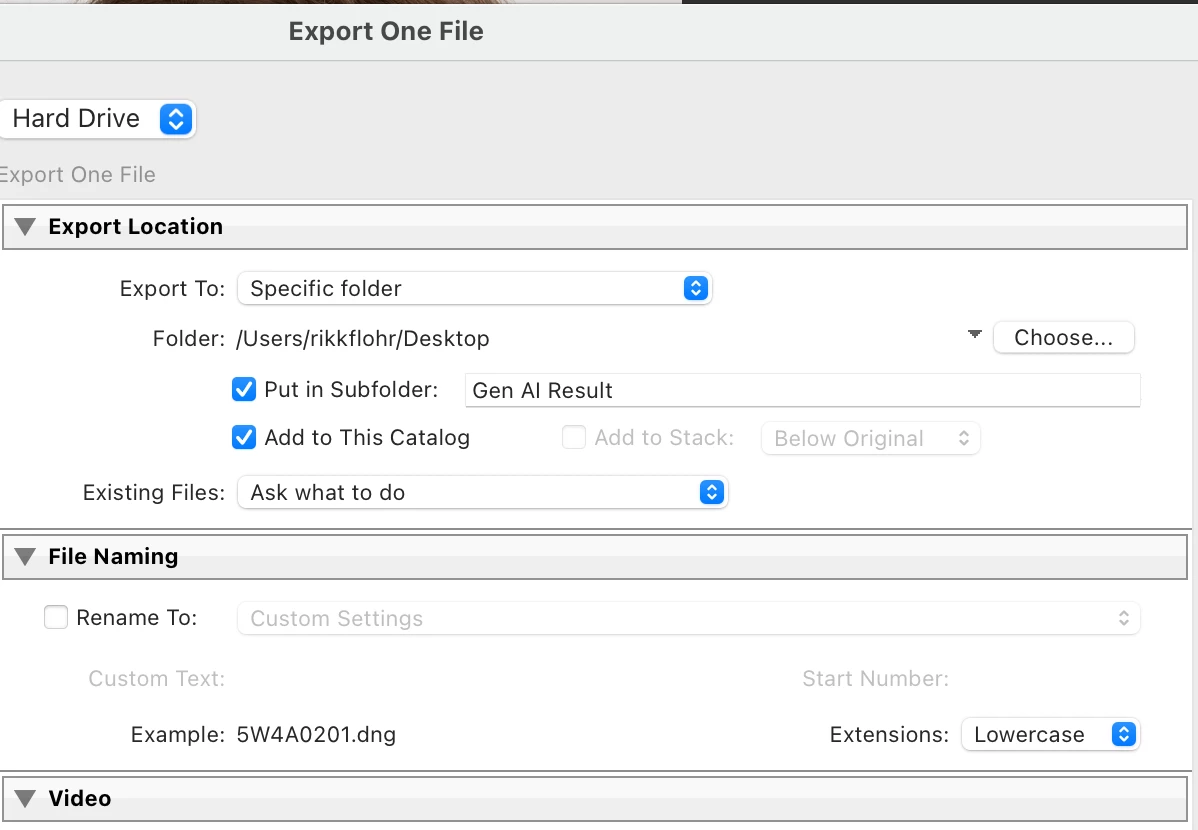
Do you mean something different than the Add to This Catalog check box in the Export dialog? It seems like that does what you want.

2 replies

Jim Wilde
Community Expert
Community Expert
May 18, 2023

And if you set it up as per this screenshot you should find the exported tiff/jpg alongside the enhanced DNG in the catalog:


Rikk Flohr_Photography
Community Manager
May 18, 2023

Do you mean something different than the Add to This Catalog check box in the Export dialog? It seems like that does what you want.

Rikk Flohr: Adobe Photography Org
hillrgAuthor
Known Participant
May 18, 2023

Thank you Rikk!!  Very much appreciated.