

Organizing LR Develop Presets: confusion on organizing
I have my LR Classic 9.2 Develop Presets in the Library > Application Support > Adobe > Camera Raw > Settings > User Presets folder. I don't understand how they are presented in the left panel in LR.
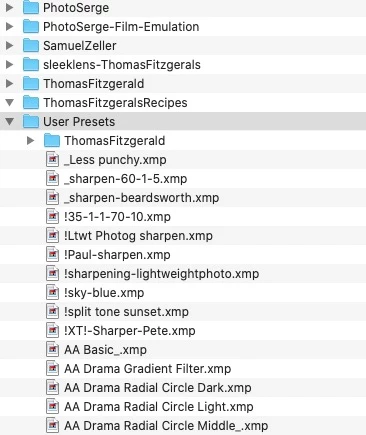
Presets that I downloaded from certain sources are in the User Presets folder. An example are the PhotoSerge presets I got from Serge Ramelli. However, even tho they are in the User Presets folder, they show up in the LR left panel nested under "PhotoSerge" and not under User Presets.
Other presets that I downloaded show up in their own unique folders in both LR and Finder.
So what I am seeing is that the folder structure in Finder doesn't reflect the structure in the Present panel in LR. Look at the attached screenshots. The "AA Drama Gradient Filter.xmp appears in User Presets in Finder but it's not under User Presets in LR (it's actually in the PhotoSerge slot).
(only talking about .xmp presets here)
Thanks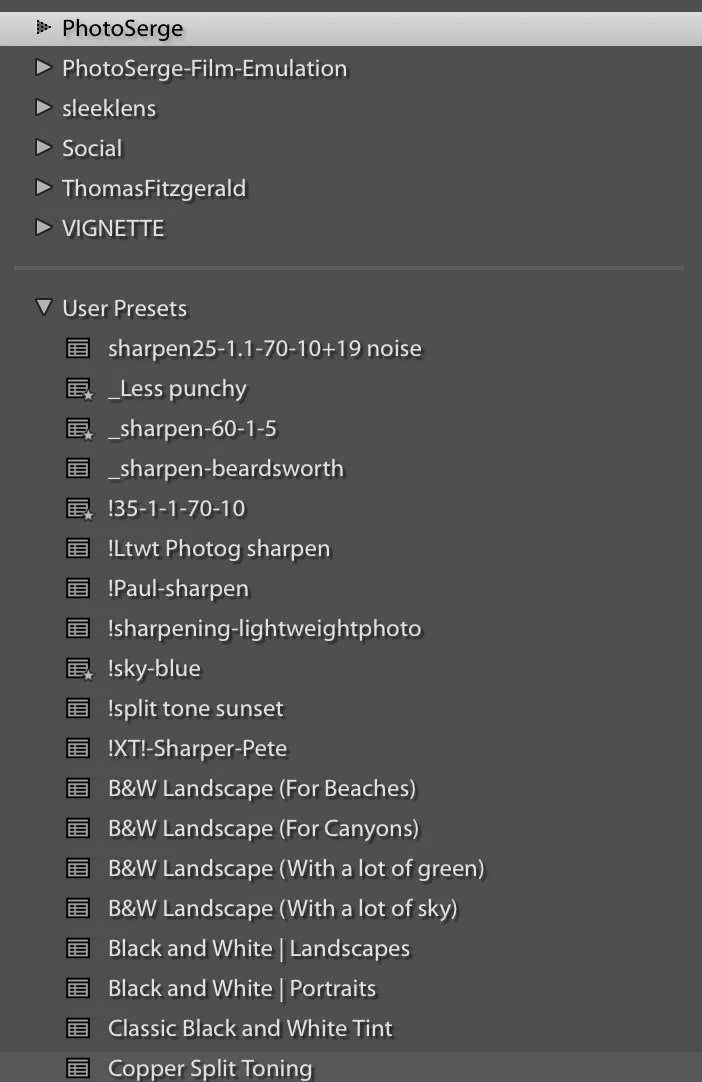
 AdChoices