Participating Frequently
September 1, 2026
Answered

P: Allow a wider Folder pane in Grid view, so to fit longer folders names

  • September 1, 2026
  • 4 replies
  • 49 views

Hello Adobe Team

In order to manage and see folders with more clarity and sense of order, I use long folder names. It would be nice to have a wider folder pane in Lr too, to reflect the same sense of order.

Sometimes I use colours to mark both files and folders. Please add more colour tags in Lr, at least to reflect those in Finder, and mirror them in finder as well. Also, please add an option to colour the folder itself in Lr, in place of the vertical bar at the end of the folder name line.

Thank you.
Marco

    Correct answer JohanElzenga

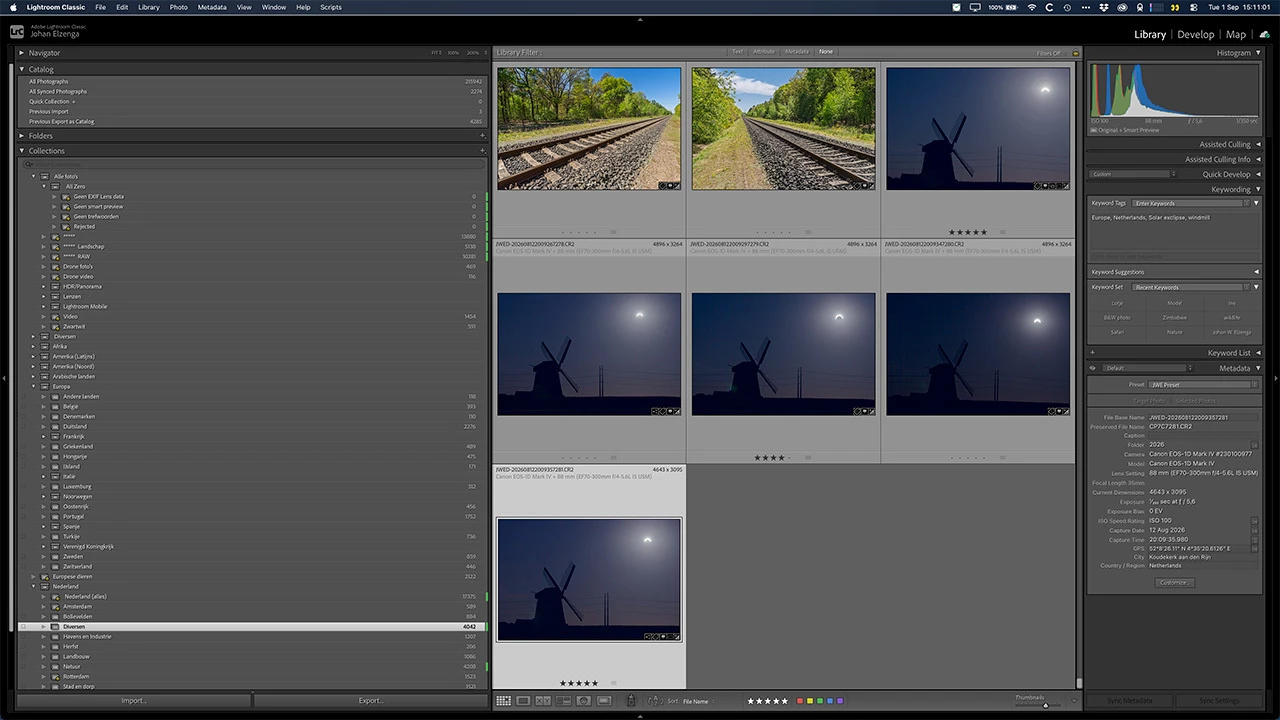
    As you are on a Mac, you’re in luck. You can already widen the panels beyond the standard maximum. Hold down the Option key while you drag on the side of the right (or left) panel.


    Wide enough for you? :-)


    4 replies

    johnrellis
    Legend
    September 1, 2026

    For future readers, you can increase the maximum width of the side panels on Windows with a simple edit to TranslatedStrings.txt:

    https://community.adobe.com/bug-reports-674/p-alt-drag-on-windows-doesn-t-expand-library-panels-like-opt-drag-on-mac-663694?postid=7154331#post7154331

    JohanElzenga
    Community Expert
    JohanElzengaCommunity ExpertCorrect answer
    Community Expert
    September 1, 2026

    As you are on a Mac, you’re in luck. You can already widen the panels beyond the standard maximum. Hold down the Option key while you drag on the side of the right (or left) panel.


    Wide enough for you? :-)


    -- Johan W. Elzenga
    Califdan2
    Inspiring
    September 1, 2026

    For Windows there is (was?) a registry hack that allowed the same thing.  I don’t know if that hack still works.