


Known Participant
March 11, 2025
Answered

P: Cannot use development module because licence is not realized

  • March 11, 2025
  • 5 replies
  • 3548 views

Hello,

i cannot use Lightroom Classic dev module. I tried everything but it's not possible to get it working.


Error message in LR Classic (german):

And in my account is shows that abo is valid until 01.03.2026.
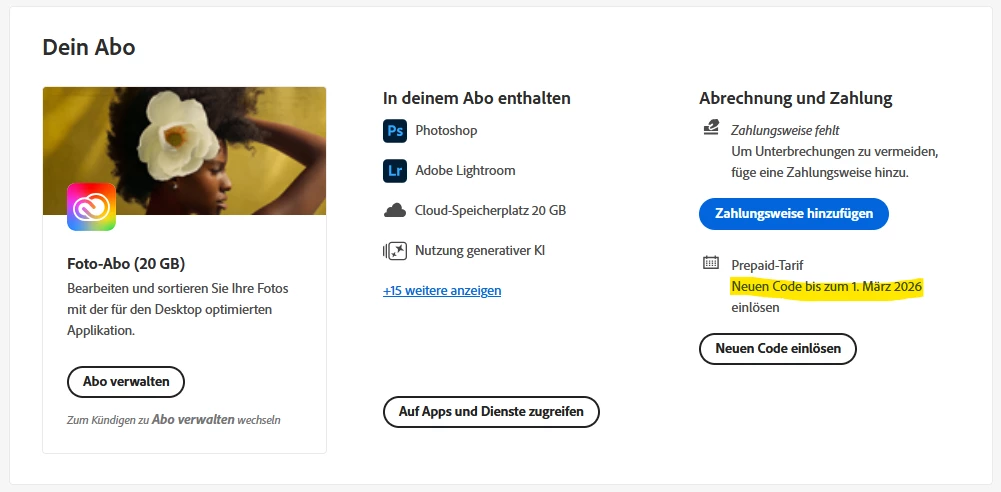
 

How to get it working again?

Br

Christian

Correct answer Rikk Flohr_Photography

That is good news. You can let support know that the issue was resolved on the Server. 

I haven't been informed yet of the Root Cause. They just asked me to verify you were working. 

5 replies

Rikk Flohr_Photography
Community Manager
March 17, 2025

@Christian329245056usg 

Is your issue resolved now? Can you confirm?


Rikk Flohr: Adobe Photography Org
Known Participant
March 17, 2025

YES ...... IT'S NOW WORKING AGAIN. :-))))))


All the "locked icon" are removed and lightroom can be used again.

Problem is solved now! Many thanks Rikk for your help!


What was the issue on the server side?

Rikk Flohr_Photography
Community Manager
March 17, 2025

That is good news. You can let support know that the issue was resolved on the Server. 

I haven't been informed yet of the Root Cause. They just asked me to verify you were working. 

Rikk Flohr: Adobe Photography Org
Rikk Flohr_Photography
Community Manager
March 17, 2025

The team is requesting additional information:


"Also, please confirm if the customer had used any redemption code to get the credit period for the current term."

Rikk Flohr: Adobe Photography Org
Known Participant
March 17, 2025

Thank you Rikk for checking this and coming back to me. 🙂

I have escalated my case on friday last week and Adobe chat support wanted to come back to me in next 24h, but now it's 3 days later without any feedback. Information from today is that i need to be patient and wait another 5-7 working days for an answer. Team is working on the case. Almost 3 weeks not beeing able now to use the apps included in the abo which i was paying for. I really do not understand why it's so difficult to solve such problem instead of endless forwarding from one expert to another expert (~20 forwardings at least, if not more). There was also somebody remotely checking the issue. Everything the expert was checking i have provided as screenshot before. How crazy is this? Level of frustriation is already on very high level. 😉


Regarding additional information required. I bought online code from large germany online shop and entered the code in Adobe account. See screenshot. Code was accepted successfully and abo shows valid until 01.03.2026. But installed apps still show no licence available.

Rikk Flohr_Photography
Community Manager
March 17, 2025

Thank you for the additional information. I've forwarded your code details to the investigating team. 

Rikk Flohr: Adobe Photography Org
Rikk Flohr_Photography
Community Manager
March 17, 2025

I've checked with the team this morning and do not yet have an answer. As soon as I do, I will post it in this thread. Until then, I would like to ask for your patience. 

Thank you!

Rikk Flohr: Adobe Photography Org
GoldingD
Legend
March 12, 2025
At least when i login now with Chrome (instead of Firefox)

Their is at least two members who apparently launch LrC via CC on the web, via an Internet Browser. 

Are you attempting by that route?

The install of the Adobe Creative Cloud Desktop App should have created a shortcut icon for that app. And using that app to install the creative apps like LrC should have created shortcuts for those as well. Most members use those shortcuts to start LrC, PS, etc. Have you tried that? Some issue might be currently occurring at Adobe for the via Internet Browser method.


Known Participant
March 12, 2025

Sure, i have also tried to start LrC via shortcut on desktop but the problem is the same.

How to get help from Adobe? They are only available at daytime when i am working.

For payed SW there must be possibility to create a ticket, but where?

GoldingD
Legend
March 12, 2025

Contact Adobe. This via a Chat. Before doing so, prepare your notes and information ahead of time as to be more efficient in communicating. Your info that you have posted in your Discussion is a start for the description, and probably have a copy of your LrC /Help/System Info/ as a text document on hand, so that you can paste or attach that into the chat. 


To accomplish the Chat, bring up an Adobe webpage, and click on the Chat button. (see image below) This will start a Chat. At first the Chat will be with a chatbot, Typing “Agent” into the chat text field will bypass the initial chatbot. If an agent does not enter the chat then be assertive in requesting an actual Adobe Tech join in the chat.


In the Chat include (as mentioned above) a description of the issue, and probably your System Info. And include a link to your discussion.


You may want to ask for a phone call.


And please keep notes so that you can share them in your post for others to see.


For example, bring up:

https://helpx.adobe.com/contact.html


and click on the Chat button, typically found in bottom right corner


If you'd rather get phone support, visit this page: https://adobe.ly/40m5tXo.


Scroll down to the "Contact Us" section and click "Start Now." Then, click the three dots in the chat window and select "More contact options."


kglad
Community Expert
Community Expert
March 11, 2025

start here - https://helpx.adobe.com/manage-account/kb/stop-creative-cloud-trial-mode-after-purchase.html


if that fails, proceed to these steps - https://helpx.adobe.com/enterprise/kb/resolve-trial-and-license-expired-errors.html


if that fails, https://helpx.adobe.com/download-install/kb/adobe-license-issues-keychain-credential-mgr.html


if those all fail, change your cc language.  eg, try international english


if that fails, change the install location


Known Participant
March 11, 2025

Tried all this but it's still not working. At least when i login now with Chrome (instead of Firefox) then i can see in the overview all the apps included in my abo. But when i click on the LR Classic icon from there it's exactly the same problem.

I have spend now more then 2h, it's very frustrating. How is it possible to open a ticket to get support from Adobe?