


Participating Frequently
June 13, 2024
Question

P: Color artifacts in JPEG XL ProPhoto RGB

  • June 13, 2024
  • 14 replies
  • 10035 views

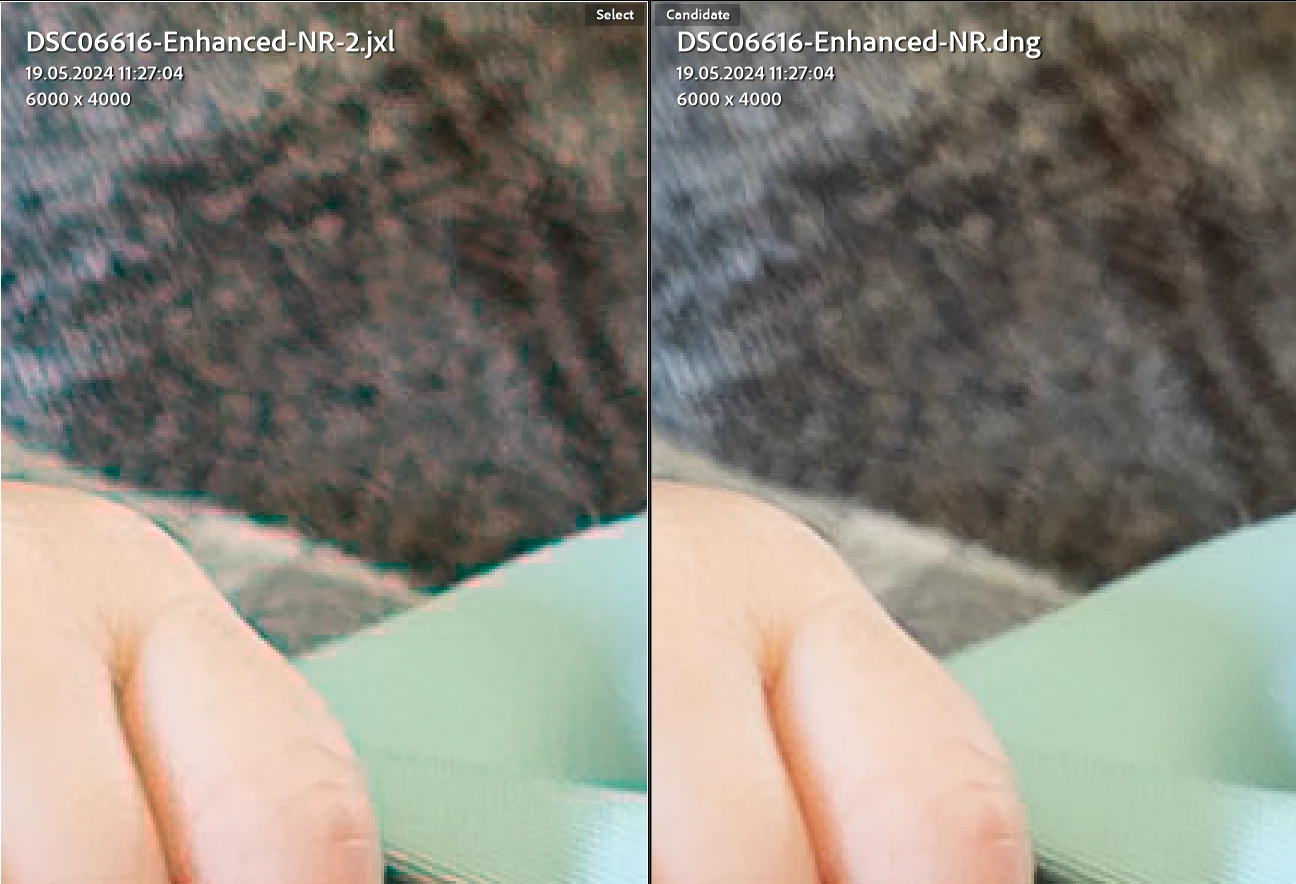
JPEG XL files with the ProPhoro RGB color space exported from Lightroom contain color compression artifacts. They appear in quality 100% and lower. Other color spaces do not have this problem.
 

Lightroom version 13.3.1

Windows 11 23H2 version 22631.3593

14 replies

apf102
Known Participant
September 23, 2024

Thanks. Have replied on the other forum too.


RE the bug. I can make the artefacts appear if I export to JXL in Rec2020 16bit with quality set to 100%. It is only the uncompressed exports which seem to be fine. 8 bit also fine.

apf102
Known Participant
September 23, 2024

Weird artefacts with jpeg xl exports + advice on best export format

expectated behaviour - high quality jxl file

actual behaviour - file has blocky artefacts and weird colour shifts

Lr Classic  13.5.1 in Win 11 and Lr 9.5.1 on iPad 


Hi. Two quick questions.

1) Does anyone know why I am getting these weird red artefacts on my Jxl exports? This is viewed on Lr Cc on my iPad. Original file was a NEF of a film negative. It was converted in negative lab pro. You can see the NEF displays fine. If I export from the NEF to a jxl I get similar red artefacts, though less pronounced. Other formats are fine. The jxl settings were 16bit compressed at 100% quality in ProPhoto colour space from LR Classic on Pc.

2) this is a workflow question. I tend to import and convert film negatives in Lightroom Classic, but for various reasons I like to edit on my iPad. This means the best workflow is to create a positive image for editing on iPad and getting rid of the raw (I have the negative so no biggy). I had been exporting to sRGB JPEG but was getting weird results when printing and of course you lose a load of depth.. Tiffs are way too large to use. The plan was to use 16bit jxl maybe with ProPhoto colour space, which seems to be about 25mb, but am getting the issue described above.

Any ideas much welcomed!

johnrellis
Legend
September 23, 2024

Re the workflow question, see my suggestion for syncing the NEFs with LR Cloud and then LR Mobile on the Ipad:

https://www.lightroomqueen.com/community/threads/workflow-issues-with-jxl-and-lightroom-classic.51142/#post-1340444

johnrellis
Legend
September 23, 2024

Re color artifacts in JPEG XL ProPhoto RGB exports, Adobe has acknowledged this bug:

https://community.adobe.com/t5/lightroom-classic-bugs/p-color-artifacts-in-jpeg-xl-prophoto-rgb/idi-p/14678954


The color spaces Display P3 and Rec 2020 don't appear to have the problem.

Rick Spaulding -
Legend
June 27, 2024


Update:  Recommendations:

  • If using lossy compression, prefer using JXL-native color spaces such as sRGB, Display P3, or Rec 2020.
  • If you must use non-native color spaces such as Adobe RGB or ProPhoto, consider using Lossless (quality 13).
Known Participant
January 19, 2025

I'm seeing artifacts I've not seen before when exporting in the JPEG XL lossy format. (90%) quality)

These a red blocks (I think 8x8 pixels size) around a strong blue colored bird. 
See areas indicated by yellow areas on the picture below.
I compared it to TIFF and JPEG (90%) of identical of identical size (pixels), both are looking fine.
Increasing the JPEG XL quality to 100% doesn't solve it. Going to Lossless does.

When I started using JPEG XL, I have evaluated it and saw superior quality compared to JPEG of similar file size. These artifacts are new to me.

I'm using LR 14.1.1, Windows 11 computer.
See attached picture at 300% for easy vieweing. Unfortunately the artifacts are visible at 100% too.

Is this normal for JPEG XL? Have I overlooked it in the past? Is the contents of my picture so specific and causing this? is it a bug ? Are a few of the questions I have.
Can share the DNG file if you like.


johnrellis
Legend
January 20, 2025

Looks like a bug to me.  


As a test, try setting Preferences > Performance > Use Graphics Processor to Off. Do the artifacts occur?  If so, try updating your graphics driver by going directly to the manufacturer's web site:
https://helpx.adobe.com/lightroom-classic/kb/troubleshoot-gpu.html#solution-4

If that doesn't help, please copy/paste here the entire contents of the LR menu command Help > System Info -- that will let us see exactly which versions of hardware and software LR thinks you're running.

johnrellis
Legend
June 14, 2024

I see similar artifacts when exporting to JXL with these options in LR 13.3.1 / Mac OS 14.5:


Prophoto, 100%, 16 bits/component

Adobe RGB, 100%, 16 bits/component


I don't see the artifacts with these options:


Display P3, 100%, 16 bits/component

Rec 2020, 100%, 16 bits/component

Prophoto, Lossless, 16 bits/component 


You can download the original DNG and exported JXLs from here -- the files are perspicuously named:

https://www.dropbox.com/s/93agakaa94zsns6/export-jxl-artifacts.2024-06-13.zip?dl=0


johnrellis
Legend
June 14, 2024

@Rikk Flohr: Photography@Rick Spaulding -, please consider moving to bugs. I've uploaded a sample file that exhibits the problem (see above).