


Known Participant
April 24, 2026
Question

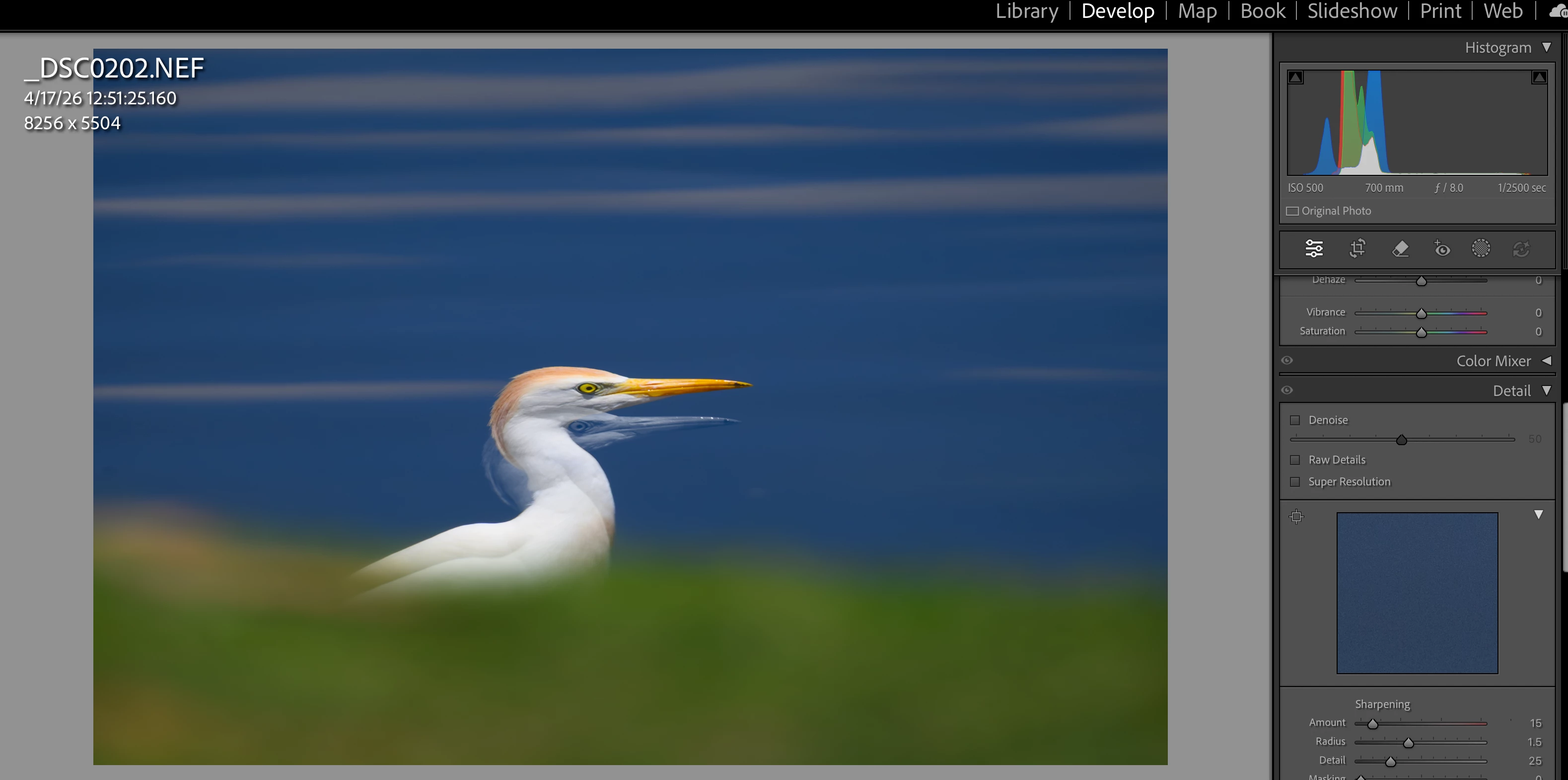
P: Develop module loupe view is showing a double exposure with the previously edited photo.
  • April 24, 2026
  • 7 replies
  • 160 views

I edit a photo, go back to Library grid, open another file for editing, when I enter Develop module loupe view what appears to be a double exposure appears. Problem is resolved by quitting LR and reopening, but returns after a few additional edits. Mac M2 Mini with Graphics Processor ON; Sequoia 15.6.1

 

    7 replies

    Known Participant
    May 16, 2026

    As far as the visual similarity to the “using the arrow keys” issue, you can find the answer to that question by comparing the image(s) in that thread with the ones I posted here. It’s simply a superimposition of the previously edit photo with a reduced-opacity photo that I’m trying to edit. 

    Known Participant
    May 14, 2026

    Hi Anshul, Thank you.
    I use multiple displays, but in practice, 99% of the time I use only one for LR. As I mentioned, if I do open the image in the second display, it displays as intended (ie, without the double exposure).
    Steps:
    After editing dozens of images (no consistency here that I can tell), I go to edit a new image: open in Develop module, and the image displays with the most recent previously edited image overlaying an opacity-reduced intended image. The superimposed image is distorted (I assume cropping has to do with this)

    Toggling GPU has no effect--the issue persists regardless.
    I tried a new catalog with a few images, but since this problem usually takes many edits to appear, it’s not efficient to try and replicate the issue with a test catalog.
    I’m afraid showing a screen recording from the point of opening the catalog sort of requires a crystal ball to predict when the issue will appear.
     

    The previously edited image
    ​​​​​​
    The new, intended image to edit in Library Loupe mode
    The problem image, appearing when I open the intended image in the Develop module.


    Lightroom Classic version: 15.3 [ 202604090947-8f3672ed ]
    License: Creative Cloud
    Language setting: en-US
    Operating system: Mac OS 15
    Version: 15.6.1 [24G90]
    Application architecture: arm64
    Logical processor count: 10
    Processor speed: NA
    SqLite Version: 3.36.0
    Adobe GSDK Version: 1.4.0.213

    Built-in memory: 16,384.0 MB
    Dedicated GPU memory used by Lightroom: 8,589.9MB / 10,922.6MB (78%)
    Real memory available to Lightroom: 16,384.0 MB
    Real memory used by Lightroom: 1,519.8 MB (9.2%)
    Virtual memory used by Lightroom: 433,054.5 MB
    Memory cache size: 427.6MB
    Internal Camera Raw version: 18.3 [ 2527 ]
    Maximum thread count used by Camera Raw: 5
    Camera Raw SIMD optimization: SSE2
    Camera Raw virtual memory: 3657MB / 8191MB (44%)
    Camera Raw real memory: 3837MB / 16384MB (23%)

    Cache1: 
    Final1- RAM:638.0MB, VRAM:984.0MB, _DSC9206.NEF
    Final2- RAM:698.0MB, VRAM:4,157.0MB, _DSC9287.NEF
    NT- RAM:1,336.0MB, VRAM:5,141.0MB, Combined:6,477.0MB

    Cache2: 
    m:427.6MB, n:704.3MB

    U-main: 325.0MB

    Standard Preview Size: 1024 pixels
    Displays: 1) 3840x2160, 2) 1920x1080

    Graphics Processor Info: 
    Metal: Apple M2 Pro
    Init State: GPU for Export supported by default
    User Preference: Auto
    Enable HDR in Library: OFF
    GPU for Preview Generation: Auto (S5_10)

    Application folder: /Applications/Adobe Lightroom Classic
    Library Path: /Volumes/A-SN770Black-2TB-A/Lightroom_Catalogs_External/JEP_Master_Catalog-v14-2/JEP_Master_Catalog-v14-2.lrcat
    Settings Folder: /Users/jimemery/Library/Application Support/Adobe/Lightroom

    Installed Plugins: 
    1) Any Filter
    2) Aurora HDR
    3) Excire Search
    4) Find Duplicates 2
    5) jb: Folder Size
    6) jb: Search+Replace
    7) jb: Syncomatic
    8) jf Metadata Presets
    9) Teekesselchen

    Config.lua flags: 

    Anshul_Saini
    Community Manager
    Community Manager
    May 15, 2026

    @jime40615875, thanks for the detailed follow-up. I appreciate the clarification regarding screen recording. Since the issue is intermittent and not easily reproducible on demand, I understand why continuously recording the full workflow isn’t very practical.


    One more thing, could you please check whether the issue discussed here for Lightroom Desktop (cloud version) looks visually similar to what you’re seeing:


    If so, that’s useful, as the product team is already investigating a similar issue.

    If your issue differs from that one, engineering will likely need exact reproducible steps and a reliable trigger pattern, since they’re currently unable to reproduce this behavior internally in Lightroom Classic.

    At the moment, I don’t have additional troubleshooting steps beyond what has already been tested.

    Thanks again for taking the time to document this.

    Best,
    Anshul Saini

    Anshul_Saini
    Community Manager
    Community Manager
    May 4, 2026

    Hi ​@PhatsPhoto ​@jime40615875,

    Thanks for reaching out and reporting this. Since this isn’t reproducible on our end and the behavior (ghost/double exposure in Develop but not Secondary Display) is quite specific, we’ll need a bit more detail to take this forward properly. Could you please help with the following:

    • Share your full System Info

    • Lightroom Classic > Help > System Info
    • Click Copy and paste it here

    • Confirm your exact setup

    • Are you using multiple displays or just one?
    • If multiple, does it always happen on the primary display only?

    • Help us with reproducible steps

    • Exact sequence (e.g., Edit photo A > go to Grid > open photo B > switch to Develop, etc.)
    • Does it happen with specific images or randomly?

    • Quick checks

    • Does toggling GPU OFF (Preferences > Performance) change the behavior?
    • Does it still happen in a new catalog with a few test images?

    Also, please share a screen recording of your entire workflow, starting from launching Lightroom and showing the transition from Library to Develop when the issue occurs?

    Once we have this, we can escalate it internally with clear repro steps.

    Best regards,
    Anshul Saini

    Known Participant
    May 5, 2026

    Appreciate your interest, Anshul. Of course, after many instances, I haven’t experienced the issue in recent days. Once it recurs I’ll provide the details. Thanks again. 
    jim

    Participant
    May 3, 2026

    I am currently experiencing this issue.  I can’t find any unusual settings that could be causing it, but there is one image that it is blending with everything else in particular.

    I would really like to figure out if this is a glitch or a feature, as I can see a lot of potential if this is something that I do do with intention.

    Ian Lyons
    Community Expert
    Community Expert
    May 3, 2026

    Please, post the LrC System Info. You can obtain this from the LrC Help > System Info menu item. Use the Copy button at top right corner of System Info dialog to capture the info, then paste into your reply.

    Rikk Flohr_Photography
    Community Manager
    April 27, 2026

    Greetings all, 


    The team is having difficulty reproducing this issue. If anyone on this thread has precise, step-by-step instructions for reproducing this failure, please post them. 

    Thanks!

    Rikk Flohr: Adobe Photography Org
    Known Participant
    April 27, 2026

    Anybody else have this issue?

    Ian Lyons
    Community Expert
    Community Expert
    April 24, 2026

    Have you tried resetting the LrC preferences?


    Details on how to can be found in the following Adobe help document.


    https://helpx.adobe.com/lightroom-classic/help/reset-preferences.html

    Known Participant
    April 25, 2026

    Thanks Ian. Well, yes...and then replaced with prefs from several days ago (using new prefs was adding too much work for that moment in time). For now things have settled down and I have not seen the problem return with the new (old) prefs.

    Known Participant
    April 25, 2026

    The problem persists. It’s gonna take me a minute to preserve my settings and plugins before I can really tackle it.
    NOTE: If I open the image in Secondary Display it shows the one pure image I’m trying to edit.


    Primary Display:


    Secondary Display: