


Participant
October 13, 2023
Question

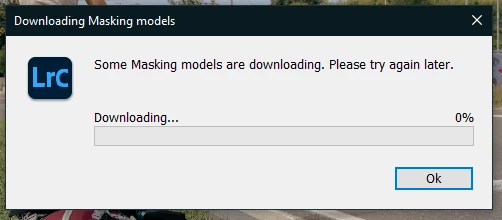
P: error : "Some masking models are downloading. Please try again later"

  • October 13, 2023
  • 12 replies
  • 129355 views

So, when I try to apply a preset, the preview works, but when I click on it, I got this message, with a downloading bar stuck at 0%

I've tried to reinitialize preferences, but nothing changes (I just lost my presets).


Never had this problem before

I'm using LRC v13.0, on a win10 64bits PC
 

12 replies

Participant
October 29, 2023

You must login with your Adobe account. So you can download it.

Known Participant
November 3, 2024

Log in where, please? Creative Cloud app, adobe.com, somewhere else? and how do you download? Where do you initiate a download? Thanks!

Known Participant
November 3, 2024

the suggestion is to sign in to your account through your creative cloud application and then relaunch LRC. try it, didn't work for me. the presets still don't work and my saved presets don't work either. still get the message:  some masking models failed to download. please try again later. this as well as the failed cut/paste settings bug is still persistent as i think you also have encountered.

Rikk Flohr_Photography
Community Manager
October 13, 2023

Restarting Lightroom Classic should start the download again. 

Lightroom Classic now downloads and installs in two parts. First, the application installs, and then it installs the various AI models after the first launch. The models, as a group, are large, so it can take some time. 

Since you are using Windows, I would recommend installing the 13.0.1 build released earlier today as it has several bug fixes and should kickstart your Model download. 


Rikk Flohr: Adobe Photography Org
Participant
October 13, 2023

Thanks, I will check that !

Participant
October 15, 2023

did it work for you , becuase i updated to 13.0.1 and still same problem 😞