

Tim.Takes.Pix
Participant
March 15, 2024
Question

P: Error writing metadata warning has appeared for many of my photos in Lightroom Classic

  • March 15, 2024
  • 7 replies
  • 1734 views

Hi! Kind of a noob here, so please bear with me.


Problem:

Today, while working in Lightroom Classic, I noticed that a bunch of my photos had an exclamation point icon added to them. See the image below.
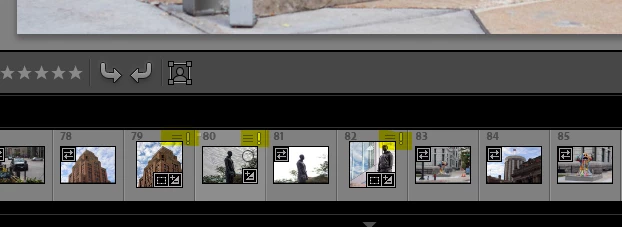
When I hover over the icon, it says "Error writing metadata" (pretty scary)

Clicking the icon opens the window below.
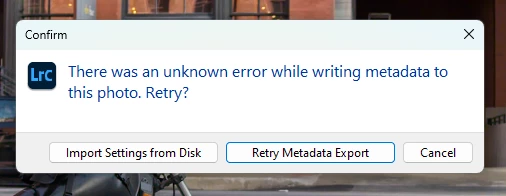
When I click "Import Setting from Disk" my adjustments seem to be cleared away (not great, lol).


When I click "Retry Metadata Export" that seems to fix the issue. The only problem is that there are thousands of photos that display that icon.


At first, I thought the issue was isolated to photos that I had made edits on, but upon further investigation, it seems that that is not the case.


Personal Investigation I'd Done:

Naturally, I googled the issue but haven't found any definitive answers.

  1. In this thread, someone with a similar issue (I think) is told by @JohanElzenga  that this is a non-issue, Adobe is aware and working on a fix, and people need to just sit tight. Should I also sit tight?
  2.  This thread from 2011 has a couple of scary posts. Is my hard drive failing?!?!
  3.  This thread seems to think there is an issue with a special character.


Questions:

  1.  Should I just accept the exclamation point icons and wait for a fix?
  2.  Is clicking "Retry metadata export" a viable fix for the time being?
  3.  I just got a new Mac and need to migrate my catalog to the new computer. Can I/ should I proceed with that migration following the steps outlined here?


System details:

Lightroom Classic version: 13.2 

Operating System: Windows 11 Home Version 23H2

Processor: Intel i7-8550U

RAM: 16GB

Photo Storage: My RAW files are stored on a 500GB SanDisk external SSD 

7 replies

Legend
January 28, 2026

@Tim.Takes.Pix 


That icon means there is metadata that is ready to be written to an XMP sidecar file. If, like myself, you don’t use XMP sidecar files, then take no notice of it. If you do use XMP sidecar files (want your edits and metadata to be read by Lightroom or Camera Raw), then choose Save changes to disk. If that is failing, I’m not sure that it is a problem with LrC because I have no experience of it. If you choose Import Settings from File, this reads the XMP sidecar file and replaces your edits/metadata (if there is no XMP file, it wipes (Resets) what you had).


Participant
January 27, 2026

I was having this issue when I bought a new computer and opened a copy my existing catalog from the new computer. 


The Save Metadata method wasn’t working for me.  Lightroom would just start the process and then stay at 0%.


The way I fixed the issue was to make a copy of the latest catalog backup folder.

For example I copied the folder named “2026-01-26 2236” as “2026-01-26 2236 Copy”.

Then I loaded the lrcat from the “2026-01-26 2236 Copy” folder as my catalog.


This seems to have worked for me.

I don’t see the exclamation marks any longer.

So far seems to be working as expected.

Participant
November 2, 2025

Same problem for me after a catalog update.

I solved it by updating the metadata.


I think the best way is to right-click on the folder to save all the metadata for the photos in the folder :


By selecting a set of files :


Or, file by file, it works, but it's clearly not the fastest way.

Participant
January 7, 2025

What's the latest with Adobe correcting this issue?  It just started happening to photographs on 1 of my external drives.  The other 2 drives are not affected at this time.  Thank you.

janets123456
Participant
January 7, 2025
I've received no help and still have the same problem.
logifreyr
Participant
August 10, 2024

Same problem

JohanElzenga
Community Expert
Community Expert
August 10, 2024

Few people seem to know this, but instead of posting a "Me too" message in a thread, you should click the voting button at the top left. 


-- Johan W. Elzenga
janets123456
Participant
July 16, 2024

I am having the same problem.  This started showing up several months ago.  I click on the Retry Metadata Export which fixes the problem but this shouldn't be happening.  Adobe doesn't seem to be rectifying the problem,

JohanElzenga
Community Expert
Community Expert
March 15, 2024

This is a known issue. Ignore the warning icons and wait for a fix.


-- Johan W. Elzenga
Participant
May 9, 2024

I have the same issue but it didn't start until I transferred my files to a new computer.