


Participating Frequently
October 15, 2023
Answered

P: Finder and Explorer do not yet support recent DNG thumbnails.

  • October 15, 2023
  • 5 replies
  • 1710 views

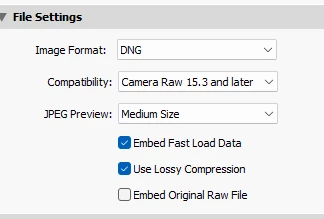
Lasted Lightroom classic V13 Export with "Lossy" lead to corrupted Thumbnail.
With camera raw 15.3 selected will lead to corrupted Thumbnail and Data Header.

With cemera raw 14 select will work like it always do on any version.
 

This topic has been closed for replies.
Correct answer Rikk Flohr_Photography

This report to happen with many of my photographer friend too.
The intruction above are correct and can replicate everytime.
Fresh OS install are also affect except if you using MacOS14


Mac and Windows do not currently support the later DNG Spec you are using to create your DNGs. This will require updates from Apple and Microsoft. 

5 replies

jamiesondean
Participating Frequently
December 4, 2023

I believe Adobe has changed the compression for the most recent version of DNG spec 15.3 compressed DNG. I've noticed that the file sizes are now under half the size of the same files using v14. I've also noticed that they no longer appear to add noise/grain to the files... I wonder if Adobe went from using JPEG compression to a high efficiency format for the newest compressed dng spec? 

Participating Frequently
October 24, 2023

Exporing raw files to dng in the new updated Camera Raw 16 doesnt show preivews of images on the files, and only shows the standard file format image. This is only an issue when setting compatibility to Camera Raw 15.3. Exporting with Camera Raw 14 doesn't give this problem. This is just after updating to the new Camera Raw 16 today. 


Mac OS Ventura

MacBook Pro / Appel M2 Max (64g)

Photoshop 2024

Rikk Flohr_Photography
Community Manager
Community Manager
October 16, 2023

I am unable to replicate this problem using the instructions supplied. 


In what application are you viewing the DNG that shows it is corrupted? Can you provide a file and/or a screenshot?

Rikk Flohr: Adobe Photography Org
Participating Frequently
October 16, 2023

Dear Rikk,
The First picture show after Export with "Lossy" and Camera raw 15.3


The Second picture show after Export with "Lossy" and Camera raw 14 (It ALWAYS work like this before)


Both are on Microsoft Windows 11 Explorer View and MacOS 13 on Both Thumnail and Open to view

After update MacOS14 the Thumbnail are show and openable, MSWindows are on lasted update


Participating Frequently
October 16, 2023

This report to happen with many of my photographer friend too.
The intruction above are correct and can replicate everytime.
Fresh OS install are also affect except if you using MacOS14

Participating Frequently
October 16, 2023

Not sure why this was move out from "Bug" to "Discussions"


Participating Frequently
October 15, 2023

Issue: 

  • Lightroom Version Number: 13.0.1
  • OS Version Number: Windows 11 22H2


Steps to reproduce:

  1. Import from Camera
  2. Export with DNG
  3. Use setting from Above picture attach

Expected result: DNG file with Thumbnail
Actual result: DNG File with corrupted Thumbnail
