
Known Participant
December 13, 2022
Answered

P: Moving to next image in Library

  • December 13, 2022
  • 3 replies
  • 1701 views

Before the latest update, when in Library, I could rate a picture with either a number or a flag, and it would automatically move to the next image. Now it doesn't do that: it just stays on that image. How can I geet Library to go to the next image when I'm rating images?
This topic has been closed for replies.
Correct answer Ian Lyons

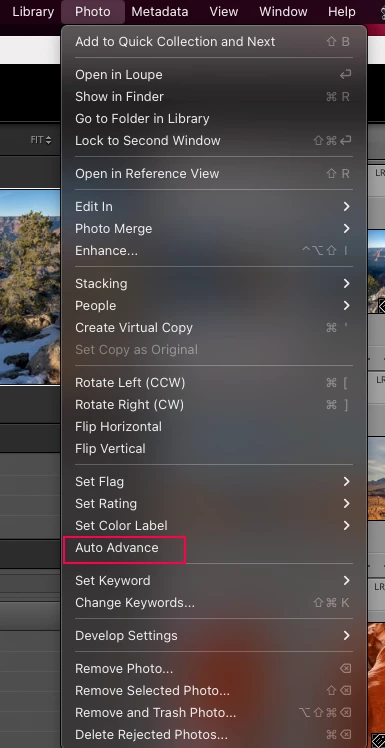
Have you enabled Auto Advance from Library module Photo menu as shown in below screenshot. This setting is working fine on the two Macs I've just checked on, but Caps Lock isn't.


3 replies

Ian Lyons
Community Expert
Ian LyonsCommunity ExpertCorrect answer
Community Expert
December 13, 2022

Have you enabled Auto Advance from Library module Photo menu as shown in below screenshot. This setting is working fine on the two Macs I've just checked on, but Caps Lock isn't.


C.Cella
Legend
December 13, 2022

@Ian Lyons 


"Caps Lock" is working for me on my Mac 🧐🧐


.

Ian Lyons
Community Expert
Community Expert
December 13, 2022

'Caps Lock' is not working on my MacBook Pro M1 Pro or Mac Studio M1 Ulra. So two different Macs and two different keyboards.

Conrad_C
Community Expert
Community Expert
December 13, 2022

In the Library module, check the setting for the Photo > Auto Advance command. If it is disabled, enable it.

Caps Lock is a shortcut for that command.


C.Cella
Legend
December 13, 2022

@craigst 


Use "Caps Lock".

LrC will switch to the next photo after applying a flag/star/label.