

johnrellis
Legend
May 20, 2024
Question

P: Raw defaults aren't applied to a Denoise DNG when imported

  • May 20, 2024
  • 4 replies
  • 756 views

Raw defaults aren't applied to a Denoise DNG when the DNG is imported. To reproduce in LR 13.2 / Mac OS:


1. Download, unzip, and open this small catalog in LR:

https://www.dropbox.com/s/ewd4kyct5pqw4t9/raw-defaults-bug.2024.05.19.zip?dl=0


2. Do File > Import Develop Profiles And Presets and import "Exposure = 5.xmp" from the catalog folder.


3. Set Preferences > Presets > Raw Defaults > Global to User Preset: Exposure = 5.


4. In the Library Folders panel, right-click the folder "raw-defaults" and do Synchronize, with Show Import Dialog Before Importing. Ensure that Build Previews: Standard and Develop Settings: None are set.


5. Observe that the raw default preset Exposure = 5 has been applied to IMG_9340.DNG (an Apple ProRAW photo) but not to DSCF2425-Enhanced-NR.dng (made with Denoise). 
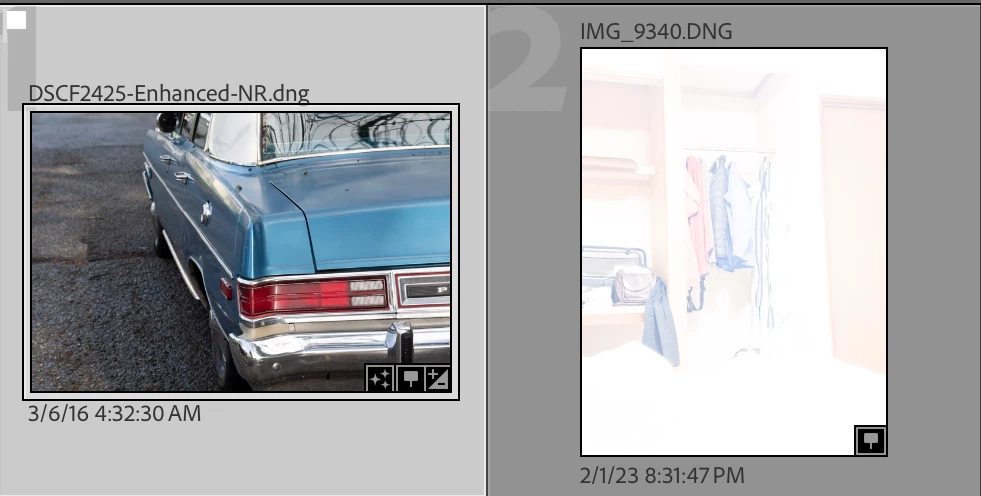
 

6. Edit DSCF2425-Enhanced-NR.dng in Develop. Observe that Exposure = 0.


7. Click Reset and observe that Exposure is now 5.

This topic has been closed for replies.

4 replies

johnrellis
Legend
August 15, 2024

@Rikk Flohr: Photography, the release notes for LR 13.5 incorrectly list this "bug" as fixed, even though the LR team previously declared it as-designed and not a bug:

https://helpx.adobe.com/lightroom-classic/kb/fixed-issues.html

Rikk Flohr_Photography
Community Manager
May 21, 2024

We've reviewed and this is not a bug. "If the DNG has embedded settings, it would be expected to use them rather than the raw defaults when importing. "

Rikk Flohr: Adobe Photography Org
johnrellis
Legend
May 21, 2024

OK, that makes sense. 


The subtlety I missed was the distinction between no embedded settings (all XMP Develop fields missing) versus embedded settings all set to their default (0) values. The sample file above had all its develop settings set to 0. When I deleted all XMP fields from the file and repeated the steps, the raw defaults get applied as expected.


Sorry for wasting the team's time on this.

johnrellis
Legend
May 20, 2024

"Is that not because a Denoised DNG file is no longer raw but demosaiced ???"


That was my first thought too, but:


- Adobe and LR consider linear raw (demosaiced) DNGs to be raws -- see here for an extended discussion about that:

https://www.lightroomqueen.com/community/threads/working-with-32bit-tiff-files-in-lightroom-classic.50181/#post-1333274


- The Apple ProRAW file included in the bug recipe is also a linear raw DNG, and the raw defaults get correctly  applied to it (as you'd expect, given that linear raw DNGs are considered "raw" by LR).


- The raw defaults get applied to the Denoise DNG when you click Reset but not on import. 

Geoff the kiwi
Community Expert
Community Expert
May 20, 2024

Is that not because a Denoised DNG file is no longer raw but demosaiced ???