johnrellis
Legend
July 2, 2018
Question

P: Truncated fields and font glitches in Metadata panel

  • July 2, 2018
  • 68 replies
  • 6456 views

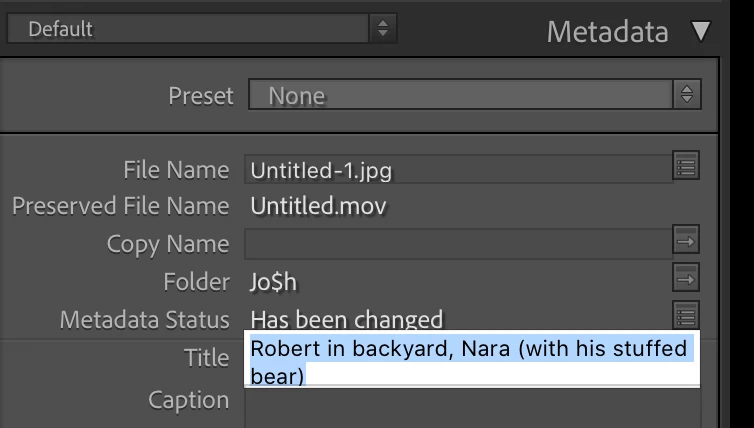
The Metadata panel has some glitches in LR 10 / Mac OS 10.15.5 with the new fonts:
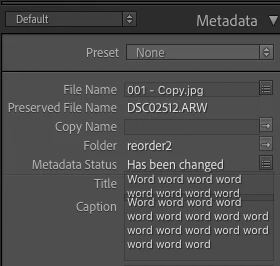


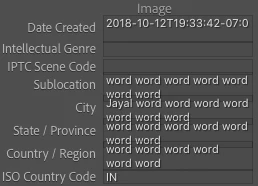
And some fields don't display their last line (off by one error?):
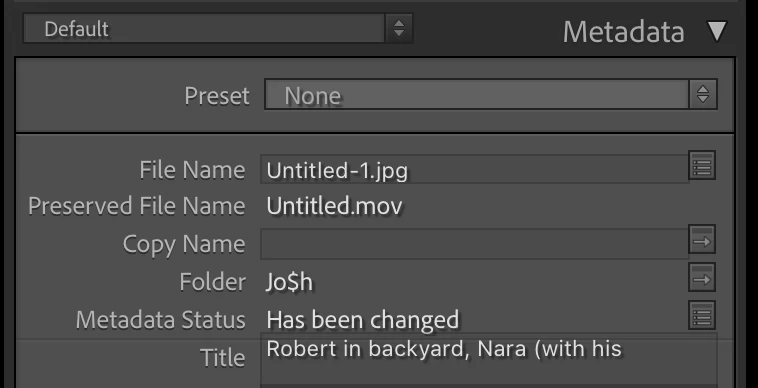
 
To reproduce this, try changing the width of the panel.
 
 
About the fonts in LR 10, the Lightroom Queen wrote: "[T]he font has been updated throughout the app, to use Adobe’s newly standards. While many formatting issues have already been identified and fixed, you might still find a few odd gremlins or spacing issues."
 
 
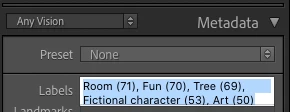
Here's another example, with a custom metadata tagset:
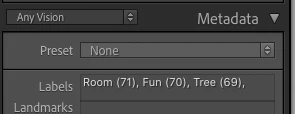
 
Here's the definition of that tagset:
return {title = "Any Vision",id = 'anyvision',items = {
     {"com.johnrellis.anyvision.labels", height_in_lines = -1},{"com.johnrellis.anyvision.landmarks", height_in_lines = -1},{"com.johnrellis.anyvision.locations", height_in_lines = -1},{"com.johnrellis.anyvision.map"},{"com.johnrellis.anyvision.logos", height_in_lines = -1},{"com.johnrellis.anyvision.faces", height_in_lines = -1},{"com.johnrellis.anyvision.text", height_in_lines = -1},{"com.johnrellis.anyvision.safeSearch", height_in_lines = -1},"com.johnrellis.anyvision.dominantColor","com.adobe.separator",{"com.adobe.caption", height_in_lines = -1},"com.adobe.GPS"}}

68 replies

Participating Frequently
September 1, 2018
I'm still seeing it, sad to say. Same LR 7.5 and Macos 10.13.6 as John.

Model Name: Macbook Pro Retina 15-in late-2016 MacBook Pro
Model Identifier: MacBookPro13,3
Processor Name: Intel Core i7
Processor Speed: 2.6 GHz
Number of Processors: 1
Total Number of Cores: 4
L2 Cache (per Core): 256 KB
L3 Cache: 6 MB
Memory: 16 GB


Image is not available


Image is not available


johnrellis
Legend
August 31, 2018
I can't reproduce it in my LR 7.5 / Macos 10.13.6.
Smit K
Participating Frequently
August 31, 2018
Hi Rob,

Is it still reproducible with Lightroom Classic 7.5?
Smit | Lightroom Team
rubyk58010202
Participating Frequently
July 3, 2018
okay, Thanks for details John and Robtmann. We are looking into it.

Regards,
Ruby
johnrellis
Legend
July 2, 2018
This also happens with my LR 7.4 / Macos 10.13.5 / Macbook Pro Retina 15-in mid-2015:


Image is not available


Image is not available

Participating Frequently
July 2, 2018
Thanks for the reply, Ruby. It’s a consistent error. It occurs in all editable fields except for the keyword field.
rubyk58010202
Participating Frequently
July 2, 2018
Hi Robtmann ,

Thanks for reporting this issue. are you seeing it consistently or it is intermittent?
Participating Frequently
July 2, 2018
In the Library module, all editable metadata fields with more than one line of text display truncated text unless I select the field. I've attached two screen grabs, one shows the unselected state and the other the selected state. When unselected, the bottom line of text is missing.


Lightroom Classic CC 7.4

Model Name: MacBook Pro
Model Identifier: MacBookPro13,3
Processor Name: Intel Core i7
Processor Speed: 2.6 GHz
Number of Processors: 1
Total Number of Cores: 4
L2 Cache (per Core): 256 KB
L3 Cache: 6 MB
Memory: 16 GB