
Participating Frequently
April 12, 2019
Answered

Panorama

  • April 12, 2019
  • 2 replies
  • 506 views

Yesterday, I created 2 panorama in LIghtroom CC, each merging 2 raw files. I was careful to choose panorama, not panorama hdr. Even so, in each case, LR applied some changes to exposure, contrast, saturation. I was able to undo these changes to apply my own edits but wasn't expecting this (and wasn't all that happy with the edits performed). Is this a bug or something Adobe has done? I didn't see this in the descriptions provided at the most recent update but may well have missed it.
    This topic has been closed for replies.
    Correct answer JP Hess

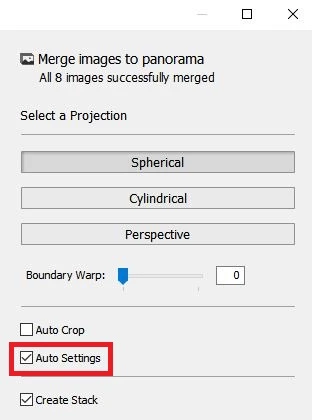
    When creating a panorama, in the panorama dialog box if the highlighted checkbox is selected then Lightroom will apply auto settings to the panorama after it is created. Was that checkbox selected?

    2 replies

    Participating Frequently
    April 12, 2019

    Well, as it turns out, yes. I thought-- obviously mistakenly-- that Auto Settings related to panorama settings, not development. Thanks for reminding me to pay close attention to each and every checkbox I encounter.

    JP Hess
    JP HessCorrect answer
    Inspiring
    April 12, 2019

    When creating a panorama, in the panorama dialog box if the highlighted checkbox is selected then Lightroom will apply auto settings to the panorama after it is created. Was that checkbox selected?