Participant
February 29, 2020
Question

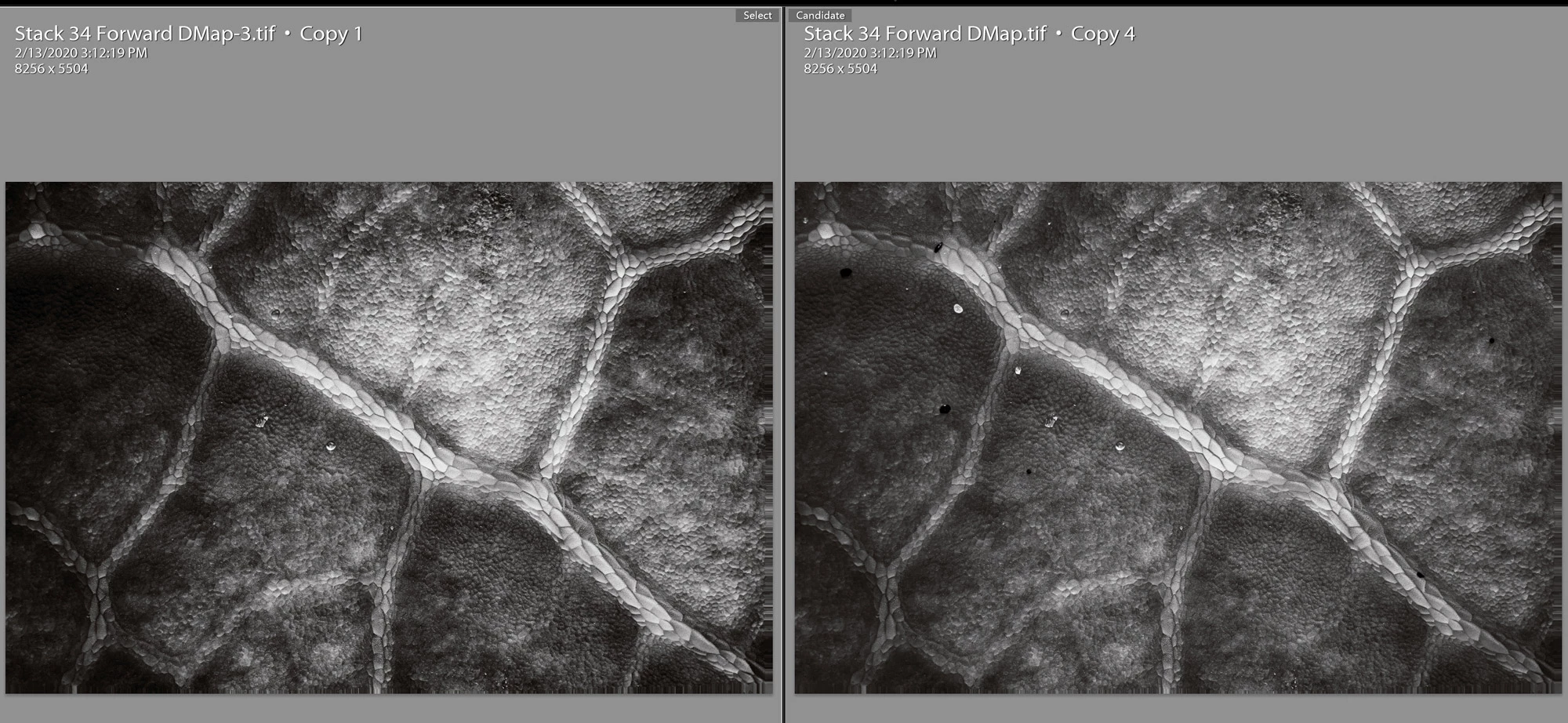
Pasting settings on copy of image does not provide same result.

  • February 29, 2020
  • 2 replies
  • 176 views

Here is the workflow to see the bug:
1. Make substantial adjustments to a tif file in Lightroom.
2. "Edit a Copy" in photoshop.

3. Perform any edit. I used the healing brush to remove a couple of spots. No tonality adjustments were made.

4. Save the file.

5. In Lightroom, copy the settings from the first file on to the second.

6. The files are substantially different.
Both files are 16 bit Tif in ProPhotoRGB.
What gives?
This topic has been closed for replies.

2 replies

JohanElzenga
Community Expert
Community Expert
March 2, 2020

Did you use 'Edit a copy' or perhaps 'Edit a copy with Lightroom adjustments'?

-- Johan W. Elzenga
johnrellis
Legend
March 2, 2020

I did a quick test following the steps and didn't observe that behavior.  To troubleshoot:


1. Select both .tifs and do Metadata > Save Metadata To File.


2. Upload the files to Dropbox or similar and post the sharing link here.


We can see if the issue occurs in other LR configurations or is specific to yours.


[Use the reply button under the first post to ensure replies sort properly.]