robertod19903257
Participant
July 3, 2018
Answered

PC crashes when importing photo and building previews

  • July 3, 2018
  • 2 replies
  • 1349 views

PC crashes when importing photos and building previews in Lightroom Classic CC.

My PC meets all specified requirement.

I've had this system for years. It is very stable. I had no problems using Lightroom Classic CC until 2 months ago.

Crashes occurs only when importing photos and building previews in Lightroom Classic CC.

I did not have any problems with other programs installed in my pc.

Thank you in advance.

    This topic has been closed for replies.
    Correct answer Akash Sharma

    Hi robertod19903257,

    Sorry that Lightroom Classic CC is crashing while importing images and building previews. Which exact version of Lightroom Classic CC are you using(latest version is 7.4) and what is your operating system?

    Please check the below steps to troubleshoot the issue:

    1) Navigate to the preview cache location of your working catalog and delete the cache folder.It is located in the same folder as the Lightroom Catalog. The preview cache name ends with previews.LRDATA and should be deleted. **Do not confuse this with *.LRCAT, which should not be deleted.

    The default location for the catalog preview on Mac and Windows(probably you are using it) are:

    Mac:- /Users/[username]/Pictures/Lightroom/Lightroom Catalog Previews.lrdata

    Windows:- C:\Users\[user name]\Pictures\Lightroom\Lightroom Catalog Previews.lrdata
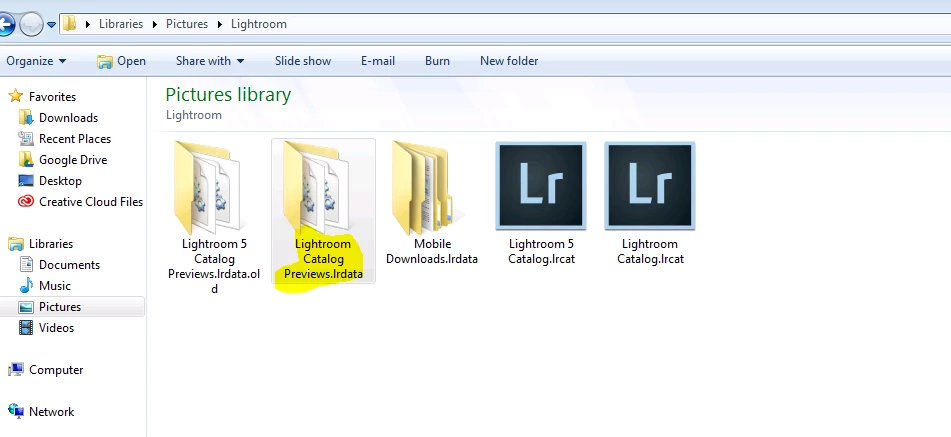
    2) As you've mentioned that your computer is crashing while importing images, which source are you importing the images from? Try importing some images from your local drive and see if the issue persists.

    Regards,

    Akash

    2 replies

    Participating Frequently
    July 9, 2018

    I don't understand why people turn to overheating and HW problems first.  Overheating cannot cause one specific application to misbehave, while all other applications and Windows itself work just fine in parallel to LR crashing.

    Anyway, I am having the same problem.  The crash during preview build happens very quickly (early on).  Deleting all the Previews folder is a bad idea as LR crashes immediately upon start when it tries to rebuild the previews.  The CPU temperature barely raises from its idle temperature, and the CPU is hitting about 30%.  At the same time, the previews are messed-up with artefacts like this:

    LR is totally unusable for me after the latest update.  I have not seen anything as bad as this since LR 1.0.

    /Karol

    dj_paige
    Legend
    July 9, 2018

    joe_e_e  wrote

    I don't understand why people turn to overheating and HW problems first.  Overheating cannot cause one specific application to misbehave, while all other applications and Windows itself work just fine in parallel to LR crashing.

    I disagree. The reason was already given earlier in this thread.

    Participating Frequently
    July 10, 2018

    Are you suggesting that Lightroom alone stresses the hardware more than running Premiere Pro and Audition and Lightroom in parallel?  This is absurd.  The other two apps never crash.

    Additionally, modern Intel CPUs have thermal throttling, which means that the processor will slow down to protect itself.  It will not randomly crash applications.

    My CPU is running around 64 degrees Celsius while creating the previews.  This is about 25 degrees Celsius below the thermal throttling limit.  My crash issues have nothing to do with the CPU overheating.

    Akash Sharma
    Akash SharmaCorrect answer
    Legend
    July 3, 2018

    Hi robertod19903257,

    Sorry that Lightroom Classic CC is crashing while importing images and building previews. Which exact version of Lightroom Classic CC are you using(latest version is 7.4) and what is your operating system?

    Please check the below steps to troubleshoot the issue:

    1) Navigate to the preview cache location of your working catalog and delete the cache folder.It is located in the same folder as the Lightroom Catalog. The preview cache name ends with previews.LRDATA and should be deleted. **Do not confuse this with *.LRCAT, which should not be deleted.

    The default location for the catalog preview on Mac and Windows(probably you are using it) are:

    Mac:- /Users/[username]/Pictures/Lightroom/Lightroom Catalog Previews.lrdata

    Windows:- C:\Users\[user name]\Pictures\Lightroom\Lightroom Catalog Previews.lrdata

    2) As you've mentioned that your computer is crashing while importing images, which source are you importing the images from? Try importing some images from your local drive and see if the issue persists.

    Regards,

    Akash

    robertod19903257
    Participant
    July 3, 2018

    I tried step 1 and step 2 with no success.

    I had already tried step 1 (erasing only the content and not the folder). Anyway, the new attempt was not successful.

    I tried to import photos from my local drive but the problem persists.

    I'm using version 7.3. Previously, I had latest version (7.4) and I disinstalled it in order to solve out the problem.

    My OS is Windows 7 Ultimate.

    Regards,

    roberto

    dj_paige
    Legend
    July 3, 2018

    PC Crashing during importing and building previews is often an overheating problem. You need to check the cooling system in your PC, and make sure that all fans and other cooling devices are working properly.