


Participant
January 30, 2023
Answered

People Mask Not working

  • January 30, 2023
  • 6 replies
  • 4534 views

I've seen others have this problem but not a sure solution. The people AI mask would not recognize anyone on my desktop or laptop. All the other masks work great! In lightroom when I open the people mask the little wheel spins for just a sec like it's looking for faces then disappears with no faces found. However, if I try to use it in Camera Raw I get the "Unable to load AI selection model" error 


The main suggestion I keep seeing was to update the driver in the graphics card. Which I did for both. It actually fixed the problem on my laptop although I never use it for editing only for on-location tethering, so not much help there.  The desktop which actually has a, older, but better graphics card it did not resolve the issue,  Is there anything else I should try? 


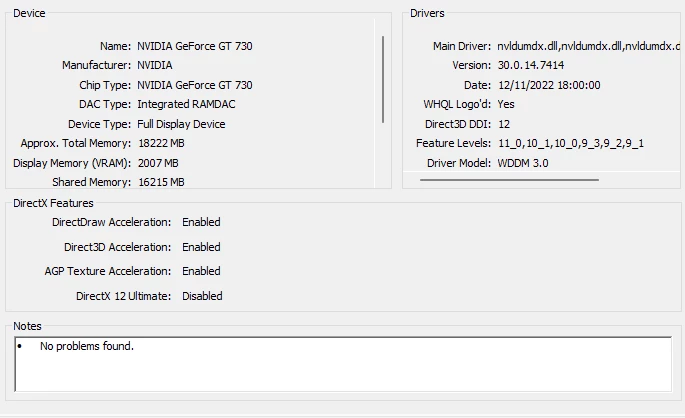
Graphics Card ( NVIDIA GeForce 730) is about 4 or 5 years old but has 2 gig of Vram. The driver was just updated and was dated 12/22 so should be the very latest. Running WIN 11


Open to any suggestions! 


Correct answer GoldingD

That NVIDIA GeForce 730 GPU is old enough that if you turn on the use of graphics acceleration, your LrC may degrade in performance, may even fail. Often a piece of advice to members with a GPU that old would be to not use graphics acceleration.


Apparently, it is not at all clear if AI masking needs or works with graphics acceleration. Unfortunately it is also not clear if AI masking acknowledges graphics acceleration on or off.


So, one would have to try out. If you have use graphics acceleration on, what happens if off?


not very hopeful this will solve anything, fairly sure another member will disagree, that argument could be very helpful, just a what if.


Before replacing that GPU, see what other members state.Do not spend money on my words.

6 replies

Participating Frequently
April 6, 2023

WORKAROUND FOUND!!!

People masking was working fine for me until last week.  My Mac is near, with 72 GB RAM, a fast video processor with 16GB memory, and all of the other bells and whistles.  Turning off the graphics processor didn't do anything, nor did installing an older version of LR, uninstalling it, and reinstalling it.  NOTHING HAS WORKED!  BUT THERE IS A WORKAROUND!!!  I have found if I mask for the background, then duplicate and invert, it will mask just the person.  Granted, there have been one or two images it would not work on, but the majority of the time it works!! Give it a shot!  Hope this helps! 

johnrellis
Genius
April 7, 2023

"I have found if I mask for the background, then duplicate and invert, it will mask just the person"


In all of my tests, a Background mask is exactly the same as a Subject mask inverted.  So you could probably save some keystrokes simply by creating Subject masks.  Subject masks often (but not always) select the same pixels as People masks with All People chosen.

GoldingD
Legend
January 30, 2023


Operating system: Windows 10 - Home Premium Edition
Version: 10.0.22000


So, I think that is Windows 11 version 21H2 (Build 22000) , released 2021-10-04 and a newer version exists, 22H2, released 2022-09-20 (Build 22621). No idea if the update would help anything in LrC.


see:

https://learn.microsoft.com/en-us/windows/release-health/windows11-release-information 


Processor speed: 2.9GHz
Real memory available to Lightroom: 32430.2 MB


Fine


Camera Raw virtual memory: 295MB / 16215MB (1%)
Camera Raw real memory: 301MB / 32430MB (0%)


I suspect fine, I can never quite relate that entry to my Camera RAW CACHE setting. I think second value of more importance.


Displays: 1) 2560x1440


So not a display resolution issue that can appear 4K and beyond.


DirectX: NVIDIA GeForce GT 730 (30.0.14.7414)
Init State: GPU for Display supported by default
User Preference: GPU for Display Enabled


Yes, up to date driver, and GPU only affecting general display, not entering in for any acceleration.


Installed Plugins:
1) AdobeStock
2) HDR Efex Pro 2
3) JPEGmini
4) Loupedeck2
5) Nikon Tether Plugin


None of those stand out as known problems. Not part of the issue.


Application folder: C:\Program Files\Adobe\Adobe Lightroom Classic


You did not include in your post the Library Path or the Settings folder, was that a desired omission, or did LrC fail to present that? If you just did not want to show that, Ok, only point in seeing that would typically to make sure that you are not placing your catalog on a network as opposed to an actual hard drive (no Network share, no NAS, no cloud, for the catalog)


Summary, nothing other than age of GPU stands out in the system info.

gao714Author
Participant
January 31, 2023

Thanks so much for taking a look.  yes i omitted that as i didn't feel it necessary, but no not on a network. It's an actual harddrive!


Suggestions from anyone on a newer graphics board? Any known issues with a particular brand i should avoid?

Sean McCormack
Community Expert
Community Expert
January 31, 2023

Just if you go Nvidia, use the Studio drivers. Get the best you can afford because you can always move it to a new computer should you change that. 

Sean McCormack. Author of 'Essential Development 3'. Magazine Writer. Former Official Fuji X-Photographer.
gao714Author
Participant
January 30, 2023

Thanks for input all!! May just have to upgrade.


system Info Not sure why it says win 10 as I'm using Win 11


Lightroom Classic version: 12.1 [ 202212072312-d7ab524b ]
License: Creative Cloud
Language setting: en
Operating system: Windows 10 - Home Premium Edition
Version: 10.0.22000
Application architecture: x64
System architecture: x64
Logical processor count: 16
Processor speed: 2.9GHz
SqLite Version: 3.36.0
CPU Utilisation: 3.0%
Built-in memory: 32430.2 MB
Dedicated GPU memory used by Lightroom: 453.9MB / 2007.3MB (22%)
Real memory available to Lightroom: 32430.2 MB
Real memory used by Lightroom: 469.6 MB (1.4%)
Virtual memory used by Lightroom: 2152.2 MB
GDI objects count: 1081
USER objects count: 3933
Process handles count: 2284
Memory cache size: 0.0MB
Internal Camera Raw version: 15.1 [ 1329 ]
Maximum thread count used by Camera Raw: 5
Camera Raw SIMD optimization: SSE2,AVX,AVX2
Camera Raw virtual memory: 295MB / 16215MB (1%)
Camera Raw real memory: 301MB / 32430MB (0%)
System DPI setting: 96 DPI
Desktop composition enabled: Yes
Standard Preview Size: 2560 pixels
Displays: 1) 2560x1440
Input types: Multitouch: No, Integrated touch: No, Integrated pen: No, External touch: No, External pen: No, Keyboard: No

Graphics Processor Info:
DirectX: NVIDIA GeForce GT 730 (30.0.14.7414)
Init State: GPU for Display supported by default
User Preference: GPU for Display Enabled

Application folder: C:\Program Files\Adobe\Adobe Lightroom Classic

Installed Plugins:
1) AdobeStock
2) HDR Efex Pro 2
3) JPEGmini
4) Loupedeck2
5) Nikon Tether Plugin

Config.lua flags: None

Adapter #1: Vendor : 10de
Device : 1287
Subsystem : 10831028
Revision : a1
Video Memory : 2007
Adapter #2: Vendor : 8086
Device : 9bc5
Subsystem : 9c51028
Revision : 5
Video Memory : 80
Adapter #3: Vendor : 1414
Device : 8c
Subsystem : 0
Revision : 0
Video Memory : 0
AudioDeviceIOBlockSize: 1024
AudioDeviceName: $$$/dvaaudiodevice/SystemDefaultAndEffectiveDeviceName=System Default - Speakers (Realtek(R) Audio)#{comment}DVAAU-4201250: Open the audio hardware preferences page.
AudioDeviceNumberOfChannels: 2
AudioDeviceSampleRate: 48000
Build: LR5x19
Direct2DEnabled: false

GoldingD
Legend
January 30, 2023

"system Info Not sure why it says win 10 as I'm using Win 11"


Just an oddity/annoyance in Windows OS, not an issue, Same I think for all Win 11 members.

Participant
May 29, 2025
In my system, masking - people, object and select background is just popup and gone. No adjustments panel is shown once its got selected. Can you please guide me to solve this issue
 
This is my system info
 
Lightroom Classic version: 14.3.1 [ 202505061331-b063faef ]
License: Creative Cloud
Language setting: en
Operating system: Windows 11 - Business Edition
Version: 11.0.26100
Application architecture: x64
System architecture: x64
Logical processor count: 12
Processor speed: 2.4GHz
SqLite Version: 3.36.0
CPU Utilisation: 1.0%
Power Source: Plugged In
Built-in memory: 16099.4 MB
Dedicated GPU memory used by Lightroom: 96.2MB / 2007.2MB (4%)
Real memory available to Lightroom: 16099.4 MB
Real memory used by Lightroom: 1335.3 MB (8.2%)
Virtual memory used by Lightroom: 1657.7 MB
GDI objects count: 960
USER objects count: 3568
Process handles count: 2616
Memory cache size: 24.5MB
Internal Camera Raw version: 17.3.1 [ 2227 ]
Maximum thread count used by Camera Raw: 5
Camera Raw SIMD optimization: SSE2,AVX,AVX2
Camera Raw virtual memory: 31MB / 8049MB (0%)
Camera Raw real memory: 32MB / 16099MB (0%)
 
Cache1: 
NT- RAM:0.0MB, VRAM:0.0MB, Combined:0.0MB
 
Cache2: 
m:24.5MB, n:0.0MB
 
U-main: 88.0MB
 
System DPI setting: 96 DPI
Desktop composition enabled: Yes
Standard Preview Size: 1600 pixels
Displays: 1) 1600x900
Input types: Multitouch: No, Integrated touch: No, Integrated pen: No, External touch: No, External pen: No, Keyboard: No
 
Graphics Processor Info: 
DirectX: NVIDIA GeForce GT 710 (27.21.14.5671)
Init State: GPU for Display supported by default
User Preference: GPU for Display Enabled
Enable HDR in Library: OFF
 
Application folder: C:\Program Files\Adobe\Adobe Lightroom Classic
Library Path: C:\Users\Lenovo\Pictures\Lightroom\Lightroom Catalog.lrcat
Settings Folder: C:\Users\Lenovo\AppData\Roaming\Adobe\Lightroom
 
Installed Plugins: 
1) AdobeStock
2) Flickr
 
Config.lua flags: 
 
Adapter #1: Vendor : 10de
Device : 128b
Subsystem : 36f71458
Revision : a1
Video Memory : 2007
Adapter #2: Vendor : 8086
Device : 4692
Subsystem : 32cb17aa
Revision : c
Video Memory : 80
Adapter #3: Vendor : 1414
Device : 8c
Subsystem : 0
Revision : 0
Video Memory : 0
AudioDeviceIOBlockSize: 1024
AudioDeviceName: System Default - Headphones (Realtek(R) Audio)
AudioDeviceNumberOfChannels: 2
AudioDeviceSampleRate: 48000
Build: LR5x26
Direct2DEnabled: false
GL_ACCUM_ALPHA_BITS: 16
GL_ACCUM_BLUE_BITS: 16
GL_ACCUM_GREEN_BITS: 16
GL_ACCUM_RED_BITS: 16
GL_ALPHA_BITS: 0
GL_BLUE_BITS: 8
GL_DEPTH_BITS: 24
GL_GREEN_BITS: 8
GL_MAX_3D_TEXTURE_SIZE: 2048
GL_MAX_TEXTURE_SIZE: 16384
GL_MAX_TEXTURE_UNITS: 4
GL_MAX_VIEWPORT_DIMS: 16384,16384
GL_RED_BITS: 8
GL_RENDERER: GeForce GT 710/PCIe/SSE2
GL_SHADING_LANGUAGE_VERSION: 4.60 NVIDIA
GL_STENCIL_BITS: 8
GL_VENDOR: NVIDIA Corporation
GL_VERSION: 4.6.0 NVIDIA 456.71
GPUDeviceEnabled: false
OGLEnabled: true
GL_EXTENSIONS: GL_AMD_multi_draw_indirect GL_AMD_seamless_cubemap_per_texture GL_ARB_arrays_of_arrays GL_ARB_base_instance GL_ARB_bindless_texture GL_ARB_blend_func_extended GL_ARB_buffer_storage GL_ARB_clear_buffer_object GL_ARB_clear_texture GL_ARB_clip_control GL_ARB_color_buffer_float GL_ARB_compatibility GL_ARB_compressed_texture_pixel_storage GL_ARB_conservative_depth GL_ARB_compute_shader GL_ARB_compute_variable_group_size GL_ARB_conditional_render_inverted GL_ARB_copy_buffer GL_ARB_copy_image GL_ARB_cull_distance GL_ARB_debug_output GL_ARB_depth_buffer_float GL_ARB_depth_clamp GL_ARB_depth_texture GL_ARB_derivative_control GL_ARB_direct_state_access GL_ARB_draw_buffers GL_ARB_draw_buffers_blend GL_ARB_draw_indirect GL_ARB_draw_elements_base_vertex GL_ARB_draw_instanced GL_ARB_enhanced_layouts GL_ARB_ES2_compatibility GL_ARB_ES3_compatibility GL_ARB_ES3_1_compatibility GL_ARB_ES3_2_compatibility GL_ARB_explicit_attrib_location GL_ARB_explicit_uniform_location GL_ARB_fragment_coord_conventions GL_ARB_fragment_layer_viewport GL_ARB_fragment_program GL_ARB_fragment_program_shadow GL_ARB_fragment_shader GL_ARB_framebuffer_no_attachments GL_ARB_framebuffer_object GL_ARB_framebuffer_sRGB GL_ARB_geometry_shader4 GL_ARB_get_program_binary GL_ARB_get_texture_sub_image GL_ARB_gl_spirv GL_ARB_gpu_shader5 GL_ARB_gpu_shader_fp64 GL_ARB_gpu_shader_int64 GL_ARB_half_float_pixel GL_ARB_half_float_vertex GL_ARB_imaging GL_ARB_indirect_parameters GL_ARB_instanced_arrays GL_ARB_internalformat_query GL_ARB_internalformat_query2 GL_ARB_invalidate_subdata GL_ARB_map_buffer_alignment GL_ARB_map_buffer_range GL_ARB_multi_bind GL_ARB_multi_draw_indirect GL_ARB_multisample GL_ARB_multitexture GL_ARB_occlusion_query GL_ARB_occlusion_query2 GL_ARB_parallel_shader_compile GL_ARB_pipeline_statistics_query GL_ARB_pixel_buffer_object GL_ARB_point_parameters GL_ARB_point_sprite GL_ARB_polygon_offset_clamp GL_ARB_program_interface_query GL_ARB_provoking_vertex GL_ARB_query_buffer_object GL_ARB_robust_buffer_access_behavior GL_ARB_robustness GL_ARB_sample_shading GL_ARB_sampler_objects GL_ARB_seamless_cube_map GL_ARB_seamless_cubemap_per_texture GL_ARB_separate_shader_objects GL_ARB_shader_atomic_counter_ops GL_ARB_shader_atomic_counters GL_ARB_shader_ballot GL_ARB_shader_bit_encoding GL_ARB_shader_clock GL_ARB_shader_draw_parameters GL_ARB_shader_group_vote GL_ARB_shader_image_load_store GL_ARB_shader_image_size GL_ARB_shader_objects GL_ARB_shader_precision GL_ARB_shader_storage_buffer_object GL_ARB_shader_subroutine GL_ARB_shader_texture_image_samples GL_ARB_shader_texture_lod GL_ARB_shading_language_100 GL_ARB_shading_language_420pack GL_ARB_shading_language_include GL_ARB_shading_language_packing GL_ARB_shadow GL_ARB_sparse_buffer GL_ARB_sparse_texture GL_ARB_spirv_extensions GL_ARB_stencil_texturing GL_ARB_sync GL_ARB_tessellation_shader GL_ARB_texture_barrier GL_ARB_texture_border_clamp GL_ARB_texture_buffer_object GL_ARB_texture_buffer_object_rgb32 GL_ARB_texture_buffer_range GL_ARB_texture_compression GL_ARB_texture_compression_bptc GL_ARB_texture_compression_rgtc GL_ARB_texture_cube_map GL_ARB_texture_cube_map_array GL_ARB_texture_env_add GL_ARB_texture_env_combine GL_ARB_texture_env_crossbar GL_ARB_texture_env_dot3 GL_ARB_texture_filter_anisotropic GL_ARB_texture_float GL_ARB_texture_gather GL_ARB_texture_mirror_clamp_to_edge GL_ARB_texture_mirrored_repeat GL_ARB_texture_multisample GL_ARB_texture_non_power_of_two GL_ARB_texture_query_levels GL_ARB_texture_query_lod GL_ARB_texture_rectangle GL_ARB_texture_rg GL_ARB_texture_rgb10_a2ui GL_ARB_texture_stencil8 GL_ARB_texture_storage GL_ARB_texture_storage_multisample GL_ARB_texture_swizzle GL_ARB_texture_view GL_ARB_timer_query GL_ARB_transform_feedback2 GL_ARB_transform_feedback3 GL_ARB_transform_feedback_instanced GL_ARB_transform_feedback_overflow_query GL_ARB_transpose_matrix GL_ARB_uniform_buffer_object GL_ARB_vertex_array_bgra GL_ARB_vertex_array_object GL_ARB_vertex_attrib_64bit GL_ARB_vertex_attrib_binding GL_ARB_vertex_buffer_object GL_ARB_vertex_program GL_ARB_vertex_shader GL_ARB_vertex_type_10f_11f_11f_rev GL_ARB_vertex_type_2_10_10_10_rev GL_ARB_viewport_array GL_ARB_window_pos GL_ATI_draw_buffers GL_ATI_texture_float GL_ATI_texture_mirror_once GL_S3_s3tc GL_EXT_texture_env_add GL_EXT_abgr GL_EXT_bgra GL_EXT_bindable_uniform GL_EXT_blend_color GL_EXT_blend_equation_separate GL_EXT_blend_func_separate GL_EXT_blend_minmax GL_EXT_blend_subtract GL_EXT_compiled_vertex_array GL_EXT_Cg_shader GL_EXT_depth_bounds_test GL_EXT_direct_state_access GL_EXT_draw_buffers2 GL_EXT_draw_instanced GL_EXT_draw_range_elements GL_EXT_fog_coord GL_EXT_framebuffer_blit GL_EXT_framebuffer_multisample GL_EXTX_framebuffer_mixed_formats GL_EXT_framebuffer_multisample_blit_scaled GL_EXT_framebuffer_object GL_EXT_framebuffer_sRGB GL_EXT_geometry_shader4 GL_EXT_gpu_program_parameters GL_EXT_gpu_shader4 GL_EXT_multi_draw_arrays GL_EXT_multiview_texture_multisample GL_EXT_multiview_timer_query GL_EXT_packed_depth_stencil GL_EXT_packed_float GL_EXT_packed_pixels GL_EXT_pixel_buffer_object GL_EXT_point_parameters GL_EXT_polygon_offset_clamp GL_EXT_provoking_vertex GL_EXT_rescale_normal GL_EXT_secondary_color GL_EXT_separate_shader_objects GL_EXT_separate_specular_color GL_EXT_shader_image_load_store GL_EXT_shader_integer_mix GL_EXT_shadow_funcs GL_EXT_stencil_two_side GL_EXT_stencil_wrap GL_EXT_texture3D GL_EXT_texture_array GL_EXT_texture_buffer_object GL_EXT_texture_compression_dxt1 GL_EXT_texture_compression_latc GL_EXT_texture_compression_rgtc GL_EXT_texture_compression_s3tc GL_EXT_texture_cube_map GL_EXT_texture_edge_clamp GL_EXT_texture_env_combine GL_EXT_texture_env_dot3 GL_EXT_texture_filter_anisotropic GL_EXT_texture_integer GL_EXT_texture_lod GL_EXT_texture_lod_bias GL_EXT_texture_mirror_clamp GL_EXT_texture_object GL_EXT_texture_shadow_lod GL_EXT_texture_shared_exponent GL_EXT_texture_sRGB GL_EXT_texture_sRGB_R8 GL_EXT_texture_sRGB_decode GL_EXT_texture_storage GL_EXT_texture_swizzle GL_EXT_timer_query GL_EXT_transform_feedback2 GL_EXT_vertex_array GL_EXT_vertex_array_bgra GL_EXT_vertex_attrib_64bit GL_EXT_window_rectangles GL_EXT_import_sync_object GL_IBM_rasterpos_clip GL_IBM_texture_mirrored_repeat GL_KHR_context_flush_control GL_KHR_debug GL_EXT_memory_object GL_EXT_memory_object_win32 GL_EXT_win32_keyed_mutex GL_KHR_parallel_shader_compile GL_KHR_no_error GL_KHR_robust_buffer_access_behavior GL_KHR_robustness GL_EXT_semaphore GL_EXT_semaphore_win32 GL_KHR_shader_subgroup GL_KTX_buffer_region GL_NV_alpha_to_coverage_dither_control GL_NV_bindless_multi_draw_indirect GL_NV_bindless_multi_draw_indirect_count GL_NV_bindless_texture GL_NV_blend_equation_advanced GL_NV_blend_square GL_NV_command_list GL_NV_compute_program5 GL_NV_conditional_render GL_NV_copy_depth_to_color GL_NV_copy_image GL_NV_depth_buffer_float GL_NV_depth_clamp GL_NV_draw_texture GL_NV_draw_vulkan_image GL_NV_ES1_1_compatibility GL_NV_ES3_1_compatibility GL_NV_explicit_multisample GL_NV_feature_query GL_NV_fence GL_NV_float_buffer GL_NV_fog_distance GL_NV_fragment_program GL_NV_fragment_program_option GL_NV_fragment_program2 GL_NV_framebuffer_multisample_coverage GL_NV_geometry_shader4 GL_NV_gpu_program4 GL_NV_internalformat_sample_query GL_NV_gpu_program4_1 GL_NV_gpu_program5 GL_NV_gpu_program5_mem_extended GL_NV_gpu_program_fp64 GL_NV_gpu_shader5 GL_NV_half_float GL_NV_light_max_exponent GL_NV_multisample_coverage GL_NV_multisample_filter_hint GL_NV_occlusion_query GL_NV_packed_depth_stencil GL_NV_parameter_buffer_object GL_NV_parameter_buffer_object2 GL_NV_path_rendering GL_NV_pixel_data_range GL_NV_point_sprite GL_NV_primitive_restart GL_NV_query_resource GL_NV_query_resource_tag GL_NV_register_combiners GL_NV_register_combiners2 GL_NV_shader_atomic_counters GL_NV_shader_atomic_float GL_NV_shader_atomic_int64 GL_NV_shader_buffer_load GL_NV_shader_storage_buffer_object GL_NV_shader_subgroup_partitioned GL_NV_texgen_reflection GL_NV_texture_barrier GL_NV_texture_compression_vtc GL_NV_texture_env_combine4 GL_NV_texture_multisample GL_NV_texture_rectangle GL_NV_texture_rectangle_compressed GL_NV_texture_shader GL_NV_texture_shader2 GL_NV_texture_shader3 GL_NV_transform_feedback GL_NV_transform_feedback2 GL_NV_uniform_buffer_unified_memory GL_NV_vertex_array_range GL_NV_vertex_array_range2 GL_NV_vertex_attrib_integer_64bit GL_NV_vertex_buffer_unified_memory GL_NV_vertex_program GL_NV_vertex_program1_1 GL_NV_vertex_program2 GL_NV_vertex_program2_option GL_NV_vertex_program3 GL_NVX_conditional_render GL_NVX_linked_gpu_multicast GL_NV_gpu_multicast GL_NVX_gpu_multicast2 GL_NVX_progress_fence GL_NVX_gpu_memory_info GL_NVX_multigpu_info GL_NVX_nvenc_interop GL_NV_shader_thread_group GL_NV_shader_thread_shuffle GL_KHR_blend_equation_advanced GL_OVR_multiview GL_OVR_multiview2 GL_SGIS_generate_mipmap GL_SGIS_texture_lod GL_SGIX_depth_texture GL_SGIX_shadow GL_SUN_slice_accum GL_WIN_swap_hint WGL_EXT_swap_control 
GoldingD
Legend
January 30, 2023

Some additional system information might be helpfull:


  • OS version and build
  • LrC version, 12.1?
  • CPU
  • RAM


To that end, in LrC, clicking on Help, then System Info, you could copy that info, and paste into a reply. Probably the info from first line down to and including plug-in info. Info after plugging-in not so helpful, just eats up space in a reply.

Sean McCormack
Community Expert
Community Expert
January 30, 2023

You're at the minimum requirements, but as the recommended is a lot higher. The first thing that users mentioned not being able to access on older cards was People. 


Like @GoldingD, I've no idea if the GPU being on is a hard requirement for Masking, but it's worth checking out. 


https://helpx.adobe.com/ie/lightroom-classic/system-requirements.html

Sean McCormack. Author of 'Essential Development 3'. Magazine Writer. Former Official Fuji X-Photographer.
GoldingD
GoldingDCorrect answer
Legend
January 30, 2023

That NVIDIA GeForce 730 GPU is old enough that if you turn on the use of graphics acceleration, your LrC may degrade in performance, may even fail. Often a piece of advice to members with a GPU that old would be to not use graphics acceleration.


Apparently, it is not at all clear if AI masking needs or works with graphics acceleration. Unfortunately it is also not clear if AI masking acknowledges graphics acceleration on or off.


So, one would have to try out. If you have use graphics acceleration on, what happens if off?


not very hopeful this will solve anything, fairly sure another member will disagree, that argument could be very helpful, just a what if.


Before replacing that GPU, see what other members state.Do not spend money on my words.

johnrellis
Genius
January 31, 2023

"it is not at all clear if AI masking needs or works with graphics acceleration. Unfortunately it is also not clear if AI masking acknowledges graphics acceleration on or off."


AI masking, including People masking, works fine when there is no graphics processor. You can easily prove that on a Windows machine by disabling the GPU in the Windows device manager, or by running Windows in a virtual machine.  AI masking runs roughly 4-5 times slower on a CPU than on a GPU.


Unfortunately, AI masking still uses the GPU even if you've set Preferences > Performance > Use Graphics Processor to Off. That too is easy to demonstrate: AI masking runs the same speed regardless of the preference setting, and Task Manager's Performance tab shows it being used regardless of the setting.


Adobe stubbornly refuses to have AI masking obey the setting of Use Graphics Processor, which would allow people with older graphics hardware to still use AI masking:

https://community.adobe.com/t5/lightroom-classic-ideas/p-ai-masking-should-obey-preferences-gt-performance-gt-use-graphics-processor/idi-p/12480845
