Participating Frequently
February 13, 2024
Question

People masks not working properly after update

  • February 13, 2024
  • 4 replies
  • 2597 views

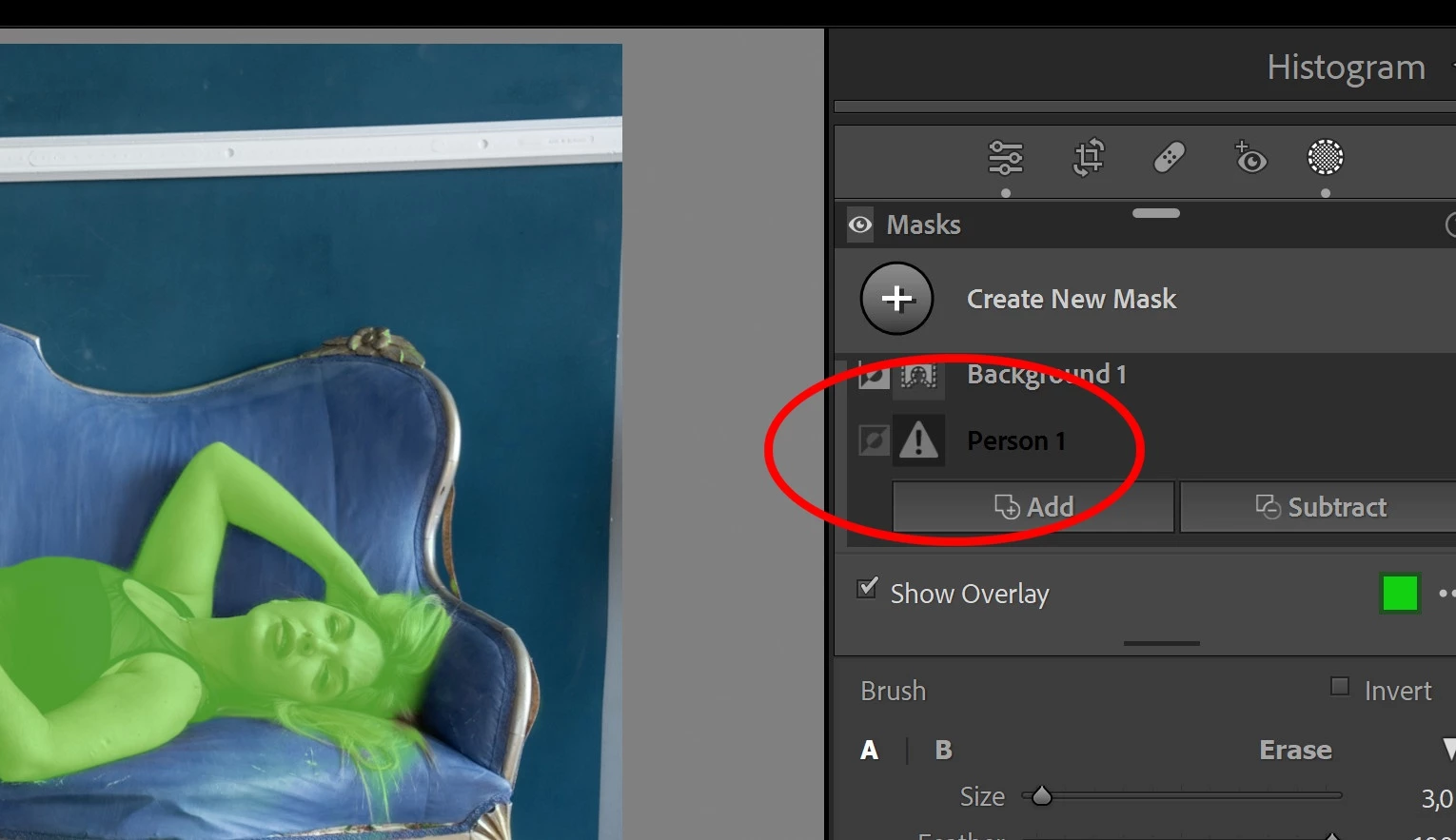
A couple of hours ago, I noticed a warning triangle in the upper part of masks panel, and a message saying "Update AI settings". 
After I did, many previously created (and detected) persons' masks became inactive. And if I try to create one again, I get the message "no people found".
It seems to happen most with people lying or sitting, not so much if standing up and clearly defined.
It's quite a nuisance, because although "subject" creates a reasonably acceptable mask for the whole person, suddenly the ability to mask individual parts (face skin, body skin, clothes, etc.) is entirely lost.
¿Anyone w/ the same problem?
This topic has been closed for replies.

4 replies

Participating Frequently
March 10, 2024

I had the same AI Person Mask error, with no people detected. I suspected it was the blur AI interfering which I normally use last in my workflow (usually pulling masks by habit before applying the blur). I turned off Blur AI off, and the person detection worked fine. Try that. This is the 13.2 version of LR and Mac OS 13.6.1 for anyone who is from Adobe seeing this.

Participating Frequently
February 22, 2024

Yesterday I got further evidence of LR weird behaviour. It's something I had ocassionally noticed in the past, but now it seems much more acute.
On the other hand, there's an easy trick that can be used to overcome the issue.
When I asked LR to apply a "select people" mask in this picture, it returned the dreaded "No people found" message, so I was stuck with the much less detailed "subject"

But, once I rotated the image so that the person appears upright instead of horizontal, not only it did detect people, it even distinguished between the main image and its reflection, allowing separate adjustments.

I haven't tried yet with other angles, for example 45º (I guess I'd have to pre-process the RAW file in PS, because LR doesn't allow "cropless fine rotation"), but I'll report results if I do.
In summary, position does have an important effect into LR AI people recognition capabilities, and "straightening" them can make them recognizable.

C.Cella
Legend
February 22, 2024

@Fernando35436819506j 

Ok apparently you were already using the latest model version when the People Selection worked.


ModelVersion = 23488197


At one Point LrC decided that is a no longer good and I can't explain why.


As you discovered ML fails to detect people in a specific condition:  eyes NOT horizontal.

This is a bug pure and simple. 


C.Cella
Legend
February 22, 2024

I did a test with my own images.


I rotated my portrait in landscape orientations so the person eyes result in a vertical line.


In some cases the detection happens.

In other cases no person is detected.


@Fernando35436819506j 

I can file a bug internally for this and add my fils + your own if you don't mind.

C.Cella
Legend
February 14, 2024

@Fernando35436819506j 


I had the same issue.

The new algorithm is sometimes but not always failing to detect People, or some parts of them, while the older algorithm was able to select them.

As a workaround you can use Objects tool to select the individual parts of the person when People fails to detect them.


  • Despite what LrC says many times "Updating Ai Settings" will not make any difference and the "updated Mask" is identical to what it was before so you can simply keep the masks as they are and ignore the update warning.


In any case you can go back in history and revert back to when the People' selections were available. 


.


C.Cella
Legend
February 14, 2024

@Fernando35436819506j


After Updating Ai (which also happens after we sync masks or aplly a preset with Masks) LrC should check if any Mask will result as "Empty" and inform us...alas there is no such basic check in palce after we Update Ai Settings.


You might have many images that have Empty masks without realising it.

To find them you need to use Any Filter Plug-in by @johnrellis


https://johnrellis.com/lightroom/anyfilter.htm 


If I remember correctly there is alredy a premade search "Has Empty Mask" that you can run.


.


johnrellis
Legend
February 14, 2024

[This post contains formatting and embedded images that don't appear in email. View the post in your Web browser.]


"If I remember correctly there is already a premade search "Has Empty Mask" that you can run.:"


There's no built-in query, but it's straightforward:


johnrellis
Legend
February 14, 2024

Attach one of the problem photos here or, if the forum won't let you, upload it to Dropbox, Google Drive, or similar, and we can see if the problem occurs in other LR installations. That will guide further troubleshooting.

Participating Frequently
February 15, 2024

Thanks.
As edited PSD or DNG of the original file? Because as far as I see/know LR doesn't export masks as channels in TIFF, unlike other software.
Sorry, I never share RAWs 🤷🏻‍♂

C.Cella
Legend
February 15, 2024

 DNG with Masking will be.


.