
Participant
February 2, 2025
Question

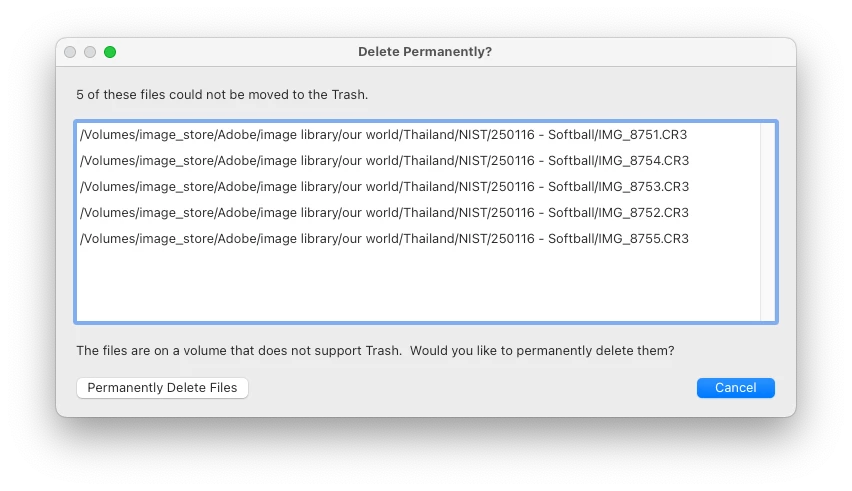
Perminantly delete files prompt

  • February 2, 2025
  • 1 reply
  • 164 views

Hi there,


The prompt to perminantly delete files on a Mac with Lightroom located on an NTFS volume should be removed. I have full READ/WRITE access to the NTFS volume and up until now when files were deleted form Lighroom they were moved to the trash in the nomral fasion. It is just a file system afterall. Please fix this bug. Thanks
 

[Moved from ‘Bugs’ to ‘Discussions’ by moderator, according to forum rules.]

1 reply

JohanElzenga
Community Expert
Community Expert
February 2, 2025

Are you sure this volume is NTFS? Do you use a special NTFS driver? MacOS can only read NTFS volumes, not write to them. That means MacOS cannot move files to the trash on such a volume, because moving a file to the trash means writing changes to the file path. As deleting a file is also a write action, I would think that MacOS cannot delete a file from an NTFS volume at all. 

There is a known issue that this error sometimes comes up for APFS of HFS+ formatted drives. There are several long threads on this forum about it, with suggestions that sometimes work, and other times don't work. Nobody really knows where this error comes from, but it is MacOS that tells Lightroom that the volume does not support trash. 

https://community.adobe.com/t5/forums/searchpage/tab/message?advanced=false&allow_punctuation=false&filter=location&location=category%3Act-lightroom-classic&q=Volume+does+not+support+trash


-- Johan W. Elzenga
Participant
February 2, 2025

I use Paragon NTFS for Mac to enable READ/WRITE access to the NTFS volume on which Lightroom resides.