
Participant
July 13, 2024
Answered

Permissions Issue on Sonoma

  • July 13, 2024
  • 1 reply
  • 354 views

I hope that someone can point me in the right direction. 


I'm using LR Classic on an M3 MacBook Pro. Both LR and the OS are up to date.


My images are contianed on an external hard drive and my catalogue backs up to Dropox. 


For no readily apparent reason I am now getting an error message as follows:-
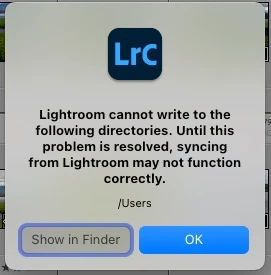


I have tried to change permissions in the OS, but it says I don't have the permissions to make such changes. 

I've given LR  Full Disk permission but to no effect. I get the same error message. 

This problem has come out of the blue and so I'm very confused.

I would be grateful for some guidance on resolving this issue.


Thanks

Stephen


{Moved from Lightroom Cloud to Lightroom Classic Forum by Moderator} 


This topic has been closed for replies.
Correct answer JohanElzenga

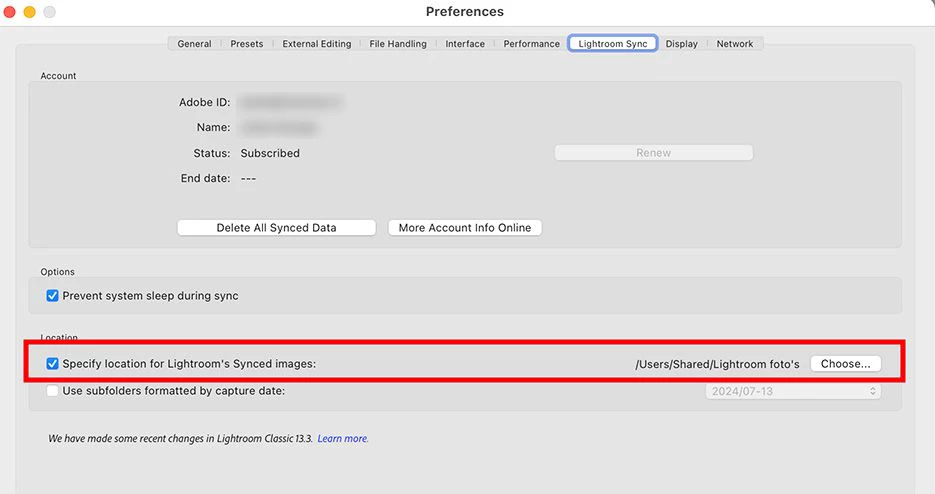
Go to Preferences - Lightroom Sync. The destination for 'incoming' images is set to your Users folder, but that folder is off limits to Lighroom. Click on the 'Choose...' button and change this to a folder in your home folder or another location that Lighroom is allowed to write to.


1 reply

JohanElzenga
Community Expert
JohanElzengaCommunity ExpertCorrect answer
Community Expert
July 13, 2024

Go to Preferences - Lightroom Sync. The destination for 'incoming' images is set to your Users folder, but that folder is off limits to Lighroom. Click on the 'Choose...' button and change this to a folder in your home folder or another location that Lighroom is allowed to write to.


-- Johan W. Elzenga