
Person name autocomplete truncates names
Issue: Person name autocomplete truncates names
Version: 11.4.1. MacOS 12.3.1
Steps to reproduce:
- Either use a person box suggested by LrC, or draw your own.
- Type the first few letters of a longer name in your people keywords.
- The keywords are often truncated and show an ellipsis.
Discussion:
Here's an example:
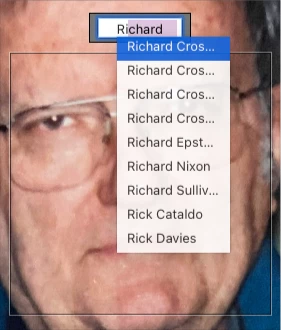
I have four different names in my keywords that begin "Richard Cros", so looking at this list with truncated values I can't tell which is which to select the right one. At other times, the list shows much wider, allowing the full values to appear. First attempts seem more likely to show the skinny list, and then subsequent attempts on later photos may work better.
I've only started seeing this bug in the last month or so; it used to always work fine. I've seen in in both 11.2 and 11.4.1. I did move from a 9-year-old iMac to a Mac Studio in that time, just in case that's relevant.
It's probably evident, but the expected result would be that LrC would always size the box of choices to show the full value of all the offered names; that is, wide enough for the longest name offered. The actual result is the truncation and ellipsis as shown above.


 AdChoices