


Participant
January 5, 2026
Question

perte des tags mots clés
  • January 5, 2026
  • 1 reply
  • 152 views

872899i2155B35E2E74C2D6.png

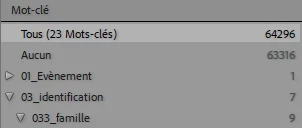
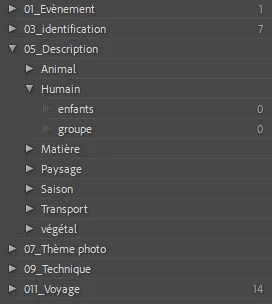
mon catalogue a perdu les tags de mes photos. dans un backup catalogue  d'octobre (rechargé pour voir), les photos étaient correctement taguées. Mon thésaurus de mot clé est, lui, complet et intact .
872900i130B2F80D37694BA.png

que peut il se passer pour perdre les tags? et mieux, comment les retrouver?
872901iBB36EA9C56EABEF7.png


1 reply

Community Manager
January 6, 2026

Hi @mducho, thanks so much for reaching out.
Your keywords should still be stored in the catalog. When you open a photo, do the keywords still appear, or is this only something you are noticing in the main view? After you reopen the catalog once the backlog has been loaded, do the keywords continue to be missing?
Let me know if anything else seems to be affected, for example edits or color labels. You can try holding the Alt key while launching Lightroom Classic. In the Select Catalog window, choose your catalog and turn on the option to test the catalog for integrity. If anything unusual comes up during that process, feel free to share it with us.
Thanks again,
Alek

*(If you mention me with an @, like @Aleke, I’ll get a notification and can respond faster.)*
mduchoAuthor
Participant
January 7, 2026

hi @Aleke ,  The keywords of my catalog (cat_MD_class-2-2-v13-3.lrcat) are all present. But The catalog has lost all the tags. I am attaching two images for exemple: keywords from the current catalog (9 tags in family) and keywords from an October backup (358 tags in family)and I didn't delete any tags myself . It's just a part of my thesaurus. It's the list on the right in the library menu. Thank you very much for your interest in my question

Community Manager
January 7, 2026

Hi @mducho,
Could you try creating a brand‑new catalog and importing a few images to see if the new catalog works correctly? If it does, you can then import your old catalog into the new one. Go to File > Import From Another Catalog, bring everything in, and choose not to move the files.
Let us know how it goes!
Alek

*(If you mention me with an @, like @Aleke, I’ll get a notification and can respond faster.)*