
Known Participant
September 19, 2023
Question

Phantom Boxes on my Slideshow. Fix it Please.

  • September 19, 2023
  • 2 replies
  • 479 views

Oh my! Lightroom is such an amazing app.  But I just slipped off to a less-known corner to make an MP4 slideshow.  All was going well and I viewed as I went as a preview.  Then I hit PLAY.  Yikes! Extra boxes everywhere.  This is an example:  
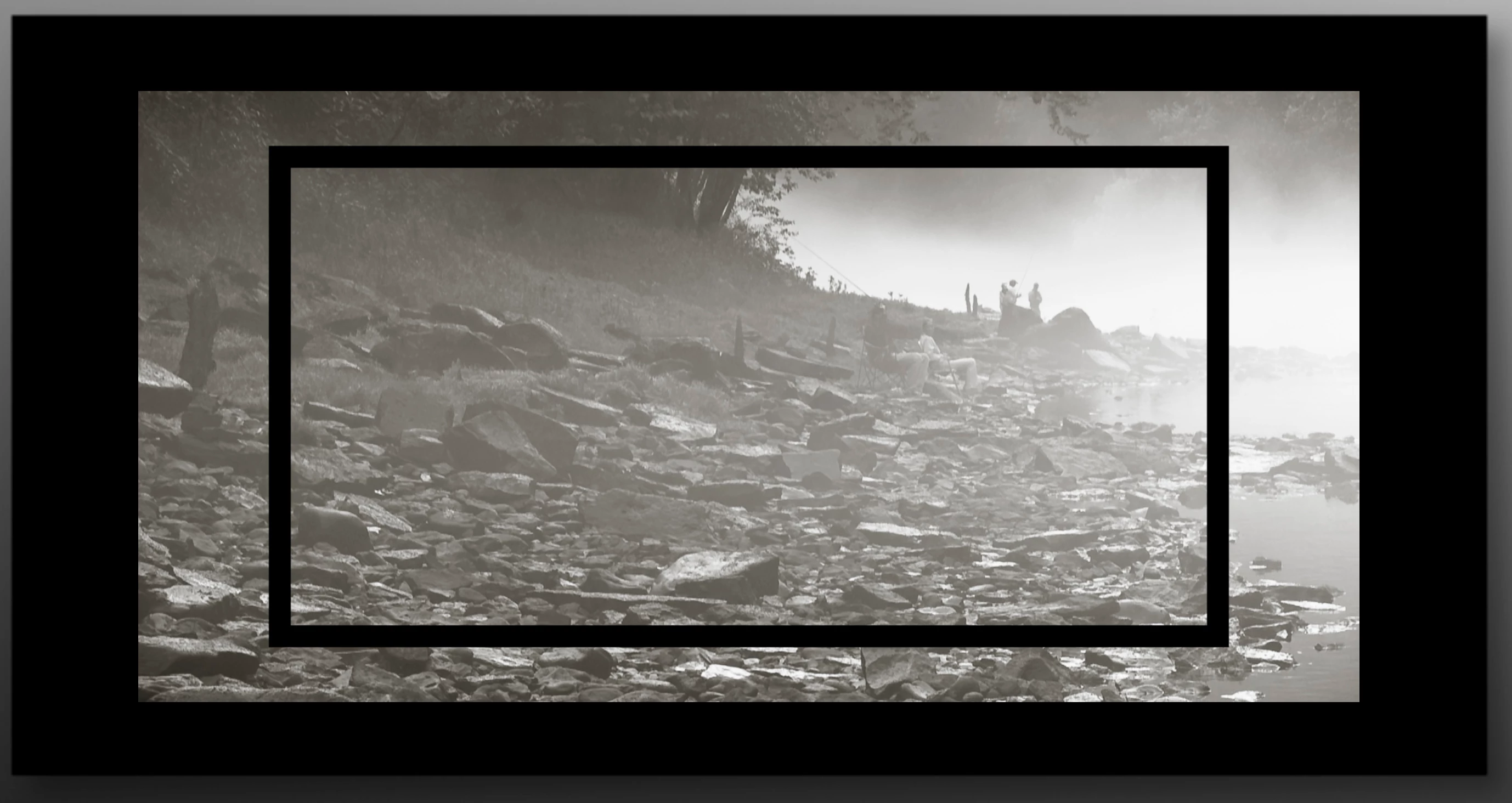
It is not in the preview but is all over the play version and the saved file.  What could it be?

This topic has been closed for replies.

2 replies

Rob_Cullen
Community Expert
Community Expert
September 20, 2023

IMO you possibly have a problem of some kind with your graphics card (That I know not!)

Your screen-clip might indicate you have the 'Stroke Border' option checked. However the border should normally follow the edges of the image as controlled by Margins in the Layout panel.

The only time I can see an image outsdide the Border is if I have a background image on the page. As in all my screen-clips-


Regards. My System: Windows-11, Lightroom-Classic 15.3, Photoshop 27.5, ACR 18.3, Lightroom 9.3, Lr-iOS 10.4.0, Bridge 16.0.3 .
Known Participant
September 21, 2023

Thanks for the help,

I turned off the borders and cleaned up those boxes.  New Boxes.  Then I noticed these new boxes showing during the transitions.  It's slight, only on screen for seconds but it should not be there.  What can be done? Hopefully, you'll see the screenshot.  The bad guy is the innermost box that looks like an ND filter in place.  Thanks in advance.

Gary Culley


Rob_Cullen
Community Expert
Community Expert
September 23, 2023

That really is weird! Something I cannot replicate.

I can only suggest you-

1) Turn off the [Use Graphics Processor] in the Lightroom-Classic Preferences > Performance tab.

2) Check you have the latest Driver for your Graphics Card from the OEM (If that's possible with a Mac OS.)

3) Reset the LrC Preferences. PREFERENCES RESET 

And post some screen-clips or all the Panels (Options, Layout, Overlays, Backdrop.) in the Slide-show module that might indicate an unusual setting. And a clip of the photo in the Develop module?


Regards. My System: Windows-11, Lightroom-Classic 15.3, Photoshop 27.5, ACR 18.3, Lightroom 9.3, Lr-iOS 10.4.0, Bridge 16.0.3 .
GoldingD
Legend
September 20, 2023

It might help if you could post a screen capture if your slideshow module.


Not a Slideshow user, but I suspect Borders (with opacity)


Known Participant
September 20, 2023

Mr GoldingD,

Thanks for the note.  I had placed a screenshot in the copy box.  I could see it but you can't.  BUT you answered anyway.  What a Legend.  I turned off my sizable frame-like borders and it smoothed it out.  I gotta meet the deadline.  I really like the borders.  Is there a way to keep them in future projects?  


Thanks,

Gary