
Participant
November 29, 2022
Question

Photo Mechanic to Lightroom - Import window blank

  • November 29, 2022
  • 3 replies
  • 2241 views

Hello,

I started using Photo Mechanic to cull/grade/rate photos before importing to Lightroom.

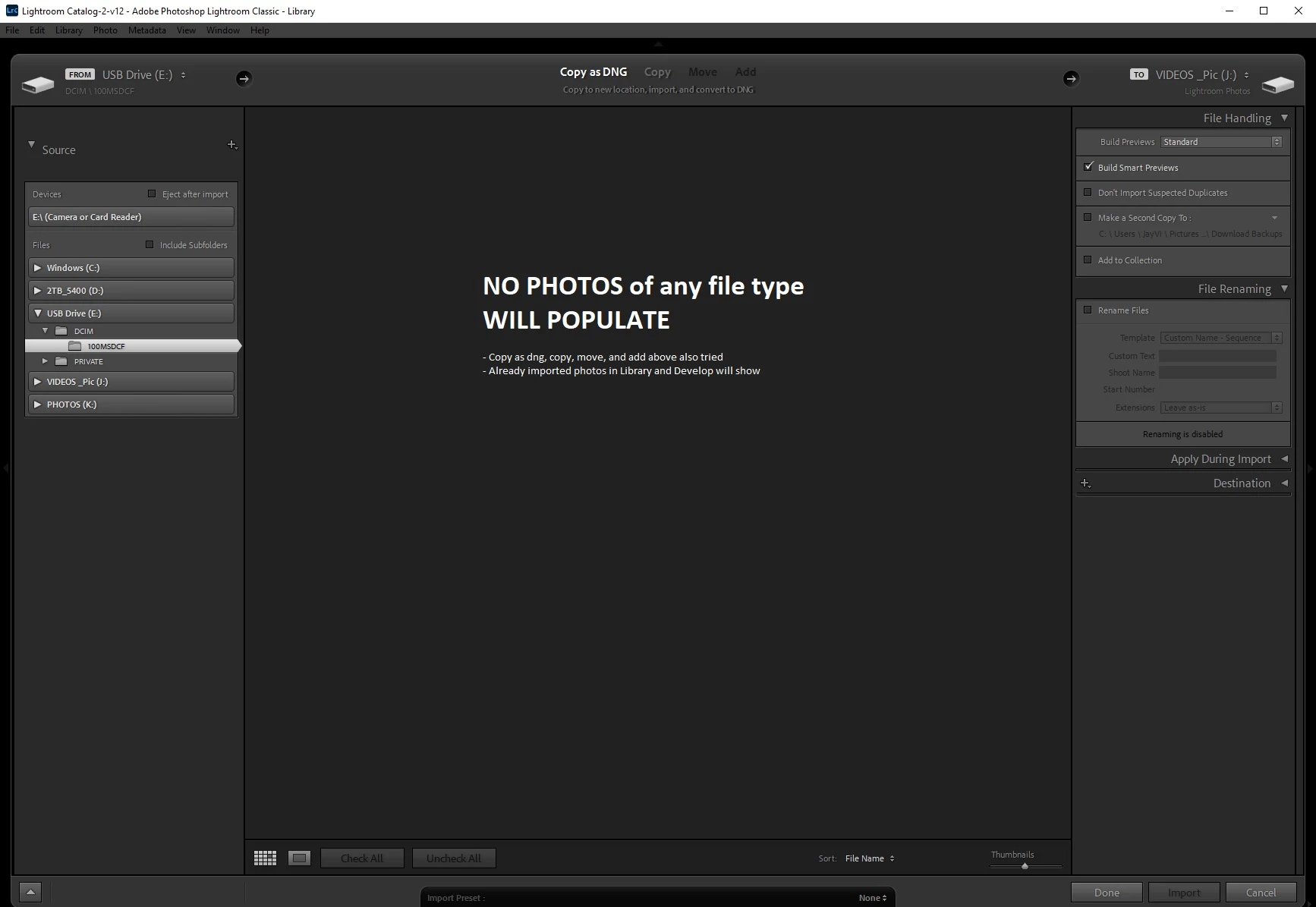
Recently when trying to edit in/import rated photos from Mechanic to Lightroom, all I see is a blank import (middle) window with the source showing the correct directory (FROM) and (TO) section showing the correct destination with 'Dont Import Suspected Duplicates' unchecked. Top of page I try selecting 'copy as dng, copy, move, and add, and I still see no pictures shown. 


I tried with numerous other photos from other directories to import, to include different file types such as jpeg, etc, and still no photos show up in window (nor do 'greyed out' photos as if already copied). 


Furthermore, when using Adobe Bridge or trying to open any photos in other progams, they open just fine with ratings included. 


Not sure why all of a sudden I can't import (see) any photos whatsoever.


Could someone assist?
 

This topic has been closed for replies.

3 replies

KR Seals
Community Expert
Community Expert
November 30, 2022

It looks you are working directly on a card in a USB card reader in PM. I have never tried that, but I think that's part of your problem.


My procedure in this situation is to use PM to ingest all the images from a shoot to a new folder on the drive where my photos files are stored. I then run a contact sheet on that folder and with full size previews in PM, I tag the images I want to import into Lightroom Classic. After tagging, I have PM show only the untagged images in the contact sheet and delete all of those. It always works perfectly and has for years.

Ken Seals - Nikon Z 9, Z 8, 14mm-800mm. Computer Win 11 Pro, I7-14700K, 64GB, RTX3070TI. Travel machine: 2021 MacBook Pro M1 MAX 64GB. All Adobe apps.
GoldingD
Legend
November 29, 2022

Please clarify, or perhaps try.


What happens if you attempt to import photos that did not go thru Photo mechanic?


Jay VizAuthor
Participant
November 30, 2022
Same thing happens when trying to port any photo outside of photo
mechanic...no photos populate in import window regardless of file type
(raw, jpeg, etc.). Subfolders selected, duplicates enabled, etc.
GoldingD
Legend
November 30, 2022

And if outside of Lrc you copy the images to a hard drive folder then use the ADD option instead of Copy?

Ian Lyons
Community Expert
Community Expert
November 29, 2022

Try enabling 'Include Subfolder' as shown in below screenshot.


Jay VizAuthor
Participant
November 29, 2022
Subfolders is enabled. I also directed towards a parent folder with
pictures from different formats but no luck.

I'm thinking simple fix out there or photo mechanic & lightroom settings
off.

Thoughts?
john beardsworth
Community Expert
Community Expert
November 29, 2022

There are things you might do in PhotoMechanic that might be responsible (eg moving photos) but in general it plays well with LR and I'd expect your problem is unrelated to PM.