Hej, hej,
so after several hours of importing the old catalog into a fresh one (Noel your message was too late - the import was already running for a while then...) Nr 2 was tried before without luck.
I was finally able to create one HDR image in the new catalog.
But looking into the figures of Metadata Status now gives the result that those are currently fluktuating.
Meaning that the number photos with "changed on disks" is going down while the number with "Conflict detected" is going up - also those with "Has been changed" is going up.
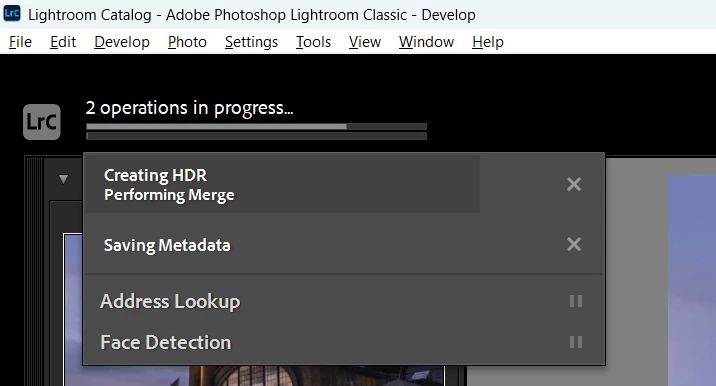
Seelecting i.e. "Has been changed" and trying to save metadata for one image as a test results in process being stuck - so the same state as with the original catalog.
BTW: After importing a catalog into a new one we seem to loose all the color labels for the directories (the color labels of the images are imported correctly). It would be hell of work to restore those for around 1500 folders so I would have to live with the fact those are lost now.
I have now tried to create another HDR but as expected having explained the above the result is the same as in the old catalog. The save metadata process gets stuck and nothing happens anymore.
So it is not a catalog issue (of course I will check integrity of the old catalog tomorrow as it is already half past one in the morning here in Germany 😉 ).
I think the root cause is that LR messes around with metadata in the background and then has trouble to deal with reading and writing metadata to files.
Working with smaller catalogs is also not really an option - well that's why Julieanne did her video originally...
Good night (at least for me),
Stephan
[EDIT] last update I switched to the original catalog with checking integrity which went okay. So it just opened after checking. Of course having same issues.
Any further ideas how to work on now? Not being able with photo merge is a show stopper for me!
Hello,
now that is definitely not possible to do wrok in my master catalog I decided for a preliminary workflow:
I created a working catalog where I want to import the images I want to work on from the filesystem and afterwards import it into the master catalog. Besides that will be a very cumbersome workflow the importing into catalog itself is - well not optimal. The dialog box is much to narrow and while when hovering over edges the mousepointer suggest you could make it wider - you cannot. Also you can only import one folder if you want to import a bunch of subfolders (in my case from my latest vacation) you have to repeat that process multiple times. Why not allowing selecting multiple folders much like in the windows explorer?
I really hope there will be a solution or LR gets much better dealing with huge databases.
[EDIT] I misunderstood the dialog and overlooked the checkboxes... My argument regarding layout still holds!
[EDIT 2] Some hours later...
For some weird reason my master database behaves like nothing happened. I am able to write and read metadata and hence the photomerge works again.
Just a wild guess: In the meantime (for other reasons) I have cleared windows' thumbnail cache and uninstalled a very old ms explorer codec (sagethumbs). Maybe that has interfered with LR?
Any thoughts welcome...
Regards,
Stephan




 AdChoices